Introduction: Why User Experience Is the New Foundation of SEO
Imagine visiting a website with a very long loading time. Buttons shift around just as you try to click them. It’s frustrating—and Google agrees.
Read all our future blogs on Elgorythm.in
Google introduced Core Web Vitals to address this. They are a set of user-centered performance metrics. These metrics reflect how well your site performs in real-world conditions. And yes, they directly influence your SEO.
Thankfully, Google Search Console now provides a dedicated section to help you monitor these vitals. In this post, we’ll explain what Core Web Vitals are. We’ll show you how to use the data in Search Console. We will also discuss practical ways to improve your website’s performance and rankings.

What Are Core Web Vitals?
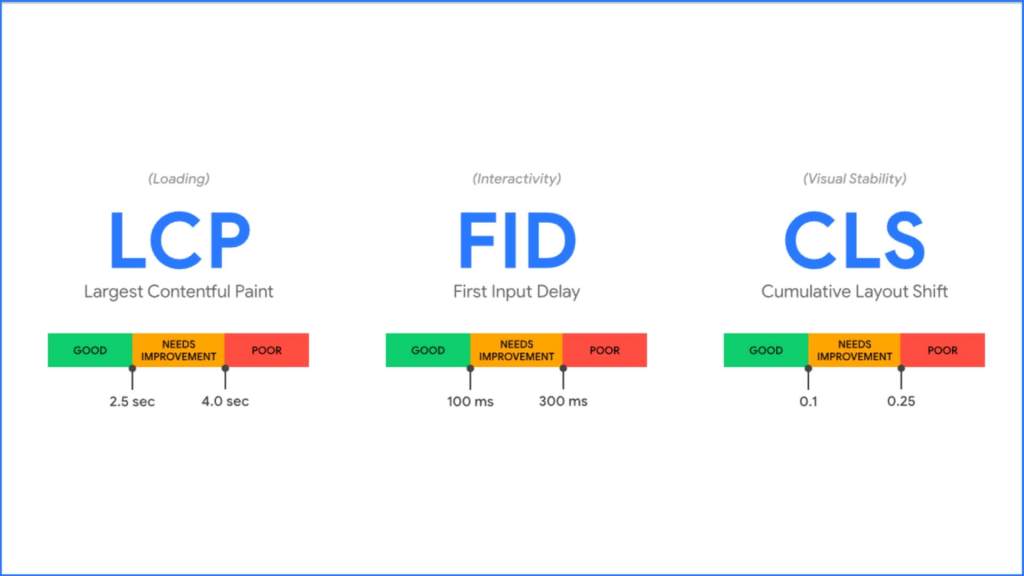
Core Web Vitals are performance indicators that reflect key aspects of the user experience. Google currently focuses on three essential metrics:
- Largest Contentful Paint (LCP)
Measures how quickly the main content of a page loads.
Target: Under 2.5 seconds - First Input Delay (FID)
Measures the time it takes for a page to respond to a user’s first interaction.
Target: Under 100 milliseconds
(Note: FID is being replaced by INP – Interaction to Next Paint, with a target under 200ms.) - Cumulative Layout Shift (CLS)
Measures the visual stability of a page—how much content unexpectedly shifts during load.
Target: Less than 0.1
If your site underperforms in any of these, it can frustrate users—and that dissatisfaction can affect your search rankings.
Understanding the Core Web Vitals Report in Search Console
In the “Experience” section of Google Search Console, you will find the Core Web Vitals report. It provides a clear picture of how your site performs across devices. You’ll find separate data for:
- Mobile
- Desktop
Each report includes:
- The number of URLs rated as Good, Needs Improvement, or Poor
- Specific issues impacting performance (e.g., “LCP issue: longer than 4s”)
- Groups of pages with similar problems (often based on templates or page types)
This data comes from the Chrome User Experience Report (CrUX), which is based on real-world user interactions—not just simulated tests.
How to Analyze Core Web Vitals Without Being a Developer
You don’t need to be a technical expert to make sense of this data. Here’s a simplified, step-by-step approach:
Step 1: Start with Mobile
Mobile performance now carries more weight due to Google’s mobile-first indexing. Prioritize issues on mobile over desktop.
Step 2: Focus on “Poor” URLs First
These pages have the most significant negative impact on your SEO. They also affect user experience. Addressing them yields the greatest return.
Step 3: Identify the Main Issue
Google flags common issues like “LCP longer than 4s.” Click on the problem to see the affected pages.
Step 4: Use PageSpeed Insights for Deeper Diagnostics
Click the “Open in PageSpeed Insights” link. It provides lab-based suggestions for specific pages.
Step 5: Monitor and Validate
After implementing changes, return to Search Console and click “Validate Fix.” This prompts Google to recheck the affected URLs and confirm if the issue is resolved.

Why Core Web Vitals Matter for SEO
Improving Core Web Vitals benefits more than just your rankings. Here’s why they’re worth your time:
- Improved User Experience = Lower Bounce Rates
Faster, more stable pages keep visitors engaged and reduce site abandonment. - They’re a Confirmed Ranking Signal
Google includes Core Web Vitals in its Page Experience update, giving them direct SEO influence. - Speed Drives Conversions
Studies show that reducing page load times can significantly increase conversions and customer satisfaction. - They Build Trust and Credibility
A fast, smooth website leaves a strong first impression. This makes your brand feel more professional and reliable.
Core Web Vitals alone won’t guarantee top rankings. They are essential for sustaining your visibility. They also improve your engagement in the long term.
Conclusion: Core Web Vitals Are Your Site’s Pulse—Don’t Ignore Them
Think of the Core Web Vitals report in Google Search Console as a health checkup for your website. It doesn’t just highlight performance issues—it offers a roadmap to a better user experience and stronger SEO.
Whether you’re managing a blog, a business site, or an online store, investing time in these metrics is worth it. Begin by reviewing your Core Web Vitals on a regular basis. Address any problem areas. You will see your performance improve in rankings and user satisfaction.
FAQs
Q1. What’s considered a good Core Web Vitals score?
A page is considered “Good” when:
- LCP is under 2.5 seconds
- FID is under 100ms (or INP under 200ms)
- CLS is under 0.1
Q2. Do Core Web Vitals directly impact rankings?
Yes. They’re part of Google’s Page Experience ranking signal, though not the sole determinant.
Q3. Can I fix Core Web Vitals issues without technical help?
Some optimizations, like compressing images or reducing third-party scripts, can be done without a developer. Others may require coding skills or web development support.
Q4. Why do Search Console and PageSpeed Insights show different results?
PageSpeed Insights provides lab data (simulated tests), while Search Console shows field data based on real user interactions. Both are useful in diagnosing performance.
Q5. How often should I check Core Web Vitals?
Review them monthly or after significant design or development changes. Regular monitoring ensures your site stays optimized over time.
 Best Digital Marketing in India