Featured

Technical SEO: Optimizing Your Website’s Crawlability

Key Highlights

  • Technical SEO is all about improving a website’s technical aspects to increase its pages’ ranking in search engines.
  • The pillars of technical optimization include making a website faster, easier to crawl, and more understandable for search engines.
  • Technical SEO is part of on-page SEO, which focuses on improving elements on your website to get higher rankings.
  • Google and other search engines prioritize websites that provide the best user experience and can easily understand the content.
  • A technically optimized website is fast, crawlable, free of dead links and duplicate content, secure, and utilizes structured data and XML sitemaps.

Introduction

In this digital age, having a strong online presence is crucial for businesses, and search engine optimization (SEO) plays a vital role in achieving that. While most people are familiar with the basics of SEO, such as keyword research and on-page optimization, there is another aspect that is equally important – technical SEO.

Search Engine Optimization

Technical SEO focuses on optimizing a website’s technical aspects to improve its crawlability and usability. It involves making the website faster, easier to crawl, and more understandable for search engines. By implementing technical SEO best practices, you can increase your website’s visibility, organic traffic, and ultimately, its ranking in search engine results.

While technical SEO may sound daunting, it doesn’t have to be. In this blog, we’ll break down the basics of technical SEO and provide you with actionable tips to optimize your website for better crawlability and usability.

Understanding Technical SEO

Technical SEO is a subset of search engine optimization that focuses on improving a website’s technical aspects to enhance its performance in search engine rankings. It involves optimizing various elements of a website, such as site structure, page load speed, URL structure, internal linking, and more.

The goal of technical SEO is to ensure that search engines can easily crawl and understand a website’s content. By addressing technical issues, you can improve your website’s visibility, organic traffic, and user experience.

The Importance of Technical SEO for Website Health

Technical SEO plays a crucial role in maintaining the health and performance of a website. By optimizing the technical aspects of your site, you can improve its visibility in search engine results and attract more organic traffic.

One of the key benefits of technical SEO is its impact on user experience. A well-optimized website loads faster, has clear navigation, and provides a seamless browsing experience for users. This not only keeps visitors engaged but also encourages them to stay on your site longer, reducing bounce rates.

In addition, technical SEO helps search engines understand and index your website’s content more effectively. By conducting regular site audits and fixing technical issues, you can ensure that search engines can crawl and index your pages properly.

Overall, technical SEO is essential for improving your website’s visibility, attracting organic traffic, and providing a positive user experience.

Website performance and SEO by SARK Promotions

Technical SEO vs. On-Page SEO vs. Off-Page SEO

When it comes to optimizing a website for search engines, there are three main components: technical SEO, on-page SEO, and off-page SEO.

Technical SEO focuses on the technical aspects of a website, such as site structure, page load speed, and internal linking. It ensures that search engines can easily crawl and understand your site’s content.

On-page SEO, on the other hand, involves optimizing individual web pages to improve their visibility in search engine results. This includes optimizing meta tags, headings, content, and keywords.

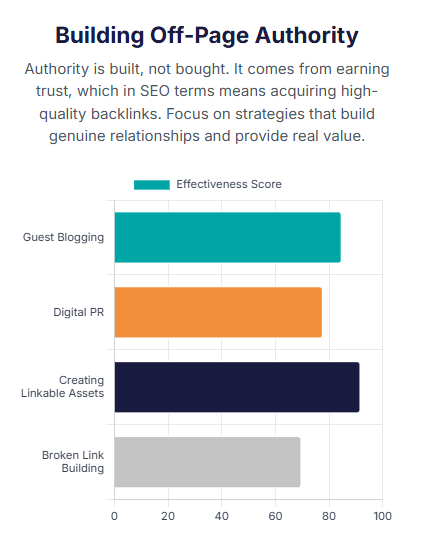
Off-page SEO refers to activities that are done outside of your website to improve its ranking in search results. This typically involves link building, where you acquire high-quality backlinks from other websites to increase your site’s authority and credibility.

While all three components are important for a comprehensive SEO strategy, technical SEO forms the foundation. Without a technically optimized website, any efforts in on-page or off-page optimization may not yield the desired results.

The role of technical SEO in website optimization

Technical SEO plays a crucial role in optimizing a website for search engine rankings. It ensures that search engines can easily crawl and index your site’s pages, which is essential for appearing in search results.

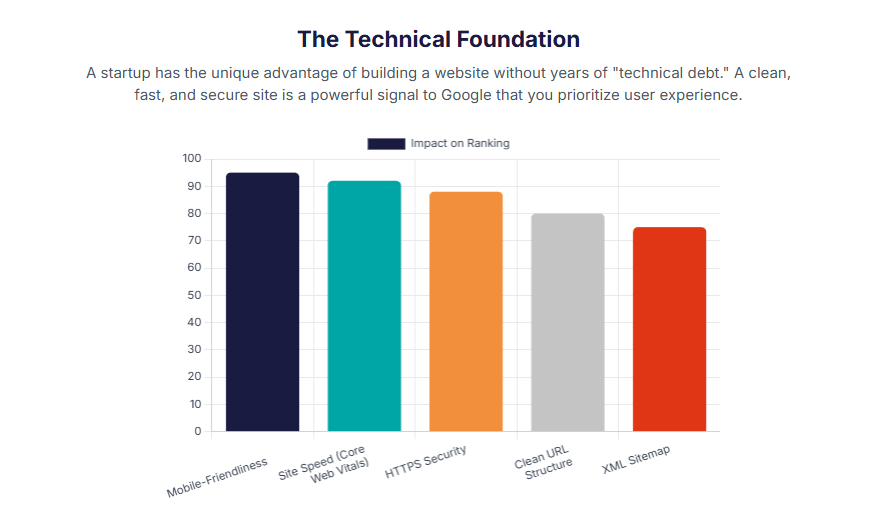
One of the key aspects of technical SEO is improving your website’s ranking factors. Search engines use various factors to determine the relevance and quality of a website, and technical optimization is one of them. By addressing technical issues, such as page load speed, mobile-friendliness, and site structure, you can improve your site’s ranking potential.

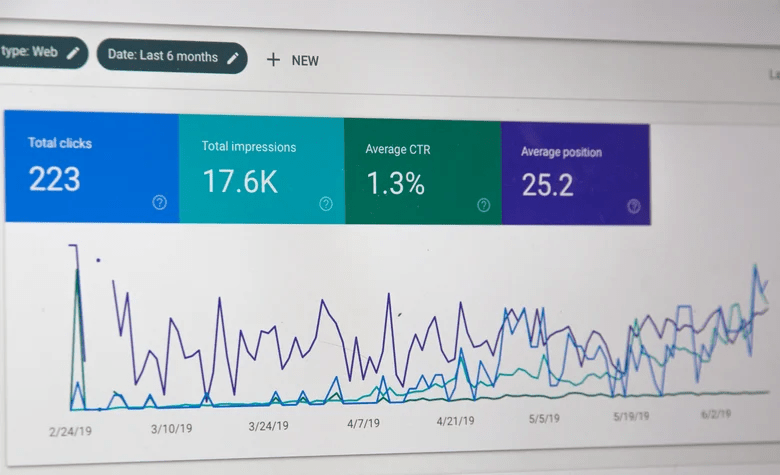
Tools like Google Search Console can help you monitor and identify technical issues on your website. By regularly analyzing and optimizing your site’s technical aspects, you can increase your chances of ranking higher in search results and attracting more organic traffic.

Google Search Console

Conducting a Technical SEO Audit

Conducting a technical SEO audit is an essential step in identifying and fixing technical issues on your website. It involves evaluating various aspects of your site, such as site structure, page load speed, URL structure, and more.

During a technical SEO audit, it’s important to prioritize important pages on your website. These are the pages that generate the most organic traffic or have high conversion rates. By focusing on optimizing these pages first, you can maximize the impact of your technical SEO efforts.

Key Components of a Technical SEO Audit

When conducting a technical SEO audit, there are several key components that you should focus on. These include:

  • XML sitemap: Ensure that your website has a properly formatted XML sitemap that lists all important pages for search engines to crawl.
  • Schema markup: Implement schema markup to provide search engines with additional information about your content, such as product details or reviews.
  • URL structure: Optimize your URL structure to make it user-friendly and descriptive of the page’s content.
  • Page load speed: Improve your website’s load time by optimizing images, minimizing code, and leveraging caching.
  • Mobile-friendliness: Ensure that your website is responsive and provides a seamless browsing experience on mobile devices.

Page speed optimization

By addressing these key components during your technical SEO audit, you can improve your website’s crawlability and usability.

Tools and Resources for Performing an SEO Audit

When performing a technical SEO audit, there are several tools and resources that can help you identify and fix technical issues on your website. Some of the most commonly used tools include:

  • Google Search Console: This free tool provides valuable insights into your website’s performance in search results and can help you identify technical issues.
  • Structured data testing tools: These tools allow you to test and validate your website’s structured data markup, ensuring that it is implemented correctly.
  • Site auditing tools: There are many site auditing tools available that can help you identify technical issues, such as broken links, duplicate content, and page load speed.

By utilizing these tools and resources, you can streamline your technical SEO audit process and ensure that your website is optimized for better crawlability and usability.

Step-by-Step Guide to Conducting a Technical SEO Audit

Conducting a technical SEO audit may seem overwhelming, but by following a step-by-step guide, you can ensure that you cover all the important aspects. Here’s a simplified guide to help you get started:

  1. Set up Google Search Console and verify your website.
  2. Analyze your website’s crawl rate and crawl errors in Google Search Console.
  3. Evaluate your site structure and internal linking to ensure that search engines can easily navigate your website.
  4. Check for any duplicate content issues and implement canonical tags to indicate the preferred version of a page.
  5. Optimize your website’s URL structure to make it user-friendly and descriptive.
  6. Test and validate your website’s structured data markup using structured data testing tools.
  7. Optimize your website’s page load speed by optimizing images, minimizing code, and leveraging caching.
  8. Check for any broken links or 404 errors on your website and set up appropriate redirects if necessary.

By following these steps, you can conduct a comprehensive technical SEO audit and address any issues that may be affecting your website’s crawlability and usability.

Analyzing and Interpreting Your Audit Results

Once you have conducted a technical SEO audit and implemented the necessary optimizations, it’s important to analyze and interpret the results. Here are some key metrics to consider:

  • Search traffic: Monitor your website’s organic search traffic and observe any changes after implementing technical SEO improvements.
  • Page speed: Measure your website’s page speed and monitor any improvements in load time. Faster-loading pages can improve user experience and search engine rankings.
  • User experience: Keep an eye on user engagement metrics, such as bounce rate and time on page. If these metrics improve, it indicates that users are finding your website more useful and engaging.

By regularly analyzing these metrics, you can assess the impact of your technical SEO efforts and make further optimizations to enhance your website’s crawlability and usability.

Optimizing Website Structure for Better Crawling

A well-optimized website structure is essential for better crawling and indexing by search engines. Here are some key aspects to consider:

  • Site architecture: Organize your website’s content in a logical and hierarchical structure, making it easier for search engines to understand the relationship between pages.
  • Robots.txt: Use the robots.txt file to guide search engine crawlers and prevent them from accessing certain parts of your website if necessary.
  • Internal links: Implement a strong internal linking strategy to guide search engine crawlers to important pages and distribute link equity throughout your site.

By optimizing your website’s structure, you can improve its crawlability and ensure that search engines can easily discover and index your content.

Web hosting services

Creating an SEO-Friendly Site Architecture

Creating an SEO-friendly site architecture is crucial for better crawling and indexing by search engines. Here are some best practices to follow:

  • Plan a logical and hierarchical structure for your website, with main categories and subcategories.
  • Use descriptive and keyword-rich URLs that reflect the content of each page.
  • Implement a breadcrumb navigation system to help users and search engines understand the site’s structure.
  • Optimize internal links by using relevant anchor text and linking to important pages.
  • Distribute link equity throughout your site by ensuring that important pages receive plenty of internal linking.

By following these best practices, you can create an SEO-friendly site architecture that improves your website’s crawlability and search engine visibility.

Utilizing Robots.txt and Sitemaps Effectively

Robots.txt and XML sitemaps are crucial tools for controlling how search engine crawlers interact with your website. Here’s how to use them effectively:

  • Robots.txt: The robots.txt file allows you to instruct search engine crawlers which parts of your website should be crawled and indexed. Use it to block access to irrelevant or sensitive pages and directories.
  • XML sitemap: An XML sitemap lists all the important pages on your website and provides search engines with a roadmap for crawling and indexing your content. Regularly update and submit your XML sitemap to ensure that search engines are aware of your most recent content.
  • Crawl rate: Monitor your website’s crawl rate in Google Search Console to ensure that search engines are crawling your site at an optimal rate. Adjust the crawl rate if necessary to prevent unnecessary strain on your server.

By utilizing robots.txt and XML sitemaps effectively, you can control how search engines interact with your website and ensure that your important pages are properly crawled and indexed.

Creating XML sitemaps for search engines

An XML sitemap is a file that lists all the important pages on your website and provides search engines with information about the organization of your site. Here are some best practices for creating XML sitemaps:

  • Include all important pages: Ensure that your XML sitemap lists all the important pages on your website that you want search engines to crawl and index.
  • Update regularly: Regularly update your XML sitemap to reflect any changes or additions to your site’s content.
  • Submit to search engines: Submit your XML sitemap to search engines, such as Google and Bing, to ensure that they are aware of your site’s structure and content.

By creating and maintaining XML sitemaps, you can help search engines better understand and index your website’s content, improving its visibility in search results.

Utilizing internal linking for effective crawling

Internal linking plays a crucial role in improving the crawlability of your website. By strategically linking to other pages on your site, you help search engine crawlers discover and understand the most important content. This helps distribute link equity throughout your site and improves the overall site architecture.

Link Building for better crawling

When implementing internal links, consider the following tips:

  • Use descriptive anchor text that accurately describes the linked page’s content. This helps search engines understand the context of the linked page.
  • Ensure that the linked pages are relevant and provide additional value to the user. Linking to unrelated or low-quality pages can negatively impact your site’s crawlability and user experience.
  • Avoid excessive internal linking, as it can dilute the link equity and make it harder for search engines to determine the most important pages on your site.
  • Regularly audit your internal links to identify and fix any broken or outdated links. Broken links can hinder the crawlability of your site and create a poor user experience.

By optimizing your internal linking structure, you can improve the crawlability of your website and enhance the overall user experience.

Mobile responsiveness and its impact on crawling and usability

In today’s mobile-first world, having a mobile-responsive website is essential for both crawling and usability. With more users accessing the web through mobile devices, search engines prioritize mobile-friendly websites in their rankings.

Mobile responsiveness refers to a website’s ability to adapt and provide a seamless user experience across different screen sizes. It not only affects how users interact with your site but also influences how search engine crawlers access and evaluate your pages.

When optimizing your website for mobile responsiveness, consider the following:

  • Use responsive design techniques to ensure your site adapts to different screen sizes and resolutions.
  • Optimize your page’s URL structure for mobile devices. Short and descriptive URLs make it easier for search engine crawlers to understand the content and navigate your site.
  • Optimize your site’s load time on mobile devices. Slow-loading pages can negatively impact both crawlability and user experience.
  • Test your website’s mobile responsiveness using tools like Google’s Mobile-Friendly Test. This will help you identify any issues and make the necessary improvements.

By prioritizing mobile responsiveness, you can improve the crawlability and usability of your website, ultimately leading to better search engine rankings and user satisfaction.

Improving Website Indexability

Improving the indexability of your website is crucial for better visibility in search engine results. Indexability refers to the ability of search engine crawlers to access and include your web pages in their index.

To improve website indexability, consider the following techniques:

  • Ensure that your is free from duplicate content. Search engines penalize websites with duplicate content as it confuses their indexing process. Use tools like Copyscape to identify and resolve any duplicate content issues.
  • Implement canonical tags to indicate the preferred version of a page when there are multiple URLs with similar content. Canonical tags help search engines understand the original source of the content and avoid duplicate content issues.
  • Submit an XML sitemap to search engines. An XML sitemap provides a list of all the pages on your site that you want to be indexed. Regularly update and submit your sitemap to ensure search engines have access to your latest content.

By implementing these techniques, you can improve the indexability of your website and increase your chances of ranking higher in search engine results.

Techniques to Ensure Your Pages Are Indexed

Ensuring that your web pages are indexed by search engines is crucial for organic visibility. Here are some techniques to improve the indexability of your pages:

  • Submit your website to Google Search Console. This tool allows you to monitor the indexing status of your pages, identify any crawl errors, and submit sitemaps for faster indexing.
  • Optimize your meta descriptions. Meta descriptions provide a concise summary of your page’s content and help search engines understand its relevance. Including relevant keywords and a compelling call-to-action can improve click-through rates and encourage search engines to index your pages.
  • Use internal linking to guide search engine crawlers to important pages. Internal links help establish the hierarchy and importance of your content, making it easier for search engines to index your pages.
  • Regularly update and publish fresh and valuable content. Fresh content signals to search engines that your website is active and relevant, encouraging them to index your pages more frequently.

By implementing these techniques, you can improve the indexability of your pages and increase their visibility in search engine results.

Handling Duplicate Content and Canonical Tags

Duplicate content can negatively impact your website’s search engine rankings. When search engines encounter multiple pages with identical or very similar content, they may struggle to determine which page to rank, leading to a lower overall visibility.

To handle duplicate content effectively, consider the following strategies:

  • Implement canonical tags to indicate the preferred version of a page. Canonical tags help search engines understand the original source of the content and avoid indexing duplicate versions. This ensures that the desired page receives proper indexing and visibility.
  • Regularly audit your website for duplicate content issues using tools like Siteliner or Screaming Frog. Identify duplicate pages, thin content, or near-duplicates and take necessary actions such as consolidation, removal, or rewriting to address the issue.
  • Use 301 redirects to redirect duplicate versions of a page to the preferred version. This consolidates the ranking signals and avoids confusion for search engines.

By effectively handling duplicate content and implementing canonical tags, you can ensure that search engines correctly index and rank your pages, improving your website’s visibility and organic traffic.

Implementing proper redirects for broken or changed URLs: Website crawlability

Implementing proper redirects for broken or changed URLs is essential for maintaining the crawlability and user experience of your website. When pages are moved or removed, redirecting the old URLs to the new ones ensures that visitors and search engine crawlers can still access the intended content.

Consider the following best practices for implementing redirects:

  • Use a 301 permanent redirect to indicate that the old URL has permanently moved to a new location. This ensures that search engines update their index and transfer the ranking signals to the new URL.
  • Regularly check for broken links on your website using tools like Ahrefs or Screaming Frog. Fixing broken links by redirecting them to relevant pages helps improve the crawlability of your site and enhances user experience.
  • Maintain a logical and organized URL structure to minimize the need for redirects. A clear and consistent URL structure makes it easier for search engines to understand your website’s content hierarchy and crawl it efficiently.

By implementing proper redirects, you can ensure that visitors and search engine crawlers can access your content, maintain the integrity of your website’s structure, and improve overall crawlability and user experience.

Optimizing robots.txt file to exclude irrelevant pages from crawling

The robots.txt file plays a crucial role in guiding search engine crawlers on which pages to crawl and which to exclude. By optimizing your robots.txt file, you can improve the crawlability and efficiency of search engine crawlers on your website.

Consider the following tips for optimizing your robots.txt file:

  • Identify and exclude irrelevant pages from crawling. This can include pages with sensitive information, duplicate content, thin content, or low-quality pages. Excluding these pages can help search engine crawlers focus on indexing relevant and valuable content.
  • Regularly review and update your robots.txt file to ensure it accurately reflects your website’s structure and content. As your website evolves, new pages may need to be included or excluded from crawling.
  • Monitor the crawl rate of your website in Google Search Console. Adjust the crawl rate if necessary to ensure that search engine crawlers can efficiently crawl and index your website without causing server overload or impacting performance.

By optimizing your robots.txt file, you can improve the crawlability and indexability of your website, ensuring search engines focus on relevant content while excluding irrelevant pages.

Responsive design

Utilizing canonical tags to avoid duplicate content issues

Duplicate content issues can harm your website’s search engine rankings and user experience. Utilizing canonical tags is an effective strategy to avoid duplicate content issues and ensure search engines understand the preferred version of a page.

Consider the following best practices for utilizing canonical tags:

  • Implement canonical tags on pages with similar or duplicate content. The canonical tag points search engines to the preferred version of the content, consolidating ranking signals and avoiding confusion.
  • Use self-referencing canonical tags on single-page websites or pages with dynamic content. Self-referencing canonical tags signal that the page itself is the preferred version, preventing duplicate content issues.
  • Regularly audit your website for duplicate content using tools like Siteliner or Screaming Frog. Identify and address any duplicate content issues by implementing canonical tags or reworking the content.

By utilizing canonical tags effectively, you can prevent duplicate content issues, improve the indexability of your pages, and enhance your website’s visibility in search engine results.

Enhancing Website Speed and Performance: Important for digital marketing

Enhancing the speed and performance of your website is crucial for both user experience and search engine rankings. Slow-loading websites result in higher bounce rates and lower user satisfaction, negatively impacting your organic visibility.

Consider the following strategies to enhance website speed and performance:

  • Optimize your page speed by minimizing file sizes, reducing server response time, and leveraging browser caching.
  • Compress images and optimize JavaScript and CSS files to reduce page load times.
  • Implement content delivery networks (CDNs) to distribute content geographically and reduce latency.
  • Regularly test your website’s speed using tools like Google PageSpeed Insights or GTmetrix. Identify and address any performance issues to ensure fast and smooth user experiences.

By enhancing website speed and performance, you can improve user satisfaction, decrease bounce rates, and increase your chances of ranking higher in search engine results.

Page Speed Optimization Best Practices: Improve Online Promotions

To optimize page speed and provide better user experiences, consider the following best practices:

  • Minimize HTTP requests by reducing the number of elements on your page, such as images, scripts, and stylesheets.
  • Enable browser caching to store static resources locally, reducing the load time for returning visitors.
  • Compress images using tools like Photoshop or online compressors to reduce file sizes without sacrificing quality.
  • Minify JavaScript and CSS files by removing unnecessary characters, whitespace, and comments.
  • Use a content delivery network (CDN) to cache and serve static resources from servers closer to the user’s location, reducing latency.
  • Consider lazy loading images and videos to only load them when they’re visible to the user, improving initial page load times.

By implementing these best practices, you can optimize page speed, reduce load times, and provide better user experiences on your website.

Leveraging Browser Caching and Minifying Resources

Leveraging browser caching and minifying resources are effective strategies to improve page speed and optimize website performance.

Browser caching allows web browsers to store static resources, such as images, JavaScript files, and CSS files, locally on the user’s device. By setting appropriate caching headers, you can instruct the user’s browser to cache these resources, reducing the need to fetch them from the server on subsequent visits.

Minifying resources involves removing unnecessary characters, whitespace, and comments from HTML, CSS, and JavaScript files. This reduces file sizes and decreases the time it takes for the browser to parse and load these resources.

By leveraging browser caching and minifying resources, you can significantly improve page speed, reduce load times, and enhance the overall user experience on your website.

Importance of optimizing website speed for search engines and user experience

Optimizing website speed is crucial for both search engines and user experience. Here’s why:

  1. Search engine ranking: Search engines, like Google, consider page speed as a ranking factor. Faster-loading websites are prioritized in search engine results, leading to higher visibility and organic traffic.
  2. User experience: Website visitors expect fast and responsive experiences. Slow-loading websites frustrate users, leading to increased bounce rates and lower engagement. Optimizing website speed improves user satisfaction and encourages longer visits and conversions.
  3. Mobile optimization: With the increasing use of mobile devices, website speed becomes even more crucial. Mobile users tend to have slower internet connections, making fast-loading websites essential for a positive mobile experience.

By prioritizing website speed optimization, you can enhance your search engine rankings, improve user experience, and drive better overall performance for your website.

Balancing design and functionality for optimal performance

Balancing design and functionality is crucial for optimizing website performance and delivering a seamless user experience. Here’s how to achieve it:

  1. Streamlined design: A clean and intuitive design improves user engagement and ensures that visitors can easily navigate your website. Removing unnecessary elements and focusing on essential content can significantly improve page load times.
  2. Efficient functionality: Implementing interactive elements and features can enhance user experience, but it’s important to optimize their performance. Use efficient code, minimize external dependencies, and prioritize functionality that adds value without sacrificing speed.
  3. Responsive design: Ensure your website is responsive and adapts to different screen sizes. Responsive design improves user experience on mobile devices, reducing bounce rates and increasing engagement.

By finding the right balance between design and functionality, you can create a visually appealing and high-performing website that provides an optimal user experience.

Using tools and analytics to assess and monitor website performance

Using tools and analytics is essential for assessing and monitoring your website’s performance. Here’s how they can help:

  1. Performance testing tools: Tools like Google PageSpeed Insights, GTmetrix, and Pingdom allow you to test your website’s performance and identify areas for improvement. They provide insights into page load times, file sizes, and optimization recommendations.
  2. Website analytics: Analytics platforms like Google Analytics provide valuable data on user behavior, including bounce rates, page views, and conversion rates. This data helps you identify performance issues and make informed decisions to improve user experience.
  3. Heatmaps and user recordings: Heatmap tools like Hotjar and Crazy Egg provide visual representations of user interactions on your website. User recordings allow you to watch individual user sessions, gaining insights into how users navigate and interact with your site.

By utilizing these tools and analytics, you can continuously assess and monitor your website’s performance, identify areas for improvement, and optimize the user experience.

Ensuring Mobile Usability for SEO

Ensuring mobile usability is crucial for SEO, considering the increasing number of users accessing the web through mobile devices. Here’s why it’s important:

  1. Mobile-first indexing: Google now predominantly uses the mobile version of a website for indexing and ranking. If your website isn’t mobile-friendly, it may not rank well in search results.
  2. User experience: Responsive design and mobile-friendly features provide a seamless experience for mobile users. This improves engagement, reduces bounce rates, and increases the likelihood of conversions.
  3. Mobile device usage: Mobile devices are ubiquitous, and users expect websites to be optimized for mobile browsing. Failing to meet mobile usability standards can result in lost traffic and potential customers.

By prioritizing mobile usability, you can improve your website’s visibility in mobile search results, enhance user experience, and drive more organic traffic.

Fix broken links

The Significance of Mobile-First Indexing

Mobile-first indexing is a significant development in the world of SEO. With the majority of internet users accessing websites through mobile devices, Google has prioritized mobile-first indexing as a ranking factor in its search algorithm. This means that Google predominantly uses the mobile version of a website’s content for indexing and ranking purposes.

Mobile-first indexing is crucial because it ensures that websites are optimized for mobile devices, providing a seamless user experience. Websites that are not mobile-friendly may experience a drop in rankings and visibility in Google search results. Therefore, it is essential for website owners and developers to prioritize mobile optimization to stay ahead in the competitive online landscape.

By implementing mobile-first indexing, Google aims to provide its users with the best possible search experience on mobile devices. This includes faster loading times, responsive design, and easy navigation. Websites that are mobile-friendly are more likely to rank higher in Google search and attract more organic traffic.

Tips for Creating a Mobile-Friendly Website

Creating a mobile-friendly website is crucial for providing a positive user experience and optimizing your site for mobile devices. Here are some tips to help you create a mobile-friendly website:

  1. Responsive Design: Use a responsive design that adapts to different screen sizes and resolutions. This ensures that your website looks and functions well on all devices, including smartphones and tablets.
  2. Mobile-Friendly Layout: Optimize your website’s layout for mobile devices by using a clean and streamlined design. Avoid clutter and make sure that important elements are easily accessible and visible on smaller screens.
  3. Clear Navigation: Simplify your website’s navigation for mobile users. Use a hamburger menu or a clear and concise navigation bar to make it easy for users to find what they’re looking for.
  4. Mobile-Optimized Content: Ensure that your content is optimized for mobile viewing. Use shorter paragraphs, larger fonts, and clear headings to improve readability on smaller screens.
  5. Fast Loading Times: Optimize your website’s loading speed for mobile devices. Compress images, minify CSS and JavaScript files, and leverage browser caching to reduce loading times.

By following these tips, you can create a mobile-friendly website that provides an excellent user experience and improves your site’s visibility on mobile devices.

The importance of mobile-friendly design for SEO

Mobile-friendly design is not only important for providing a positive user experience but also plays a crucial role in SEO. Here’s why mobile-friendly design is essential for your website’s organic search rankings:

  1. Improved User Experience: A mobile-friendly design ensures that users can navigate and interact with your website easily on their mobile devices. This positive user experience leads to longer visit durations, lower bounce rates, and higher engagement metrics, all of which are favorable signals for search engines.
  2. Mobile-First Indexing: With Google’s mobile-first indexing, having a mobile-friendly design is crucial for optimal visibility in search results. Websites that are not mobile-friendly may experience a drop in rankings and organic traffic.
  3. Mobile Search Dominance: Mobile devices have become the primary means of accessing the internet, with a significant portion of search queries originating from mobile devices. Having a mobile-friendly design ensures that your website is optimized for mobile search and can capture this valuable traffic.
  4. Competitive Advantage: Mobile-friendly websites have a competitive edge over non-mobile-friendly websites. By meeting the expectations of mobile users, you can attract and retain more visitors, leading to higher organic search rankings and increased visibility.

In conclusion, a mobile-friendly design is essential for SEO as it improves user experience, aligns with mobile-first indexing, dominates mobile search, and provides a competitive advantage in today’s digital landscape.

Testing and monitoring mobile usability for SEO performance

Testing and monitoring mobile usability is crucial for optimizing your website’s SEO performance. Here are some key reasons why testing and monitoring mobile usability are important:

  1. Identify Mobile Usability Issues: By testing your website’s mobile usability, you can identify any issues that may affect user experience on mobile devices. This includes issues such as slow loading times, broken links, unresponsive design, or poor navigation.
  2. Improve User Experience: By addressing mobile usability issues, you can provide a better user experience for mobile users. This leads to higher engagement, lower bounce rates, and increased time spent on your website, all of which can positively impact your SEO performance.
  3. Mobile-Friendly Design Optimization: Testing and monitoring mobile usability can help you fine-tune your website’s mobile design to ensure it is optimized for different devices and screen sizes. This includes optimizing page speed, improving navigation, and enhancing overall mobile user experience.
  4. Stay Competitive: As mobile usage continues to grow, having a mobile-friendly website is essential for staying competitive. Testing and monitoring mobile usability allow you to stay ahead of the curve and provide an exceptional mobile user experience that can give you an edge over your competitors.

In conclusion, testing and monitoring mobile usability are critical for optimizing your website’s SEO performance, improving user experience, and staying competitive in the mobile-driven online landscape.

Securing Your Website with HTTPS

Securing your website with HTTPS is crucial for protecting user data and establishing trust. Here’s why HTTPS is important for your website:

  1. Data Security: HTTPS encrypts the communication between a user’s browser and your website, ensuring that sensitive information such as passwords, credit card details, and personal data remains secure and private.
  2. User Trust: HTTPS is a visual cue to users that your website is safe and trustworthy. The presence of a padlock icon in the browser’s address bar and the “https://” prefix instills confidence in users and encourages them to interact and transact on your website.
  3. SEO Benefits: Google considers HTTPS as a ranking signal, meaning that websites with HTTPS may receive a slight boost in search rankings. This can lead to increased organic visibility and traffic for your website.

By obtaining an SSL certificate and implementing HTTPS, you can protect user data, establish trust, and potentially improve your website’s SEO performance.

The Impact of HTTPS on SEO and User Trust

Implementing HTTPS has a significant impact on both SEO and user trust. Here’s how HTTPS affects your website:

  1. SEO Rankings: Google has confirmed that HTTPS is a ranking signal, meaning that websites using HTTPS may receive a slight boost in search rankings. This can lead to increased organic visibility and traffic for your website.
  2. User Trust: HTTPS provides a secure and encrypted connection between a user’s browser and your website. This instills confidence in users that their data is safe and protected, leading to increased trust and a positive user experience.
  3. Data Security: HTTPS encrypts data transmitted between a user’s browser and your website, ensuring that sensitive information such as passwords, credit card details, and personal data remains secure and private. This helps protect users from potential security threats and data breaches.

Implementing HTTPS is crucial for both SEO and user trust. By obtaining an SSL certificate and migrating your website to HTTPS, you can improve your website’s rankings, enhance user trust, and protect user data.

Migrating from HTTP to HTTPS: A Step-by-Step Guide

Migrating from HTTP to HTTPS is an essential step in securing your website and improving its SEO performance. Here is a step-by-step guide to help you migrate from HTTP to HTTPS:

  1. Obtain an SSL Certificate: Purchase and install an SSL certificate from a trusted certificate authority (CA). This certificate will encrypt the communication between your website and users’ browsers.
  2. Update Internal Links: Update all internal links on your website to point to the HTTPS version of your pages. This includes updating links within your website’s content, navigation menus, and footer sections.
  3. Update External Links: Reach out to other websites that link to your website and request them to update their links to the HTTPS version of your pages. This ensures that all incoming traffic is directed to the secure version of your website.
  4. Redirect HTTP to HTTPS: Set up 301 redirects from the HTTP version of your website to the HTTPS version. This ensures that users are automatically redirected to the secure version of your website and that search engines update their index accordingly.
  5. Update XML Sitemaps and Robots.txt: Update your XML sitemap and robots.txt file to include the HTTPS version of your pages. This helps search engines crawl and index the secure version of your website.

By following these steps, you can successfully migrate your website from HTTP to HTTPS, ensuring a secure browsing experience for your users and improving your website’s SEO performance.

Potential issues and solutions when switching to HTTPS

Switching from HTTP to HTTPS is not without its challenges. Here are some potential issues you may encounter when migrating to HTTPS and their solutions:

  1. Mixed Content: Mixed content occurs when a secure HTTPS page contains elements (such as images, scripts, or stylesheets) that are loaded over an insecure HTTP connection. This can cause security warnings in browsers. To resolve this issue, update all resources on your website to use HTTPS.
  2. Certificate Errors: If your SSL certificate is not properly installed or configured, users may encounter certificate errors when accessing your website. Double-check your SSL certificate installation and configuration to ensure it is valid and trusted.
  3. Performance Impact: Encrypting data with HTTPS can increase the load time of your website. To mitigate this, optimize your website’s performance by enabling HTTP/2, implementing caching mechanisms, and compressing resources.
  4. Broken Links: When switching to HTTPS, ensure that all internal and external links on your website are updated to use the HTTPS protocol. Broken links can negatively impact user experience and SEO.

By addressing these potential issues and following best practices, you can successfully switch from HTTP to HTTPS, ensuring a secure browsing experience for your users and maintaining your website’s SEO performance.

Impact of HTTPS on SEO rankings and user experience

Implementing HTTPS has a significant impact on both SEO rankings and user experience. Here’s how HTTPS affects your website:

  1. SEO Rankings: Google considers HTTPS as a ranking signal, meaning that websites using HTTPS may receive a slight boost in search rankings. This can lead to increased organic visibility, higher click-through rates, and more traffic to your website.
  2. User Trust: HTTPS provides a secure and encrypted connection between a user’s browser and your website. This instills confidence in users that their data is safe and protected, leading to increased trust and a positive user experience.
  3. Improved User Experience: HTTPS ensures that the data transmitted between a user’s browser and your website is encrypted and secure. This enhances user trust and confidence, leading to longer visit durations, lower bounce rates, and higher engagement metrics.

By implementing HTTPS, you can improve your website’s SEO rankings, enhance user trust, and provide a secure and seamless browsing experience for your users.

Advanced Technical SEO Strategies

Advanced technical SEO strategies can take your website’s visibility and performance to the next level. Here are some key strategies to consider:

  1. Implementing Structured Data Markup: Structured data markup helps search engines understand your website’s content better, leading to enhanced search visibility and potential rich results in search listings. Use schema markup and rich snippets to provide additional information about your content.
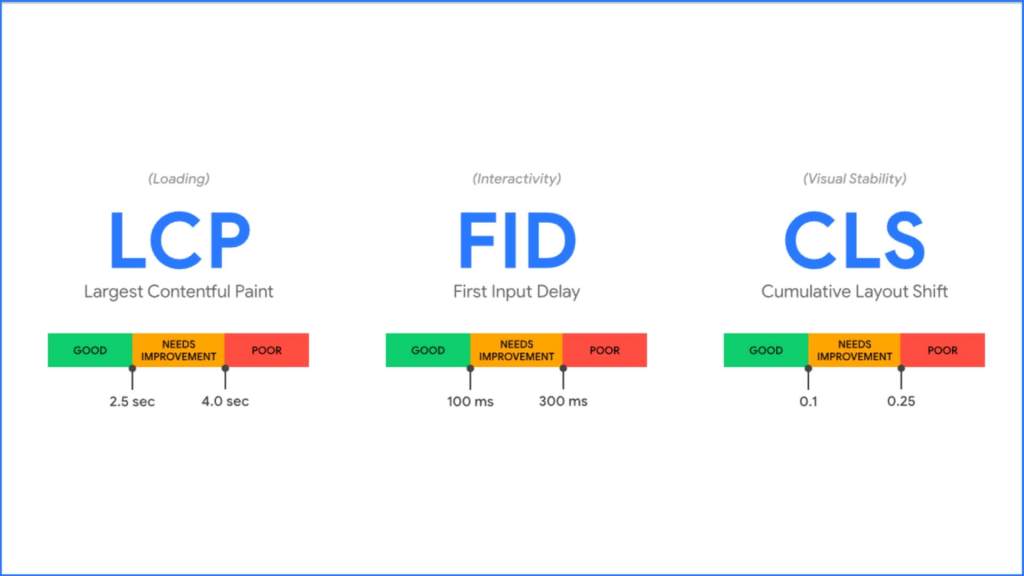
  2. Optimizing for Core Web Vitals and User Experience: Core Web Vitals are key performance metrics that measure user experience, including page speed and interactivity. Optimize your website’s performance to meet these metrics and provide a seamless user experience.
  3. Leveraging Structured Data for Enhanced Search Visibility: By implementing structured data, you can increase your website’s chances of appearing in rich results and featured snippets, enhancing its visibility in search engine listings.
  4. Harnessing the Power of Accelerated Mobile Pages (AMP): Accelerated Mobile Pages (AMP) are lightweight and fast-loading versions of web pages designed for mobile devices. Implementing AMP can improve your website’s mobile performance and page speed, leading to a better user experience and potential SEO benefits.

By incorporating these advanced technical SEO strategies, you can optimize your website for improved search visibility, user experience, and performance.

Implementing Structured Data Markup

Implementing structured data markup is a crucial aspect of advanced technical SEO. Here’s why structured data markup matters and how to implement it effectively:

Structured data markup provides additional contextual information to search engines about your website’s content. This helps search engines understand and categorize your content better, leading to enhanced search visibility and potential rich results in search listings.

One way to implement structured data markup is by using schema markup. Schema markup is a standardized vocabulary of tags that can be added to the HTML code of your website. These tags provide specific information about your content, such as product details, event information, recipes, and more.

To implement schema markup effectively, identify the appropriate schema types for your content and add the relevant schema tags to your HTML code. You can use Google’s Structured Data Markup Helper or schema.org as resources to generate the necessary code.

By implementing structured data markup, you can improve your website’s search visibility, increase the chances of appearing in rich results, and provide search engines with valuable contextual information about your content.

Optimizing for Core Web Vitals and User Experience

Optimizing for core web vitals and user experience is crucial for providing a seamless browsing experience and improving your website’s SEO performance. Here’s how you can optimize for core web vitals:

  1. Improve Page Speed: Page speed is a key component of core web vitals. Optimize your website’s loading times by minimizing server response time, leveraging browser caching, compressing images and files, and reducing the number of HTTP requests.
  2. Enhance Mobile Usability: Mobile usability is another critical aspect of user experience. Ensure that your website is mobile-friendly, with responsive design, clear navigation, and fast-loading pages.
  3. Minimize Cumulative Layout Shift (CLS): Cumulative Layout Shift measures visual stability during page loading. Avoid elements that cause unexpected shifts in layout, such as ads or images without defined dimensions.

By optimizing for core web vitals and user experience, you can improve your website’s overall performance, enhance user satisfaction, and potentially boost your organic search rankings.

Leveraging Structured Data for Enhanced Search Visibility

Leveraging structured data is an effective way to enhance your website’s search visibility and stand out in search results. Here’s why structured data matters and how to leverage it effectively:

Structured data provides search engines with additional information about your content, enabling them to display rich results in search listings. Rich results include features like star ratings, images, and additional information, making your more prominent in search results and attracting more clicks.

To leverage structured data effectively, identify the appropriate schema types for your content and implement the relevant schema markup on your web pages. This can include markup for products, recipes, events, articles, and more.

By providing search engines with structured data, you increase the chances of your website appearing in rich results, improving its visibility in search listings and attracting more organic traffic.

Harnessing the Power of Accelerated Mobile Pages (AMP)

Harnessing the power of Accelerated Mobile Pages (AMP) can significantly improve your website’s mobile performance and page speed. Here’s why AMP matters and how to implement it effectively:

Accelerated Mobile Pages (AMP) are lightweight versions of web pages designed for optimal mobile performance. AMP pages load quickly and provide a seamless browsing experience on mobile devices.

To harness the power of AMP, you can create AMP versions of your web pages using the AMP HTML framework. This involves simplifying the HTML code, using streamlined CSS, and leveraging caching techniques.

By implementing AMP, you can provide a fast and responsive mobile experience, reduce bounce rates, and potentially improve your website’s mobile search rankings. AMP is particularly valuable for publishers, e-commerce websites, and sites with content-heavy pages.

Harnessing the power of AMP can enhance your website’s mobile performance, improve page speed, and provide a better user experience for mobile users.

Analytics Cookies

Analytics cookies play a crucial role in understanding user behavior and optimizing website performance. Here’s how analytics cookies work and why they are important:

Analytics cookies are small text files placed on a user’s device when they visit a website. These cookies collect information about the user’s browsing behavior, including pages visited, time spent on each page, and actions taken on the site.

By analyzing this data, website owners can gain valuable insights into user preferences, engagement, and conversion rates. This information can be used to optimize website content, improve user experience, and drive targeted marketing campaigns.

It’s important to note that analytics cookies must comply with privacy regulations, such as GDPR and CCPA. Website owners must obtain user consent for the use of cookies and provide clear information about the types of data collected and how it will be used.

Analytics cookies, when used responsibly and in compliance with privacy regulations, are valuable tools for optimizing website performance and enhancing the user experience.

Marketing Cookies

Marketing cookies play a crucial role in enhancing user experience and targeting specific audiences. These cookies allow websites to collect and store information about users’ browsing behavior, preferences, and interests. By analyzing this data, marketers can deliver personalized content, ads, and offers to individual users.

Marketing cookies can help improve the effectiveness of advertising campaigns by ensuring that the right message reaches the right audience. They also contribute to a better user experience by displaying relevant content and reducing irrelevant ads.

However, it’s important to obtain user consent before using marketing cookies, as they involve the collection and use of personal data. Privacy regulations, such as the General Data Protection Regulation (GDPR), require websites to inform users about the use of cookies and give them the option to opt-out.

In summary, marketing cookies are essential for targeted advertising and personalized user experiences. They help businesses understand their audience better and optimize their marketing strategies accordingly.

Troubleshooting Common Technical SEO Issues

Technical SEO issues can negatively impact a website’s performance in search engine rankings. It is crucial to identify and troubleshoot these issues to ensure optimal crawlability and usability. Common technical SEO issues include crawl errors, redirect chains, indexing issues, broken links, duplicate content, and mobile optimization.

Identifying and Fixing Crawl Errors

Crawl errors occur when search engines are unable to access certain pages on a website. These errors can prevent search engines from properly indexing and ranking the site’s content. To identify crawl errors, website owners can use tools like Google Search Console, which provides a detailed report of any crawl errors found by Google.

Once crawl errors are identified, they can be fixed by addressing the underlying issues. This may involve fixing broken links, ensuring proper URL structure, and resolving server errors. By resolving crawl errors, website owners can ensure that their content is accessible to search engines, improving their chances of ranking higher in search results.

Addressing Redirect Chains and Loops

Redirect chains and loops occur when a page redirects to another page, which then redirects to another page, forming a chain or loop of redirects. These can negatively impact a website’s crawlability and user experience.

To address redirect chains and loops, website owners should review their website’s URL structure and ensure that redirects are set up correctly. They should also use permanent redirects (301 redirects) instead of temporary redirects (302 redirects) to ensure that search engines understand that the redirect is permanent.

Additionally, website owners should regularly check for and fix any broken or outdated redirects that may be causing redirect chains or loops. By addressing these issues, website owners can improve their website’s crawlability and provide users with a seamless browsing experience.

Broken links and 404 errors

Broken links and 404 errors occur when a link on a website leads to a page that no longer exists or has been moved. These errors can negatively impact a website’s user experience and search engine rankings.

To address broken links and 404 errors, website owners should regularly check their website for broken links using tools like Google Search Console or third-party link checkers. Once broken links are identified, website owners should either update the links to point to the correct page or set up redirects to a relevant page on their website.

By fixing broken links and 404 errors, website owners can improve their website’s user experience and ensure that search engines can properly access and index their content.

Duplicate content and canonicalization

Duplicate content refers to identical or similar content appearing on multiple pages of a website or across different websites. Duplicate content can confuse search engines and negatively impact a website’s search engine rankings.

To address duplicate content, website owners should implement canonicalization. Canonicalization is the process of specifying the preferred version of a webpage to search engines. This can be done by adding a canonical tag to the HTML of the duplicate pages, indicating the original or preferred version of the content.

By implementing canonicalization, website owners can consolidate the ranking signals of duplicate pages and ensure that search engines understand the intended version of the content. This can help improve a website’s search engine rankings and avoid any penalties associated with duplicate content.

Mobile optimization and responsive design

Mobile optimization and responsive design are essential for providing a seamless user experience on mobile devices. With the increasing use of smartphones and tablets, it is crucial for websites to be mobile-friendly to ensure optimal performance and usability.

Mobile optimization involves designing and optimizing a website specifically for mobile devices, taking into account factors such as screen size, touch controls, and page load speed. Responsive design, on the other hand, involves designing a website that automatically adjusts its layout and content based on the user’s device and screen size.

By implementing mobile optimization and responsive design, website owners can ensure that their website is accessible and user-friendly on all devices, leading to better user engagement and improved search engine rankings.

Indexing issues with search engines

Indexing issues can occur when search engines have difficulty accessing or understanding a website’s content. This can lead to a website’s pages not being properly indexed or ranked in search engine results.

To address indexing issues, website owners should conduct a site audit to identify any technical issues that may be hindering search engine indexing. This may involve checking for blocked pages, improper use of robots.txt, or issues with the website’s XML sitemap.

Once indexing issues are identified, website owners should rectify them by removing any blocks on important pages, updating the robots.txt file, or fixing any issues with the XML sitemap. By addressing these issues, website owners can ensure that their website’s content is properly indexed and ranked in search engine results.

Conclusion

Ultimately, mastering Technical SEO is crucial for enhancing website performance and visibility. By optimizing crawlability, site structure, and indexability, you can boost your website’s chances of ranking well in search results. Focusing on mobile usability, speed, and security with HTTPS also play pivotal roles in user experience and SEO success. Implementing advanced strategies like structured data markup and optimizing Core Web Vitals can further elevate your site’s performance. Lastly, vigilantly monitoring for and addressing common technical SEO issues ensures your site remains healthy and competitive. Remember, staying abreast of the latest trends and updates is key to sustained SEO success.

Frequently Asked Questions

What is the first step in starting technical SEO?

The first step in starting technical SEO is to conduct a comprehensive technical SEO audit. This involves analyzing your website’s current technical, including factors such as site structure, keyword research, Google Search Console, and user experience. Based on the audit findings, you can then prioritize implement necessary technical optimizations.

How often should I conduct a technical SEO audit?

Ensuring your website’s health is crucial. Conduct a Technical SEO Audit regularly to spot issues. Frequency may vary based on site changes, but aim for quarterly audits for optimal performance. Stay proactive in maintaining your site’s crawlability and usability.

Can technical SEO improvements affect my site’s ranking immediately?

While technical SEO improvements can have a positive impact on your site’s ranking, the effects may not be immediate. Search engines take time to crawl and reindex websites, so it may take some time for the changes to be reflected in search engine rankings. However, implementing technical SEO best practices can contribute to long-term improvements in rankings and organic traffic.

How Can You Improve Your Technical SEO?

To improve your technical SEO, you can focus on several key areas, including structured data implementation, internal link optimization, mobile usability, page speed optimization, and regular technical SEO audits. By addressing these areas, you can enhance your website’s crawlability, usability, and overall technical performance.

How can structured data markup improve Technical SEO?

Structured data markup, also known as schema markup, provides additional context and information to search engines about your website’s content. By implementing structured data markup, you can enhance search engine understanding and potentially earn rich results, which can improve your website’s visibility and click-through rates in search results.

What role does site speed play in Technical SEO?

Site speed is a crucial aspect of technical SEO. A fast-loading website provides a better user experience, reduces bounce rates, and can contribute to improved search engine rankings. Search engines, like Google, consider page speed as a ranking factor and prioritize websites that offer a faster and smoother user experience.
Featured

A Website or a mobile app – What your business needs?

Marketing strategy and brand building by SARK Promotions, india
s best marketing company. www.marketingseo.in
Website vs Mobile app

For a business, if you wish to establish a communication and transaction portal with your customers or vendors, there are multiple methodologies present. The most common structures used in present-day are a website or a mobile app with customized features.

If you’re planning to establish a mobile presence for your business or organization one of the first considerations that will likely come to mind is whether you want to create a mobile application for users to download (app) or a mobile website, or perhaps both. Mobile websites and apps can look very similar at first glance and determining which is most suited to your needs will depend upon a number of factors, including target audiences, available budget, intended purpose, and required features.

What’s the Difference Between a Mobile Website and an App (Application)?

Before you can evaluate the benefits of a website vs. an app it’s important to understand the key differences between the two. Both apps and websites are accessed on a handheld device such as smartphones (e.g. iPhone, Android and Blackberry) and tablets. However, a website can also be accessed on laptops and PCs.

A mobile website is similar to any other website in that it consists of browser-based HTML pages that are linked together and accessed over the Internet (for mobile typically WiFi or 3G or 4G networks). The obvious characteristic that distinguishes a mobile website from a standard website is the fact that it is optimized for the smaller handheld display and touch-screen interface. Increasingly, responsive web design is becoming the new standard for websites that are not only mobile-friendly, but that can scale to any sized device – from desktop down to tablet and handheld smartphones.

Websites can display text content, data, images and video. They can also access mobile-specific features such as click-to-call (to dial a phone number) or location-based mapping.

Apps are actual applications that are downloaded and installed on your mobile device, rather than being rendered within a browser. Users visit device-specific portals such as Apple’s App Store, Android Market, or Blackberry App World in order to find and download apps for a given operating system. The app may pull content and data from the Internet, in a similar fashion to a website, or it may download (but not everything) the content so that it can be accessed without an Internet connection.

Marketing strategy and brand building by SARK Promotions, india
s best marketing company. www.marketingseo.in

Which is Better – an App or a Website?

When it comes to deciding whether to build a native app or a website, the most appropriate choice really depends on your end goals. If you are developing an interactive game an app is probably going to be your best option.

But if your goal is to offer content and shopping experience to the widest possible audience then a website is probably the way to go. In some cases, you may decide you need both a mobile website and a mobile app, but it’s pretty safe to say that it rarely makes sense to build an app without already having a website in place. You can know what are smart websites from our team of experts.

A website should be considered your first step in developing a mobile web presence, whereas an app is useful for developing an application for a very specific purpose that cannot be effectively accomplished via a web browser.

Advantages of a Website vs. Native Apps

If your goals are primarily related to marketing or public communications, a mobile/responsive website is almost always going to make sense as a practical first step in your mobile outreach strategy. This is because a mobile website has a number of inherent advantages over apps, including broader accessibility, compatibility and cost-effectiveness.

Immediacy –Websites Are Instantly Available

A mobile website is instantly accessible to users via a browser across a range of devices (iPhone, Android, BlackBerry, etc).  Apps on the other hand require the user to first download and install the app from an app marketplace before the content or application can be viewed – a significant barrier between initial engagement and action/conversion. 

Compatibility – Mobile Websites are Compatible Across Devices

A single mobile website can reach users across many different types of mobile devices, whereas native apps require a separate version to be developed for each type of device. Furthermore, mobile website URLs are easily integrated within other mobile technologies such as SMS, QR Codes and near field communication (NFC).

Upgradability –Websites Can Be Updated Instantly

A mobile website is much more dynamic than an app in terms of pure flexibility to update content. If you want to change the design or content of a mobile website you simply publish the edit once and the changes are immediately visible; updating an app on the other hand requires the updates to be pushed to users, which then must be downloaded in order to update the app on each type of device. 

Marketing strategy and brand building by SARK Promotions, india
s best marketing company. www.marketingseo.in

Findability –Websites Can be Found Easily

Mobile websites are much easier for users to find because their pages can be displayed in search results and listed in industry-specific directories, making it easy for qualified visitors to find you. Most importantly, visitors to your regular website can be automatically sent to your mobile site when they are on a handheld (using device detection).  In contrast, the visibility of apps is largely restricted to manufacturer app stores.

Shareability –Websites Can be Shared Easily by Publishers, and Between Users

Mobile website URLs are easily shared between users via a simple link (e.g. within an email or text message, Facebook or Twitter post). Publishers can easily direct users to a mobile website from a blog or website, or even in print. An app simply cannot be shared in this fashion.

Reach –Websites Have Broader Reach

Because a website is accessible across platforms and can be easily shared among users, as well as search engines, it has far greater reach capability than a native app. 

LifeCycle –Websites Can’t be Deleted

The average shelf-life of an app is pretty short, less than 30 days according to some research, so unless your app is something truly unique and/or useful (ideally, both), it’s questionable how long it will last on a user’s device. Mobile websites on the other hand are always available for users to return to them. 

A Mobile Website Can be an App!

Just like a standard website, mobile websites can be developed as database-driven web applications that act very much like native apps. A mobile web application can be a practical alternative to native app development.

Time and Cost – Websites are Easier and Less Expensive

Last but certainly not least, mobile website development is considerably more time and cost-effective than development of a native app, especially if you need to have a presence on different platforms (requiring development of multiple apps).

Support and Maintenance

The investment considerations of app vs website don’t end with the initial launch; properly supporting and maintaining an app (upgrades, testing, compatibility issues and ongoing development) is more much more expensive and involved than supporting a website over time.

When Does an App Make Sense?

Despite the many inherent benefits of the mobile web, apps are still very popular, and there are a number of specific use scenarios where an app will be your best choice.  Generally speaking, if you need one of the following, an app makes sense:

  • Interactivity/Gaming – for highly interactive games (think Angry Birds) an app is likely going to be your best choice, at least for the foreseeable future. For simpler games (e.g. puzzles and such) there may be less of a difference in terms of user experience with a browser-based version vs. a native app. 
    • Regular Usage/Personalization – If your target users are going to be using your app in a personalized fashion on a regular basis (think EverNote, Facebook, online Banking) then a native app provides a great way to do that that is easily accessible in almost all scenarios. 
    • Complex Calculations or Reporting with Visualization – If you need something that will take data and allow you to manipulate it with complex calculations, charts or reports (think financial or scientific tools) an app will help you do that very effectively.
  • Native Functionality or Processing Required – Mobile web browsers are getting increasingly good at accessing certain mobile-specific functions such as click-to-call, SMS, device libraries and GPS functions. However, if you need to access a user’s camera or processing power an app will still do that much more effectively.
  • Push Notifications – An inherent capability of apps is the ability to send push notifications to users who have the app installed on their device, giving app publishers the ability to send messaging to users directly. The of course assumes the user has allowed the app to send push notifications in their settings (not everyone does). Also interesting to note is that many browsers now allow web-based push notifications, allowing website owners to similarly send notifications to visitors who opt-in on both desktop and compatible mobile devices.
  • No Connection Required – If you need to provide offline access to content or perform functions without a network/wireless connection then an app makes sense, as you can store the data locally and then have it upload once a connection is established. 

As with any project, when developing an app you want to ensure that your are getting an optimal return on your investment. What you want to avoid at all costs is the needless and expensive exercise of building an app to do something basic that can be achieved with a mobile website.

In Conclusion

As mobile use continues to grow worldwide, the “app vs web” question will remain a very real consideration for organizations seeking to establish a mobile presence. If your mobile goals are primarily marketing-driven, or if your aim is to deliver content and establish a broad mobile presence that can be easily maintained, shared between users, and found on search engines, then the a mobile-friendly responsive website is the logical choice.

On the other hand, if your goal is to provide a user experience that feels more like a gaming interface or a computer program than a website, or if you need access to a user’s phone storage and native functions, then an app is probably going to be required.

It’s also important to remember that a mobile/responsive website and a native app are not necessarily mutually exclusive. Plenty of organizations have both a mobile-friendly public website for their general web presence, as well as a downloadable native app to accommodate more specific requirements. In the end, it’s all about choosing the right tool for the job.

Scenario with marketplace

When you plan to launch your market place the factors considered are:

  1. Payment Gateways – with third-party API options being available the payment gateways have become versatile across any kind of platform. Thus, there is no difference left in a website, a mobile website or an app.
  2. Multiple Languages – website is the easiest bet here. Language packs on mobile apps can be space-consuming for users and frequent updates become a challenge.
  3. Inventory management & reporting – For a marketplace, a backend website is always preferred to ease the management and reporting of inventory. Plus searchability online is much more widespread for a website as compared to an app. But yes, to promote the app, if you have one, you can allow app-only discount coupons.
  4. Data Security – security patches are customized as per the operating system in case of an app and thus become a really costly affair. On the other hand for a website the security features are universal.

To fulfil all your queries and the needs to setup and operate any such online service, you have a one-stop solution as SARK Promotions.

Featured

Digital Marketing for Specialty Chemicals

7 Astounding/ Impressive Digital Marketing Approaches for Speciality Chemical Industry

Covering more than 80,000 commercial products, India’s extremely diversified chemical industry is the sixth-largest producer of chemicals in the world. The chemical sector in India has the moment for notable growth, with global companies looking to de-risk their supply chains that are dependent on China. In this favorable scenario, India’s specialty chemicals companies are scaling up their capacities to satisfy rising demand from domestic and overseas markets.

Marketing for Specialty Chemicals

Despite the current pandemic situation, the chemical industry has enjoyed remarkable success owing to adopting digitalization. Digital transformation means the adoption and integration of digital tools across an organization’s operation. Applying readily available digital approaches to marketing and sales has the power to unlock as much as $105 billion to $205 billion annually to the $3.8-trillion-a-year chemical industry. Fast-mover companies that act aggressively to embrace digital tools could also capture $45 billion to $65 billion additionally by taking customers and revenues away from less nimble peers (https://www.mckinsey.com/industries/chemicals/our-insights/demystifying-digital-marketing-and-sales-in-the-chemical-industry)

Specialty chemicals companies must consider digital marketing to achieve organic business growth and sustainability goals. As the market’s digital maturity increases, digital approaches are increasingly needed in sales and marketing to complement personal interaction with customers. Multichannel businesses consistently outperform their single-channel competitors by making the customer experience engaging. Yet so far, few chemical companies have deployed online sales channels; most still serve customers mainly through their direct sales forces and distribution partners.

The scramble to shift to novel digital marketing tactics, however, can be a challenge. At SARK Promotions we have the expertise and the products to partner with you to optimize your digital marketing efforts. A few important initiatives include

1.     Creating a best-in-class online sale channel.

2.     Using advanced analytics to reduce customer churn.

3.     Identifying new customer leads, and support upselling.

4.     Developing customer journeys that attract fresh business.

Our intimate understanding of the marketing needs can enhance your customer satisfaction by as much as 20 to 30 percent thereby fostering loyalty, and boosting your share of wallet.

The chemical industry leaders associated with SARK Promotions have risen the growth of their revenues by up to twice the market average.

Some of the issues faced by Chemical Industries are –

The Chemical Industry is extremely competitive, and it is continuously changing with contemporary technologies, products, and services. Chemical companies are always looking for latest ways to increase the sales of their products. Most chemical companies have already adopted internet marketing strategies but still, some companies are not aware of how to use the internet effectively to promote their business.

Chemical companies have always had to compete with one another to win over customers, but now they’re also competing with startups- focused on quality and customer service- that use SEO to attract customers through online channels.

High Cost

The global economic downturn has put pressure on all businesses, but those that manufacture chemicals have had a tough time. In recent years we have seen rising raw material costs, exchange rate fluctuations, and the threat of pollution control laws. If that’s not enough, many other factors can affect the bottom line – from government regulation to customer loyalty.

All these factors make it harder for chemical companies to maintain a positive return on investment. Therefore more and more businesses are turning to internet marketing to boost their sales and profits to get prompt ROI.

Lack of Visibility

The biggest problem faced by chemical industries without adopting SEO is that they will not be able to reach out to their target audience from different regions looking for chemical products. This means that potential customers won’t be able to find them when searching for products or services resulting in losing out on huge contracts or even missing out on sales.

Digital Transformation of the Chemical Industry

Here are the important aspects of digital marketing in the chemical industry that one needs to be mindful of , to become a market leader. Demystifying the concepts of digital marketing below.

Creating a strong brand image. As discussed, it is critical to find the USP, as more or less it includes the same components. One needs to pay more attention to the details like name, logo, design, etc, and make it distinct as compared to peers. Apart from the mentioned, it also includes timely deliverables, quality products, competitive pricing, and customer support as 80% of the buyer’s decision depends on reviews and this could be later communicated to the target group using content marketing.

Content Marketing. Notably, around 96% of B2B buyers want content advocated by industry leaders or resourced from trusted sources. Hence, focusing more on SEO-driven content could result in targeting the right customers. It is the most influential strategic approach which focuses on delivering relevant, valuable, and consistent content which will help drive more audiences and retain them as loyal customers. Impressively, digital marketers have been spending a major piece on content optimization and have found interesting results over time. Long posts and blog articles work well when it comes to this sector and accordingly, 80% make the utmost use of such an important piece of content.

Pull vs Push Marketing Chemical industry marketers could use pull marketing, by curating engaging, educational, informative, and entertaining content that could add value for the audience, this would ensure your presence and help in brand recall rather than pushing different sales ads and ad campaigns which could end up getting in the spam folder. Approximately 81% of B2B buyers consume Newsletters and email content.

Social Media Marketing It would come as a surprise to few but in these changing times, tapping social media platforms becomes important. Not just being on the space but being active helps in attracting a few possible potential leads. According to the latest insights, around 50% of B2B marketers consume social media content. Also, communication is key. The communication should align with the objectives and face of the brand.

Every brand is unique and so is its story. The digital marketing techniques would sound similar, but the applications and weightage of the medium differ from industry to industry. Every Digital story is curated after thorough research and an ample number of resources. SARK Promotions has successfully handled esteemed clients from the chemical industries in India. We are a group of young, vibrant and experienced individuals, who would help you set a perfect platform for your brand, and with our excellent services in terms of creativity and delivering the best results, we have successfully become a perfect solution for all digital marketing concerns. If you are still thinking about how digital marketing would help you drive more audience and how social media could act as a valuable source for lead generation, talk to us.

Blogs/Articles

Blogs, also called articles, help drive traffic to your website to generate awareness, leads, and ultimately sales.

Promoting your articles through social media is a splendid way to boost the visibility of your content to thousands of qualified product consumers.

SEO + Web Content

Search engine optimization (SEO) and web content centred on strategic keywords help people find your products. This is crucial since most buyers conduct product research long before reaching out to your sales team. Keeping up with public search engine algorithms and which search terms to use in your web content can take a lot of time and expertise.

The analytics can help your team quickly and easily understand which of your products are seeing the most traffic and which keywords are helping formulators find you. It’s likely that the trends your products are experiencing will help your sales team develop better and more accurate forecasts.

White Papers and E-books

Like blogs, white papers and e-books can drive traffic to your website. But more importantly, they can help position your company as a thought leader in a particular area. And when gated, white papers and e-books can help you gather new contacts or leads.

By leveraging targeted emails, we can help distribute your white paper to thousands of customers. This helps make the most of the time and effort you put into creating your content by extending the reach of your white paper or e-book beyond your existing customers and prospects.

Pay Per Click

Pay Per Click campaigns to help you reach the top of search engine results by bidding on specific terms. Like SEO, it’s critical to have insights into your search and keyword trends.

The analytics can help you understand which keywords are popular. Consider relevant keywords for your Pay Per Click campaigns. Additionally, SARK Promotions can provide your products more visibility by elevating your product listing when consumers search for relevant keywords.

Specialized Search Engines

Listing your products on specialized search engines and industry-specific sites places your listings in front of qualified consumers. Leveraging industry search engines can help you direct your chemical marketing efforts toward a concentrated audience likely to purchase your products.

Webinars

Webinars can be an impressive  way to launch a new product or speak in depth about products and trends that are relevant to the industry. They can be a good alternative to presentations that you may have planned for a trade show. While webinars are a useful tool in the current environment, they can be time-consuming to coordinate.

Team at SARK can help you quickly and easily conduct a webinar. Your team only has to come up with the content and speaker and we handle the rest. SARK Promotions promotes your webinar to our audience of various industrial segments, facilitates the webinar, and then posts the recording for you. Post-event analysis and contact information for those who attended the webinar or downloaded the presentation is also provided.

Applying these 7 digital marketing strategies, can help specialty chemical manufacturers accomplish their business revenue goals, and help ensure that companies meet the world’s chemical needs now and in the future.

Click To partner with Chemical Marketing Experts now!

Top Website Development Services in Jhansi

Introduction | Best Website Development Agency

In today’s digital-first world, businesses in Jhansi are realizing the importance of having a strong online presence. Whether you are a small shop or an educational institute, your website is the foundation of your brand identity. It is also crucial if you manage a fast-growing e-commerce store. It serves as a crucial representation of who you are. Choosing the right website development company in Jhansi is therefore a critical decision.

SARK Promotions stands out as the most trusted partner for website design and development in the region. We have expertise across industries like healthcare, fashion, weddings, education, tea exports, and chemicals. We have delivered customized solutions using WordPress, Shopify, and Wix platforms.

Website development Agency

Why Jhansi Businesses Need Professional Website Development

Jhansi has a growing base of industries such as agriculture, education, healthcare, and retail. From herbal tea exporters to schools and local fashion brands, businesses in Jhansi are embracing digital opportunities. However, without a well-structured website, even the best product or service fails to capture attention.

That’s where a professional website design company in Jhansi becomes vital. At SARK Promotions, we combine clean design with user-friendly layouts. We also use SEO-friendly coding. This combination ensures your website works as a 24/7 sales tool.

Industries We Have Served in Jhansi and Beyond

Healthcare and Doctors

We have built appointment booking websites for doctors, clinics, and healthcare professionals in Jhansi. This ensures easy access for patients. It also provides strong visibility on Google.

Fashion and Weddings

For fashion retailers and wedding planners, our team has delivered visually stunning websites. These websites feature integrated galleries, product catalogs, and online store functionalities.

Educational Institutes

Jhansi is known for its reputed schools and coaching centers. Our web development services in Jhansi have helped institutes create online admission portals, digital classrooms, and informative websites.

Website Design Agency

Tea and Luxury Products

Herbal tea and luxury tea brands require an elegant and trustworthy online presence. Our Shopify and Wix solutions have enabled these businesses to manage product catalogs, handle payments, and expand their reach.

Chemical and Industrial Businesses

Industrial players in chemicals and manufacturing need professional websites to attract B2B buyers. We create responsive websites with technical content that builds trust and credibility.

Why Choose SARK Promotions as Your Website Development Partner

Proven Expertise in Multiple Platforms

From WordPress for content-driven sites to Shopify for e-commerce and Wix for fast launches, our expertise spans all major platforms.

Tailored Solutions for Every Industry

We understand that a doctor’s website is very different from a fashion store or a chemical company. That’s why we provide customized solutions rather than one-size-fits-all designs.

SEO-Optimized Websites

Every site we deliver is optimized for search engines from the start. This ensures your website ranks higher and drives organic traffic consistently.

End-to-End Services

Our role doesn’t end with development. We also handle digital marketing, SEO, and ongoing maintenance to ensure your website stays updated and effective.

Our Process for Website Development in Jhansi

  1. Need Analysis – Understanding your business and industry.
  2. Design Planning – Creating wireframes and user-focused designs.
  3. Development – Building responsive, fast, and scalable websites.
  4. Testing – Ensuring speed, security, and compatibility across devices.
  5. Launch & Maintenance – Deploying your website and providing ongoing support.

How We Help Jhansi Businesses Stand Out

Affordable and Transparent Pricing

We provide cost-effective packages suitable for small businesses as well as enterprises.

Focus on Local SEO

Our websites are designed with local SEO strategies, ensuring businesses in Jhansi prominently in search results.

Mobile-First Approach

With mobile usage rising, we ensure all websites are responsive and deliver seamless user experiences.

FAQs

1. Why choose SARK Promotions as the best website development company in Jhansi?

Because we combine experience, industry-specific expertise, and SEO-driven design to deliver measurable results.

2. Which platforms do you use for website development?

We specialize in WordPress, Shopify, and Wix to suit different business needs.

3. Can you handle e-commerce websites in Jhansi?

Yes. We have successfully developed online stores for fashion, tea, and other industries with secure payment and shipping integrations.

4. Do you offer SEO with website development?

Absolutely. Every website we deliver is optimized for SEO from day one.

5. How much does a website cost in Jhansi?

Costs depend on project scope, but we guarantee affordable packages without compromising quality.

Conclusion

If you’re looking for a website development company in Jhansi, SARK Promotions is your most reliable choice. From doctors and schools to fashion stores and chemical industries, we have helped diverse businesses achieve digital success. With SEO-friendly coding, user-focused design, and transparent pricing, we ensure your website becomes your strongest growth asset.

SEO for Startups: How to Get Your New Business Noticed (and Dominate Page 1!)

Your Startup’s Secret Weapon for Online Visibility


Read all our future blogs on Elgorythm.in


For any burgeoning enterprise, establishing a strong online presence is not merely an option; it is a fundamental necessity. In this digital age, Search Engine Optimization (SEO) stands as a pivotal strategy, offering a distinct advantage over traditional marketing avenues. Unlike Pay-Per-Click (PPC) campaigns, which cease to deliver traffic the moment the advertising budget is depleted 1, organic search, once cultivated, provides a continuous stream of visitors without direct per-click expenditure. This inherent cost-effectiveness makes SEO an invaluable asset for new businesses operating with constrained marketing budgets.2

SEO for Startups

The benefits of SEO extend far beyond immediate traffic generation, contributing significantly to a brand’s long-term viability and market standing. Consistent high rankings on Search Engine Results Pages (SERPs) convey a powerful message to users: that search engines, particularly Google, deem the website and its content trustworthy and authoritative.2 This cultivated trust directly translates into enhanced click-through rates and, crucially, a higher volume of qualified leads and subsequent sales.2 While SEO results typically manifest over a period of 4 to 6 months, or potentially longer depending on the specific niche and competitive landscape 5, the return on investment (ROI) it yields is consistently remarkable, often catalyzing transformative business growth.2

From a strategic perspective, SEO for a startup should be viewed not as a mere tactical expenditure but as a foundational investment. While paid advertising can offer immediate validation and quick wins, SEO systematically builds a durable digital asset—comprising domain authority and organic visibility—that appreciates in value over time. This approach progressively diminishes a business’s reliance on costly paid channels as it scales. Such a focus aligns seamlessly with the “lean startup” methodology 7, emphasizing efficient, sustainable growth by integrating SEO as a core component of the business strategy from its inception. It is about establishing a valuable, trust-generating online footprint that compounds over time, rather than simply driving transient traffic.

Startup growth Engine
Comparison of PPC and SEO

Understanding the Startup SEO Landscape: Challenges & Opportunities

New businesses entering the digital arena frequently encounter a unique set of obstacles that can impede their online visibility. A primary concern is often the inherent budget and resource limitations, which make it challenging to allocate substantial funds towards comprehensive SEO initiatives.3 Furthermore, startups must contend with the formidable presence of established brands that possess considerable online authority and extensive backlink profiles.3 Technical SEO, encompassing aspects like site speed and indexing, can also present daunting complexities for new ventures, particularly those lacking dedicated in-house technical teams.3 The consistent production of high-quality content and the acquisition of valuable backlinks represent additional common struggles for nascent businesses.3

Despite these formidable hurdles, startups inherently possess unique advantages that can be strategically leveraged for SEO success. Their inherent agility allows for swift iteration and adaptation to evolving SEO trends and algorithm updates, a flexibility often absent in larger, more entrenched organizations.10 Moreover, a focused niche often enables startups to target specific, less competitive long-tail keywords, thereby attracting users with higher purchase intent.7 New businesses can also build credibility from the ground up by prioritizing an exceptional user experience, developing valuable content that directly addresses customer pain points, and actively fostering engagement with their audience.4

The resource constraints faced by startups, rather than being a disadvantage, can actually compel a more intelligent and focused SEO strategy. Without the financial capacity to compete with industry giants for generic, high-volume keywords 3, new businesses are naturally guided towards long-tail keywords 12 and highly specialized content. These more specific keywords, while exhibiting lower individual search volumes, attract users who demonstrate a significantly higher intent to convert.13 This results in superior conversion rates.2 This strategic pivot, often summarized as “low volume + a problem you solve = winning” 10, transforms a perceived limitation into a potent competitive advantage. It fosters a focus on delivering specific value, which ultimately yields higher quality leads and a more favorable return on investment, rather than merely inflating traffic numbers.

Mastering Keyword Strategy: Get Found by the Right People

For startups, a nuanced approach to keyword strategy is paramount for achieving online visibility. While broad, high-volume terms such as “startup” (which boasts a global search volume of 1,000,000) 7 might seem appealing, directly competing for such keywords is often an unfeasible and “losing game” for new businesses.12 Instead, the focus should shift to

SEO Opportunities and challenge

Long-tail keywords.

These are specific phrases, typically three or more words in length, that convey a heightened level of user intent and focus.13 Long-tail keywords are inherently less competitive, making them significantly easier for new websites to rank for, and they consistently attract highly qualified traffic.13 For instance, optimizing for “best running shoes for flat feet” is far more effective than attempting to rank for the generic term “shoes”.13

To effectively uncover these valuable, high-intent keywords, startups should leverage a suite of powerful keyword research tools. Google Keyword Planner, a free resource, along with industry-leading platforms like SEMrush and Ahrefs, are indispensable for identifying keyword suggestions, analyzing search volume data, and assessing competitive difficulty.22

Google Search Console provides direct insights into the keywords for which a website is already ranking and any indexing issues.22 Tools such as

AnswerThePublic and Ubersuggest are particularly useful for discovering question-based long-tail keywords and related search queries that reflect natural user language.18 Furthermore, a thorough analysis of competitor keywords can reveal untapped opportunities and successful strategies within a specific niche.11

A particularly potent subset of long-tail keywords for startups are those that address “pain points.” These are specific search terms that articulate a user’s immediate problem, challenge, or unmet need.14 By strategically targeting these pain point keywords, startups can attract an audience that is already “problem-aware” or “decision-ready”.14 This leads to a significantly higher conversion potential.26 Methods for identifying these crucial terms include conducting detailed audience interviews, meticulously scrutinizing competitor reviews, analyzing “People Also Ask” sections in search results, and reviewing customer service tickets for recurring issues.14 This strategy allows startups to bypass direct competition with established brands on broad, generic terms. Instead, it enables them to position their offerings as direct solutions to specific, urgent problems, converting searchers into customers more efficiently. This approach underscores that SEO for startups is not merely about achieving rankings; it is about strategically aligning content with the user’s journey and their specific needs at each stage, thereby transforming search visibility into tangible business growth.

Here is a table illustrating high-intent long-tail keyword examples for various startup categories:

Category/Industry (Example)Broad Keyword (High Volume, High Competition)High-Intent Long-Tail Keyword (Lower Volume, Higher Conversion)User Intent
SaaS (Software)CRM softwareCRM software for real estate teamsTransactional
E-commerce (Apparel)ShoesBest running shoes for flat feetTransactional
Local Service (Plumbing)PlumbingEmergency plumber near me 24/7Transactional
Health TechMental health appAffordable online therapy for anxietyTransactional
EdTechOnline learning platformBest coding bootcamps for beginners in DelhiInformational/Transactional
FintechDigital bankingHow to choose a secure mobile banking app for small businessInformational/Transactional

Crafting Content That Ranks: On-Page SEO & NLP Optimization

The cornerstone of effective SEO is the creation of unique, valuable, and comprehensive content. Search engines, particularly Google, prioritize content that genuinely assists users by providing thorough and authoritative answers to their queries.4 For startups, this translates into a mandate to develop original, informative, and engaging content that directly addresses the target audience’s questions and pain points.4 The objective is not merely to achieve a certain word count, but to demonstrate deep topical authority and expertise.27

mastering keyword strategy

Beyond the quality of the content itself, its structure plays a critical role in both user experience and search engine comprehension. A clear, logical organization is vital for both human readers and search engine crawlers. Utilizing HTML headings (H1 for the main title, H2s for primary sections, and H3s for subsections) effectively organizes content into a digestible hierarchy.4 Breaking up extensive text into shorter paragraphs, incorporating bullet points, and using lists significantly enhances readability and scannability.4 Employing an “inverted pyramid” structure, where the most crucial information is presented at the outset, is also highly effective for engaging users and conveying core messages promptly.30

Modern search engines, powered by sophisticated Natural Language Processing (NLP) systems like Google’s BERT 30, have evolved to understand the context and underlying meaning of content far beyond simple keyword matching.29 To optimize for NLP, content should be written naturally, as if engaging in a conversation with a person, rather than resorting to “keyword-ese” or artificial keyword stuffing.7 A key aspect of this involves focusing on

Semantic keywords

terms that are conceptually related to the main topic, even if not direct synonyms.24 Directly answering specific user queries, particularly within Frequently Asked Questions (FAQs) or Q&A formats, can significantly increase the likelihood of content appearing in valuable featured snippets on SERPs.27

Furthermore, entity recognition is fundamental to semantic SEO. It involves clearly communicating the subject matter and its associated entities—such as people, places, organizations, or abstract concepts—to search engines.32 Implementing

structured data (often referred to as Schema markup) explicitly informs Google about the relationships between different entities on a page.6 This structured information helps search engines better interpret content, potentially leading to richer, more informative search results.

Meta titles, meta descriptions, and image alt text serve as critical on-page elements that form a website’s initial impression on the SERP. Crafting compelling meta titles and descriptions that naturally incorporate primary keywords and accurately summarize the page’s content can significantly improve click-through rates.4 For images, utilizing descriptive alt text that includes relevant keywords not only enhances accessibility but also aids search engines in understanding the visual content.4

The evolution of search engine algorithms signifies a profound shift from the outdated practice of keyword stuffing to a sophisticated emphasis on contextual relevance and entity understanding. Google’s advanced algorithms are exemplified by BERT 30. These algorithms are designed to comprehend the meaning and context of content. They focus on understanding rather than simply detecting the presence of specific keywords. Consequently, the mere repetition of keywords is not only ineffective but can lead to penalties.7 The contemporary focus is on creating content that thoroughly covers a topic, provides comprehensive answers to user questions, and demonstrates Expertise, Experience, Authoritativeness, and Trustworthiness (E-E-A-T).4 This is achieved by naturally integrating semantically related terms and entities.29 This implies that a startup’s content strategy must prioritize delivering genuine user value and employing natural language over attempting to manipulate search rankings through technical keyword tactics. High-quality, well-structured, and contextually rich content that deeply addresses user intent will inherently perform better in modern search environments, as it aligns directly with how Google processes and ranks information.

The high ranking content blueprint

Building Authority: Off-Page SEO & Local Visibility

Beyond on-page optimizations, establishing a strong online authority is crucial for startup SEO, with backlinks playing a pivotal role. Backlinks, which are links from other reputable websites pointing to your own, serve as a powerful signal of authority and trustworthiness to search engines.2 For nascent websites, acquiring high-quality backlinks can be one of the most challenging aspects of SEO.3 Nevertheless, they are indispensable for enhancing domain authority and improving overall search rankings.5

Startups can implement several actionable link-building strategies to build their authority:

  • Guest Blogging: Contributing high-quality articles to relevant industry websites can secure valuable backlinks. It is important to target sites known for their editorial standards and ensure that any links are naturally integrated within the content.21
  • Digital PR: Engaging in strategic digital public relations efforts can generate media coverage and brand mentions, which often naturally translate into backlinks.21
  • Converting Unlinked Mentions: Proactively monitoring for instances where your brand or product is mentioned online without a corresponding hyperlink provides an opportunity to reach out to the site owner and request a clickable link.21
  • Broken Link Building: Identifying broken links on reputable websites within your niche and proposing your relevant content as a replacement can be an effective way to acquire new backlinks.21
  • Creating Linkable Assets: Developing truly valuable, comprehensive content such as in-depth guides, original research, or compelling infographics can naturally attract links from other websites over time.21
  • Collaboration and Networking: Building genuine relationships with other businesses, industry influencers, and peers within your niche can lead to organic backlink opportunities and content collaborations.21

For startups with a physical location or those serving a specific geographic area, Local SEO is paramount for getting noticed in their immediate vicinity.3 Key local SEO essentials include:

  • Optimizing Google Business Profile (GBP): This is arguably the most effective tool for appearing in local search results and Google Maps.4 It is crucial to ensure that all business information, including Name, Address, and Phone number (NAP), is consistent and accurate across all online platforms.13 High-quality photos and detailed operating hours should also be included.28
  • Local Citations and Reviews: Building local citations by listing the business in various online directories (e.g., Facebook, Yelp, Bing Places) enhances online visibility.13 Actively encouraging and promptly responding to customer reviews is also vital, as reviews significantly build credibility and influence purchasing decisions.2
  • Localized Content: Creating content that caters to local interests, events, and news, while naturally incorporating location-specific keywords, can greatly improve local search visibility.13
Off-Page Authority

For resource-constrained startups, prioritizing specific link-building strategies can transform a perceived weakness into a strategic advantage. Instead of pursuing expensive, large-scale link acquisition campaigns typically employed by larger corporations, new businesses should focus on low-cost or free methods that leverage existing assets and relationships. This includes creating “shoulder niche” content—content not directly about the product but highly relevant to the target audience’s broader interests, making it more shareable and link-worthy.24 Leveraging existing networks by asking friends, relatives, employees, and business partners for relevant links can provide an initial boost.37 Focusing on local link building, by engaging with local businesses, organizations, and community websites, is often less competitive and highly effective for local visibility.25 Additionally, developing truly valuable, comprehensive content (linkable assets) that naturally attracts links over time is a sustainable approach.21 This strategic emphasis shifts from aggressive, quantity-driven link building to organic, relationship-based, and value-driven approaches that are more sustainable and impactful for new domains.

Technical SEO Checklist: Ensuring Your Site is Search-Engine Friendly

A technically sound website is the bedrock of any successful SEO strategy, particularly for startups looking to establish a robust online presence.

Site Speed and Mobile-Friendliness: Google places significant emphasis on websites that load quickly and are fully optimized for mobile devices, as these factors directly impact user experience.8 Slow-loading pages can lead to high bounce rates and negatively affect search rankings.9 To optimize site speed, it is recommended to compress images, choosing efficient formats like JPEG over PNG, and to compress HTML, CSS, and JavaScript files.24 Implementing a Content Delivery Network (CDN) can also significantly reduce loading times by serving content from servers geographically closer to the user.35 Ensuring that the website is responsive and adapts seamlessly across all devices is also critical for mobile-friendliness.13

Sitemaps and robots.txt: An XML sitemap serves as a comprehensive map of your website, helping search engines understand its structure and discover all pages intended for indexing.6 Submitting this sitemap through Google Search Console is a crucial step.6 Conversely, a

robots.txt file provides instructions to search engine bots, indicating which pages or sections of the site should not be crawled. This helps manage the crawl budget and prevents the indexing of duplicate or private content.13

How to dominate local search

Fixing Common Technical Issues: Regular audits of the website are essential to identify and rectify common technical issues that can impede performance. These include broken internal and external links 8, duplicate content 13, and crawl errors that prevent search engines from accessing pages.6 Ensuring proper indexing of all relevant pages and connecting “orphan pages” (pages without any internal links pointing to them) are also vital for comprehensive discoverability.9

Structured Data (Schema Markup): Implementing structured data, commonly known as Schema markup, is a powerful technical SEO tactic. It involves adding specific code to your website that helps search engines understand the meaning and context of your content, rather than just the keywords present.13 This can lead to the display of “rich snippets” in search results, such as star ratings, product prices, or event dates, which significantly enhance visibility and click-through rates.6

While technical SEO might initially appear overwhelming, it offers a distinct competitive advantage for startups. Many larger, more established businesses often accumulate “technical debt” over time, leading to issues such as slow loading times, broken links, or indexing problems.9 A new startup, by contrast, has the opportunity to proactively build a clean, fast, and mobile-friendly website from its inception, complete with properly configured sitemaps and structured data.13 This meticulous attention to foundational technical elements allows a new business to outmaneuver competitors who may have neglected these crucial aspects. This proactive approach to technical SEO signals quality and a user-centric design to Google, thereby establishing a strong foundation that supports all other SEO efforts, improving crawlability, indexability, and overall user experience, which are all critical ranking factors.

Here is an essential technical SEO checklist for new websites:

Technical ElementWhy it MattersAction for Startups
Mobile-FriendlinessCrucial for user experience and mobile-first indexing.Use Google’s Mobile-Friendly Test; ensure responsive design across all devices.
Site SpeedHigh bounce rates for slow pages; ranking factor.Compress images (JPEG over PNG); minify HTML/CSS/JS; consider a CDN.
XML SitemapHelps search engines discover and understand site structure.Create and submit an XML sitemap via Google Search Console.
Robots.txtControls crawler access to specific parts of your site.Configure robots.txt to guide crawlers and manage crawl budget.
HTTPS ProtocolEssential for security and a minor ranking factor.Ensure your website uses HTTPS (SSL certificate).
Structured Data (Schema)Enhances search engine understanding; enables rich snippets.Implement relevant Schema markup for your content (e.g., LocalBusiness, Product, FAQ).
Broken LinksHarms user experience and SEO.Regularly audit for and fix broken internal and external links.
Duplicate ContentConfuses search engines, dilutes ranking power.Identify and resolve duplicate content issues (e.g., canonical tags, 301 redirects).
URL StructureImproves crawlability and user understanding.Keep URLs short, descriptive, and keyword-rich.
Crawl ErrorsPrevents pages from being indexed.Monitor Google Search Console for crawl errors and fix them promptly.
Google Search ConsoleEssential for monitoring site performance and indexing.Set up and regularly review Google Search Console for insights and alerts.
Google AnalyticsTracks user behavior, traffic sources, and conversions.Set up Google Analytics (GA4) to monitor website traffic and user engagement.

Measuring Success: Tracking Your SEO Journey

While achieving a Page 1 ranking is often the ultimate aspiration, a truly effective SEO strategy for a startup must extend beyond mere visibility metrics. It is crucial to track performance indicators that directly correlate with business objectives. The focus should shift from solely organic traffic volume to, more importantly, conversions—such as leads generated, sign-ups, demo requests, or direct sales—and the overall Return on Investment (ROI) from organic channels.2 Other vital metrics that provide insights into user engagement and content quality include bounce rate, time on page, and pages per session.14 These metrics offer a holistic view of how effectively SEO efforts are contributing to the business’s bottom line.

To accurately monitor and analyze these performance indicators, startups should utilize a suite of powerful SEO and analytics tools. Google Search Console (GSC) is an indispensable, free resource that provides direct data from Google on how a site performs in search results. It is invaluable for identifying indexing errors, tracking performance by specific search queries and pages, and receiving alerts for any major issues.6

Google Analytics (GA4) is equally essential for understanding detailed user behavior on the website, including traffic sources, engagement metrics, and conversion paths.4 For more comprehensive competitive analysis, keyword rank tracking, site audits, and in-depth backlink analysis, paid tools such as

The technical foundation of SEO

SEMrush and Ahrefs offer robust dashboards and features.22

For startups, where resources are often limited and the need to demonstrate tangible business impact is immediate 3, simply increasing organic traffic can be a vanity metric if it does not translate into actual conversions.40 Therefore, SEO measurement must be deeply integrated with conversion tracking. By focusing on and attributing metrics like leads, sign-ups, and sales directly to organic search efforts 2, startups can clearly justify their SEO investment and optimize their strategies for genuine business growth, rather than just superficial visibility. This approach also reinforces the effectiveness of targeting high-intent long-tail keywords, as these are designed to attract users who are closer to a conversion point.14 This strategic imperative transforms SEO from a purely technical exercise into a direct revenue driver, which is critical for the survival and scaling of any new business.

Conclusion: Your Path to Page 1 Starts Now!

Achieving significant online visibility and dominating search engine results is not an overnight feat for startups, but it is an incredibly powerful and sustainable long-term investment. By strategically focusing on high-intent, long-tail keywords, crafting valuable and NLP-optimized content that genuinely addresses user needs, building authority through quality backlinks, and ensuring a technically sound website, new businesses can dramatically enhance their online presence and attract their ideal customers. The key to success lies in consistency, a relentless user-first approach, and a commitment to continuous optimization.

What truly matters is measurement

Ready to transform your startup’s online presence and climb to the top of the SERPs? At marketingseo.in, our expertise is dedicated to helping businesses like yours navigate the intricate world of SEO. From comprehensive keyword research and strategic content development to meticulous technical audits and robust link-building campaigns, our seasoned team is equipped to get your new business noticed and on its way to dominating Page 1. Contact us today for a personalized consultation and let us help you unlock your full online potential.1

Frequently Asked Questions (FAQs)

What is SEO and how long does it take to see results?

SEO, or Search Engine Optimization, is the systematic process of optimizing a website to enhance its visibility and ranking on search engine results pages (SERPs), ultimately increasing organic (non-paid) traffic.1 While some minor improvements might be observed sooner, most comprehensive SEO campaigns typically require 4 to 6 months to begin showing noticeable results. In highly competitive niches, this timeline can extend further.5 Despite the time investment, SEO is recognized as a long-term strategy that delivers unparalleled return on investment.5

Do I need SEO if I’m a small startup?

Yes, absolutely. SEO is critically important for startups. It represents one of the most cost-effective methods for acquiring new clients without direct per-click costs.41 Furthermore, SEO is instrumental in building long-term brand awareness, enhancing credibility, and fostering trust with your target audience.2 It provides a crucial avenue for new businesses to compete effectively with larger, more established brands by enabling them to target specific niche markets and high-intent users.3

What are the biggest SEO challenges for new businesses?

New businesses commonly face several significant SEO challenges, including limited marketing budgets and resources, intense competition from well-established brands, and complexities associated with technical SEO (such as ensuring fast page speed or resolving indexing issues).3 Additionally, maintaining a consistent schedule for producing high-quality content and building a profile of authoritative backlinks are frequent struggles.3 However, these challenges can be effectively addressed through a focused and strategic approach.14

How do I find the right keywords for my startup?

Finding the right keywords begins with a deep understanding of your target audience’s pain points and their underlying search intent.14 It is advisable to prioritize long-tail, less competitive keywords that indicate high user intent, rather than broad, high-volume terms that are difficult to rank for.12 Utilize professional tools such as Google Keyword Planner, SEMrush, and Ahrefs for comprehensive keyword research. Google Search Console can also provide insights into existing keyword performance. Additionally, examining “People Also Ask” sections on Google and conducting competitor analysis can reveal valuable keyword ideas.14

Can AI-generated content hurt my SEO?

While Artificial Intelligence (AI) tools can certainly assist in content creation, the primary focus for effective SEO remains on producing helpful, original, and well-researched content that demonstrates genuine experience and expertise (E-E-A-T).4 Google’s algorithms are designed to reward high-quality, human-like content that provides real value to users.10 Simply generating content with AI without human oversight, thorough fact-checking, and the addition of unique insights can result in generic, unhelpful material that struggles to rank.8 The optimal approach is to leverage AI as a tool to

enhance human expertise and creativity, rather than allowing it to entirely replace the human element in content development.40

Works cited

  1. Products | Sark Promotions, accessed on June 14, 2025, https://www.marketingseo.in/digital-products
  2. 15 SEO Benefits You Need to Know in 2025 – WebFX, accessed on June 14, 2025, https://www.webfx.com/blog/seo/seo-benefits/
  3. Common Seo Challenges Faced By Startups – FasterCapital, accessed on June 14, 2025, https://fastercapital.com/topics/common-seo-challenges-faced-by-startups.html
  4. SEO for Small Businesses: Everything You Need to Know – Investopedia, accessed on June 14, 2025, https://www.investopedia.com/seo-for-small-businesses-8584627
  5. www.rivalmind.com, accessed on June 14, 2025, https://www.rivalmind.com/15-common-seo-questions
  6. 40+ SEO FAQs You Should Know as a Beginner in 2025 – Outreach Monks, accessed on June 14, 2025, https://outreachmonks.com/seo-faqs/
  7. Top 75+ SEO Keywords for Startups – Media Search Group, accessed on June 14, 2025, https://www.mediasearchgroup.com/industries/seo-keyword-ideas-for-startups.php
  8. www.seo.com, accessed on June 14, 2025, https://www.seo.com/blog/seo-challenges/
  9. 6 Common SEO Issues & How to Solve Them – WordStream, accessed on June 14, 2025, https://www.wordstream.com/blog/seo-issues
  10. Non-obvious SEO advice for startups – PostHog, accessed on June 14, 2025, https://posthog.com/newsletter/seo-for-startups
  11. SEO Step-by-Step Tutorial: 3 Essentials for Beginners [+ Next Steps] – HubSpot Blog, accessed on June 14, 2025, https://blog.hubspot.com/marketing/tabid/6307/bid/1436/shortest-tutorial-ever-on-seo-search-engine-optimization.aspx
  12. Writesonic.com, accessed on June 14, 2025, https://writesonic.com/blog/seo-for-startups#:~:text=Targeting%20high%2Dvolume%20keywords%20like,making%20them%20far%20more%20valuable.
  13. 10 Best Long Tail Keyword Examples Revealed – Topic Ranker Blog, accessed on June 14, 2025, https://blog.topicranker.com/what-are-long-tail-keywords/
  14. What is Pain Point SEO? – SEO.AI, accessed on June 14, 2025, https://seo.ai/blog/pain-point-seo
  15. www.whyoptimize.com, accessed on June 14, 2025, https://www.whyoptimize.com/seo-tips-for-small-businesses
  16. The Short Story about Long-Tail Keywords for SEO Strategies | Paradux Media Group, accessed on June 14, 2025, https://paraduxmedia.com/long-tail-keywords-for-seo/
  17. www.bigcommerce.com, accessed on June 14, 2025, https://www.bigcommerce.com/glossary/what-are-long-tail-keywords-how-to-target-in-organic-paid-search/#:~:text=Definition%3A%20Long%20tail%20keywords%20are,a%20niche%20or%20focused%20vertical.
  18. What are Long-Tail Keywords? And How to Find Them – Conductor, accessed on June 14, 2025, https://www.conductor.com/academy/long-tail-keywords/
  19. The Ultimate Guide to Long-Tail Keywords for eCommerce Success – LuccaAM, accessed on June 14, 2025, https://www.luccaam.com/long-tail-keywords-for-ecommerce/
  20. Top Startup Keywords | Free SEO Keyword List – KeySearch, accessed on June 14, 2025, https://www.keysearch.co/top-keywords/startup-keywords
  21. blog.topicranker.com, accessed on June 14, 2025, https://blog.topicranker.com/what-are-long-tail-keywords/#:~:text=Here%20are%20a%20few%20basic,instead%20of%20%E2%80%9Cdog%20food.%E2%80%9D
  22. Best SEO Tools for Startups to Grow Traffic and Visibility, accessed on June 14, 2025, https://seo.ai/blog/best-seo-tools-for-startups
  23. www.networksolutions.com, accessed on June 14, 2025, https://www.networksolutions.com/blog/small-business-seo-guide/#:~:text=Tools%20like%20Google%20Keyword%20Planner,what%20users%20are%20looking%20for.
  24. The 17 Most Important SEO Tips for Higher Rankings – Backlinko, accessed on June 14, 2025, https://backlinko.com/actionable-seo-tips
  25. SEO for Small Business: 14 Quick Wins for 2025 – Search Atlas, accessed on June 14, 2025, https://searchatlas.com/blog/seo-for-small-business/
  26. Pain Point SEO: Finding Solid Topics That Can Drive Revenue – Taylor Scher Consulting, accessed on June 14, 2025, https://www.taylorscherseo.com/saas-seo/pain-point-seo/
  27. An Ultimate Guide on Semantic SEO (Tips+Tools+Examples) – weDevs, accessed on June 14, 2025, https://wedevs.com/blog/420674/semantic-seo-best-practices/
  28. Small Business SEO: What to Prioritize? – Gen3 Marketing, accessed on June 14, 2025, https://gen3marketing.com/blog/small-business-seo/
  29. A Guide for Writing Content for Natural Language Processing (NLP), accessed on June 14, 2025, https://www.jenxwebdesign.com/blog/writing-content-for-nlp
  30. How To Optimize Your Local Content For NLP – Search Endurance, accessed on June 14, 2025, https://searchendurance.com/how-to-optimize-your-local-content-for-nlp/
  31. www.hikeseo.co, accessed on June 14, 2025, https://www.hikeseo.co/learn/technical/natural-language-processing-examples#:~:text=To%20boost%20NLP%20scores%2C%20tailor,FAQs%2C%20videos%2C%20or%20tables.
  32. www.dandymarketing.co.uk, accessed on June 14, 2025, https://www.dandymarketing.co.uk/blog/seo/semantic-seo-for-dummies-how-search-is-changing/#:~:text=Semantic%20SEO%20uses%20natural%20language,with%20how%20semantic%20search%20works.
  33. What Are Entities In SEO And 6 Ways To Use Them, accessed on June 14, 2025, https://surferseo.com/blog/entity-seo/
  34. Entity SEO: The Ultimate Guide for Semantic Optimization and Higher Google Rankings, accessed on June 14, 2025, https://seo.tenten.co/en/seo/entity-seo-the-ultimate-guide/
  35. A Comprehensive Technical SEO Checklist for 2025 – DashThis, accessed on June 14, 2025, https://dashthis.com/blog/technical-seo-checklist/
  36. SEO FAQ: 30+ Questions To Help You Master SEO, accessed on June 14, 2025, https://www.seo.com/blog/seo-faq/
  37. Link Building Strategies: The Complete List (2025) – Backlinko, accessed on June 14, 2025, https://backlinko.com/link-building-strategies
  38. Local SEO: Tips & Strategies to Get Discovered – InMoment, accessed on June 14, 2025, https://inmoment.com/blog/local-seo/
  39. Travel Website Development Experts | SEO & Booking Growth …, accessed on June 14, 2025, https://www.marketingseo.in/experts-in-travel-website-development
  40. SEO for Startups: A 10-Step Guide to Boost Your Visibility – Writesonic, accessed on June 14, 2025, https://writesonic.com/blog/seo-for-startups
  41. Post your startup and ill give you free SEO advice : r/SaaS – Reddit, accessed on June 14, 2025, https://www.reddit.com/r/SaaS/comments/1l9mu8m/post_your_startup_and_ill_give_you_free_seo_advice/

SEO & PPC Advertising for Chemical Manufacturers in Vadodara & Surat: Your Complete Digital Marketing Guide

The chemical manufacturing industry in Gujarat, particularly in industrial hubs like Vadodara and Surat, is experiencing unprecedented growth and competition. As traditional marketing approaches lose their effectiveness, chemical manufacturers are discovering a need for digital marketing strategies. Specifically, Search Engine Optimization (SEO) and Pay-Per-Click (PPC) advertising have become essential for business growth and customer acquisition1. Modern chemical companies can no longer rely solely on conventional relationship-building methods, as potential clients increasingly view chemical supply as a commodity rather than a relationship-based service1. This guide provides insights into SARK Promotions. They are India’s leading full-service digital marketing agency. The guide illustrates how they can assist chemical manufacturers in Vadodara and Surat. By leveraging powerful SEO and PPC strategies, they help dominate the market and attract high-quality leads. These strategies are key to achieving sustainable business growth in a digital world.


Read all our future blogs on Elgorythm.in


Understanding the Digital Marketing Landscape for Chemical Manufacturers

The chemical manufacturing sector faces unique challenges that make digital marketing both crucial and complex. The industry encompasses diverse segments including basic chemicals, specialty chemicals, consumer chemicals, and chemical equipment manufacturing, each requiring customized digital strategies1. Chemical companies in Vadodara and Surat operate in a highly competitive environment. New technologies, products, and services continuously reshape the market landscape1.

Traditional marketing methods that once dominated the chemical industry are becoming less effective as the working demographic changes and buyer behavior evolves1. Many innovative chemical companies struggle to gain adequate market exposure despite having superior products or services1. This shift has created an urgent need for chemical manufacturers. They must adopt comprehensive digital marketing strategies. These strategies can effectively reach their target audience. They can also establish market presence.

The complexity of chemical products and services requires specialized marketing approaches. These approaches can communicate technical information effectively. They also build trust and authority2. Chemical manufacturers need digital marketing strategies that not only increase visibility but also improve user experience and brand credibility2. This is particularly important for B2B chemical companies that serve clients requiring deep technical expertise and specialized solutions2.

Search Engine Optimization Strategies for Chemical Companies

Technical SEO Foundation for Chemical Manufacturers

SEO for chemical companies requires a deep understanding of the industry, its products, applications, and target markets1. Effective SEO implementation begins with creating a robust technical foundation that ensures search engines can properly crawl, index, and rank chemical company websites2. Modern web design uses responsive frameworks to significantly improve user experience. This enhancement is crucial across mobile and tablet devices. It is essential because of the increasing number of B2B decision-makers accessing information on mobile platforms2.

Google search console data for chemical manufacturer SEO

Website performance optimization plays a critical role in SEO success for chemical manufacturers. Page load speed directly impacts user experience, with slow-loading pages resulting in higher bounce rates and lower conversion rates2. Chemical companies must ensure their websites load quickly and provide seamless navigation, as consumers expect immediate access to technical information and product specifications2. This improved user experience translates directly into better search engine rankings and increased organic traffic.

The architecture and navigation of chemical company websites require careful planning to accommodate complex product catalogs and technical documentation. Proper website structure helps search engine bots understand and index content effectively, leading to improved rankings for relevant industry keywords2. Chemical manufacturers in Vadodara and Surat can benefit significantly from local SEO optimization that targets location-specific searches and captures regional market opportunities.

Content Marketing and Authority Building

Content marketing serves as a cornerstone strategy for chemical manufacturers seeking to establish industry authority and engage their target audience effectively3. The chemical industry’s complex nature requires educational content that bridges the gap between technical complexity and audience understanding5. Chemical companies can leverage various content formats including technical articles, case studies, infographics, and videos to communicate their expertise and product benefits35.

Technical articles addressing industry challenges and product applications help chemical manufacturers demonstrate their knowledge while providing value to potential customers5. For example, articles discussing “The Impact of Specialty Chemicals on Sustainable Manufacturing” or “Advanced Chemical Solutions for Water Treatment” can attract qualified prospects while showcasing technical expertise5. These articles should be optimized for relevant keywords while maintaining readability and providing actionable insights for the target audience.

Ananlytics for SEO of Chemical Industry

Case studies represent particularly powerful content assets for chemical manufacturers, as they provide tangible proof of product effectiveness and build trust with potential clients5. Real-world applications demonstrating how chemical products improved manufacturing efficiency, reduced costs, or solved specific industry challenges create compelling narratives that resonate with B2B decision-makers5. Visual content including infographics and videos helps simplify complex chemical processes and makes technical information more accessible to diverse audiences5.

Local SEO for Vadodara and Surat Markets

Chemical manufacturers operating in Vadodara and Surat can leverage local SEO strategies to capture regional market opportunities and connect with nearby industrial clients. Local SEO optimization involves targeting location-specific keywords such as “chemical manufacturers in Vadodara,” “specialty chemicals Surat,” and “industrial chemical suppliers Gujarat.” These targeted approaches help businesses appear in local search results when potential customers seek chemical solutions in their geographic area.

Google My Business optimization plays a crucial role in local SEO success for chemical companies. Properly optimized business profiles include accurate contact information, business hours, service descriptions, and customer reviews. Regular posting of updates about new products, certifications, or industry achievements helps maintain active engagement and improves local search visibility. Chemical manufacturers should also encourage satisfied customers to leave positive reviews, as these reviews significantly impact local search rankings and influence potential customer decisions.

Industry-specific directory listings and local business citations enhance local SEO effectiveness for chemical manufacturers. Submissions to relevant industry directories, chamber of commerce listings, and trade association websites create valuable backlinks while improving local search authority. Consistent NAP (Name, Address, Phone) information across all online platforms ensures search engines can accurately associate business information with the correct location and industry.

Pay-Per-Click Advertising for Chemical Industry Growth

Strategic PPC Campaign Development

PPC advertising offers chemical manufacturers immediate visibility in search results and the ability to reach highly targeted audiences actively searching for chemical solutions5. Well-structured PPC campaigns enable chemical companies to appear at the top of search engine results for relevant keywords, ensuring maximum exposure to potential customers5. The key to successful PPC campaigns lies in understanding customer search behavior and creating targeted approaches that align with audience needs and drive measurable results5.

Google Ads campaigns for chemical manufacturers should target specific keywords related to their products and services, such as “industrial adhesives supplier,” “chemical additives for water treatment,” or “specialty chemicals for pharmaceuticals”5. These targeted keyword strategies attract high-quality leads who are actively searching for chemical solutions, resulting in higher conversion rates and better return on investment5. Campaign structure should reflect the diverse nature of chemical products, with separate ad groups for different product categories and applications.

Ad extensions enhance PPC campaign effectiveness by providing additional information and increasing ad visibility5. Chemical manufacturers can utilize various ad extensions including sitelink extensions showcasing different product categories, callout extensions highlighting certifications or quality standards, and structured snippet extensions displaying specific product types or applications5. These extensions not only improve click-through rates but also provide more information to potential customers, leading to higher-quality leads and improved campaign performance.

Remarketing and Audience Targeting

Remarketing campaigns represent a powerful strategy for chemical manufacturers to reconnect with website visitors who showed initial interest but didn’t convert5. These campaigns display personalized ads to previous website visitors, reminding them of specific products or services they viewed and encouraging them to return and complete their inquiry5. Remarketing is particularly effective for chemical companies because B2B purchase decisions often involve extended consideration periods and multiple stakeholders.

Display advertising on industry-relevant websites helps chemical manufacturers reach new audiences and enhance brand awareness5. Placing visually appealing banner ads on chemical industry publications, trade websites, and relevant B2B platforms exposes the brand to potential customers who may not have discovered the company through organic search5. These display campaigns should focus on showcasing key differentiators, certifications, and product benefits that set the chemical manufacturer apart from competitors.

Competitor keyword bidding allows chemical manufacturers to capture market share by targeting competitor names and related keywords5. This strategy redirects competitor traffic to their own solutions while highlighting competitive advantages5. However, this approach requires careful execution to ensure compliance with advertising policies and ethical marketing practices while maximizing the opportunity to attract customers considering alternative suppliers.

Performance Tracking and Optimization

Continuous monitoring and optimization are essential for maximizing PPC campaign effectiveness for chemical manufacturers5. Advanced analytics tools provide insights into campaign performance, allowing marketers to identify high-performing keywords, ad copy, and audience segments5. Regular performance analysis enables data-driven decisions about budget allocation, keyword bidding strategies, and campaign refinements that improve overall return on investment5.

AI-powered analytics enhance PPC campaign optimization by providing real-time insights and automated recommendations5. These tools can identify performance trends, suggest bid adjustments, and recommend campaign optimizations that human marketers might overlook5. Chemical manufacturers can leverage predictive analytics to anticipate customer needs and adjust their PPC strategies proactively, ensuring campaigns remain effective as market conditions change5.

Landing page optimization plays a crucial role in PPC campaign success for chemical manufacturers. Campaign traffic should be directed to relevant, optimized landing pages that provide detailed product information, technical specifications, and clear calls-to-action. These pages must load quickly, display properly on all devices, and include trust signals such as certifications, customer testimonials, and industry awards that build credibility with potential customers.

Integrated Digital Marketing Solutions from SARK Promotions

Comprehensive SEO and PPC Services

SARK Promotions (www.marketingseo.in) offers specialized digital marketing solutions designed specifically for chemical manufacturers in Vadodara and Surat6. Our comprehensive approach combines advanced SEO strategies with targeted PPC campaigns to deliver maximum visibility and lead generation for chemical companies across all industry segments6. We understand the unique challenges facing chemical manufacturers and develop customized strategies that address specific market dynamics, product complexities, and customer acquisition goals.

Our SEO services for chemical manufacturers include technical website optimization, content strategy development, local SEO implementation, and ongoing performance monitoring. We conduct thorough keyword research to identify high-value search terms specific to chemical manufacturing, ensuring our clients rank prominently for relevant industry searches. Our content marketing strategies focus on creating authoritative, educational content that demonstrates technical expertise while improving search engine rankings and customer engagement.

PPC campaign management from SARK Promotions encompasses strategic campaign development, advanced audience targeting, and continuous optimization to maximize advertising ROI6. We create targeted campaigns that reach decision-makers in specific industries, geographic regions, and company sizes, ensuring chemical manufacturers connect with their ideal customers6. Our data-driven approach includes performance tracking, conversion optimization, and regular reporting that provides clear insights into campaign effectiveness and business impact.

Industry Expertise and Local Market Knowledge

SARK Promotions brings deep understanding of the chemical manufacturing industry combined with extensive knowledge of the Vadodara and Surat industrial markets. Our team recognizes the unique characteristics of Gujarat’s chemical industry cluster and develops marketing strategies that leverage regional advantages and market opportunities. We understand the regulatory environment, industry certifications, and business practices that influence chemical manufacturing marketing success.

Our local market expertise enables us to create highly targeted campaigns that resonate with regional customers and suppliers. We understand the industrial ecosystem in Vadodara and Surat, including key industries, major players, and market dynamics that affect chemical manufacturers. This knowledge allows us to develop more effective keyword strategies, create relevant content, and design campaigns that address specific regional market needs and opportunities.

The chemical industry requires specialized marketing approaches that can effectively communicate complex technical information while building trust and credibility. SARK Promotions has experience working with various chemical industry segments, from basic chemicals and specialty chemicals to chemical equipment manufacturers. This experience enables us to quickly understand client needs, develop appropriate messaging strategies, and create campaigns that effectively reach target audiences.

Technology Integration and Innovation

SARK Promotions leverages cutting-edge marketing technology and AI-powered tools to deliver superior results for chemical manufacturing clients5. Our data-driven marketing approach utilizes predictive analytics to anticipate customer needs and optimize marketing strategies proactively5. We implement advanced tracking and attribution systems that provide comprehensive insights into customer behavior, campaign performance, and ROI measurement.

Marketing automation platforms enable us to create sophisticated lead nurturing campaigns that guide potential customers through the complex B2B buying process typical in chemical manufacturing. These automated systems deliver personalized content based on prospect behavior, industry segment, and position in the sales funnel. Our automation strategies help chemical manufacturers maintain consistent communication with prospects while maximizing sales team efficiency and conversion rates.

AI-powered personalization enhances campaign effectiveness by analyzing customer behavior, preferences, and history to deliver highly relevant marketing messages5. For chemical manufacturers, this means presenting the most appropriate products, applications, and technical information to each prospect based on their specific needs and interests5. This personalized approach improves engagement rates, increases conversion probability, and enhances overall customer experience.

Measuring Success and ROI in Chemical Industry Digital Marketing

Key Performance Indicators for Chemical Manufacturers

Successful digital marketing for chemical manufacturers requires comprehensive measurement strategies that track both online performance and business impact. Key performance indicators should include organic search rankings for industry-relevant keywords, website traffic growth from target customer segments, and lead quality metrics that reflect the likelihood of conversion to sales. Chemical companies must also monitor brand awareness metrics, including branded search volume, social media mentions, and industry recognition.

Lead generation metrics play a crucial role in measuring digital marketing success for chemical manufacturers. These metrics include the number of qualified leads generated through SEO and PPC campaigns, cost per lead acquisition, and lead-to-customer conversion rates. For B2B chemical companies, lead quality often matters more than quantity, making it essential to track metrics such as lead scoring, sales-qualified leads, and average deal size from digital marketing sources.

Customer acquisition cost and lifetime value calculations help chemical manufacturers understand the long-term impact of their digital marketing investments. These metrics enable businesses to optimize their marketing spend allocation between SEO and PPC channels based on which strategies deliver the highest return on investment. Regular analysis of these metrics helps chemical companies make data-driven decisions about marketing budget allocation and strategy refinement.

Long-term Growth and Market Positioning

Digital marketing success for chemical manufacturers extends beyond immediate lead generation to include long-term brand building and market positioning. SEO strategies contribute to sustained organic visibility and industry authority, while PPC campaigns provide immediate market penetration and competitive advantage. The combination of these approaches creates a comprehensive digital presence that supports both short-term sales goals and long-term business growth.

Industry thought leadership development through content marketing and social media engagement helps chemical manufacturers establish authority and influence within their market segments. Regular publication of technical articles, participation in industry discussions, and sharing of innovative solutions positions companies as preferred partners for complex chemical applications. This thought leadership translates into improved customer trust, higher conversion rates, and premium pricing opportunities.

Market expansion opportunities often emerge from successful digital marketing implementations as chemical manufacturers discover new customer segments, geographic markets, or application areas through online engagement and analytics insights. Digital marketing data provides valuable market intelligence that can inform product development, pricing strategies, and business expansion decisions, making marketing investments contribute directly to strategic business growth.

Conclusion

The chemical manufacturing industry in Vadodara and Surat stands at a critical juncture where digital marketing adoption determines competitive advantage and business growth potential. Traditional marketing approaches are no longer sufficient to reach modern B2B customers who increasingly rely on digital channels for supplier research and selection1. Chemical manufacturers must embrace comprehensive SEO and PPC strategies to maintain market relevance, attract qualified leads, and achieve sustainable growth in an increasingly competitive landscape.

SARK Promotions offers chemical manufacturers the expertise, technology, and local market knowledge necessary to succeed in digital marketing. Our specialized approach to SEO and PPC advertising for chemical companies ensures maximum visibility, qualified lead generation, and measurable ROI. Through strategic campaign development, continuous optimization, and comprehensive performance tracking, we help chemical manufacturers in Vadodara and Surat dominate their markets and achieve their business objectives. Contact SARK Promotions at www.marketingseo.in to discover how our digital marketing solutions can transform your chemical manufacturing business and drive unprecedented growth in the digital age.

working on SEO of Chemical industry

Frequently Asked Questions: SEO & PPC Strategies for Chemical Manufacturers

1. Why do chemical manufacturers in Vadodara and Surat need specialized SEO strategies?

Chemical manufacturing involves complex products, technical specifications, and niche markets that require tailored SEO approaches. Generic strategies fail to address industry-specific challenges like explaining chemical applications or targeting procurement managers. Localized SEO ensures visibility for queries like “epoxy resin suppliers in Vadodara” or “industrial solvents Surat,” connecting manufacturers with regional buyers14.

2. How does PPC advertising deliver faster results compared to SEO for chemical companies?

PPC provides immediate visibility for high-intent keywords like “buy specialty chemicals Gujarat” or “pharmaceutical-grade solvents,” placing ads above organic search results. This is critical for new product launches or time-sensitive promotions. Unlike SEO (which takes 3-6 months to show results), PPC campaigns can generate leads within days, making them ideal for manufacturers needing quick market entry56.

3. What local SEO tactics are most effective for chemical manufacturers in Gujarat?

Optimizing Google My Business profiles with accurate contact details, service areas (e.g., “Serving Surat Industrial Zone”), and keywords like “chemical exporters Vadodara” improves local search rankings. Creating location-specific landing pages for “chemical distributors near Ankleshwar” or “Vadodara polymer suppliers” and earning backlinks from Gujarat Chamber of Commerce listings further boosts regional visibility14.

4. How do technical SEO improvements impact lead generation for chemical websites?

Slow-loading pages or mobile-unfriendly designs increase bounce rates, costing potential leads. Fixing Core Web Vitals (e.g., reducing page load time below 2 seconds) and implementing schema markup for product data sheets can improve rankings for technical queries like “HDPE granules specifications PDF,” driving 40% more qualified traffic13.

5. What type of content resonates best with chemical industry buyers?

Case studies demonstrating how your chemicals improved client ROI (e.g., “Reduced curing time by 30% for Surat composite manufacturers”) build credibility. Technical blogs on topics like “REACH compliance for Gujarat exporters” or video tutorials on solvent handling also engage engineers and procurement teams34.

6. Can PPC campaigns target specific industries like pharmaceuticals or textiles in Surat?

Yes! Geo-targeted campaigns for “textile auxiliaries Surat” or “pharma solvent suppliers Gujarat” let you focus on verticals dominant in the region. Layering audience targeting with job titles (e.g., “plant manager” or “procurement head”) ensures ads reach decision-makers in niche sectors56.

7. How do we measure ROI from SEO/PPC efforts for chemical manufacturing?

Track metrics like “cost per lead” for PPC campaigns targeting “buy sodium bicarbonate Vadodara” and compare it to organic conversions from SEO-optimized pages ranking for “sodium bicarbonate MSDS.” Tools like Google Analytics 4 reveal which channels drive inquiries from high-value clients like Surat dye manufacturers45.

8. Why choose SARK Promotions over generic digital marketing agencies?

We combine 12+ years of experience in chemical sector marketing with hyperlocal expertise in Gujarat’s industrial clusters. Our portfolio includes SEO campaigns ranking “Vadodara chemical equipment” #1 on Google and PPC strategies reducing cost-per-lead by 60% for Surat pigment companies. Visit www.marketingseo.in for case studies tailored to your niche25.

Essential Steps to Recover Your Hacked WordPress Site

Key Highlights

  • Learn actionable steps to recover your hacked website, including assessing the extent of the damage and contacting your hosting provider.
  • Understand the importance of implementing strong passwords, updating software, and using security plugins like Wordfence and Sucuri for WordPress security.
  • Identify common WordPress vulnerabilities, such as outdated plugins, misconfigurations, and default settings, to prevent future cyber attacks.
  • Discover how tools like access logs, web application firewalls, and malware scanners can secure your website and protect sensitive information.
  • Explore strategies for clear communication with users after a security breach to maintain transparency and rebuild trust.

Introduction

The online world is full of security threats. Websites and web applications are always at risk of cyber attacks. If your website gets hacked, it can cause data loss. You might also face issues like lost login credentials, disrupted operations, and damaged reputations. This guide helps you deal with these situations step by step. It shows you how to keep your WordPress website safe. Knowing about risks like SQL injection and brute force attacks makes you more alert and ready to respond.

Website hacked and safety

How secure is WordPress?

WordPress is one of the most popular content management systems (CMS) out there. It’s known for being strong and easy to use. At the same time, there are some risks with WordPress. Because many people use it, hackers often try to get into sites by finding mistakes or old things that are not updated. The WordPress team works hard to fix any security problems. But users also need to watch out for their own sites and keep them from getting into trouble. They should stay ready for new threats. Using strong passwords, adding security plugins, and choosing good hosting can help keep your site safe. Even if you do all this, some risks might still be there.

Poorly set up websites, leaks of private data, and unsafe third-party plugins can cause problems. Hackers often look for weak spots, like basic settings and old software. You can protect yourself by taking steps like setting up a web application firewall. It is a good idea to choose safe hosting and check your site often. These actions can make your defenses better against attacks like brute-force and denial. While WordPress helps with safety, it is very important to follow good rules to make it even safer.

Common WordPress attacks

Cyber attackers use several ways to target WordPress sites. One method is called brute force attacks. In these attacks, hackers repeatedly try different usernames and passwords. Weak login details leave your site more vulnerable. You can reduce the risks by using MFA and limiting the number of failed login attempts.

Another way is DDoS attacks. These attacks send a ton of traffic to the server. This can take your website offline or make it very slow. To guard against sudden traffic spikes, it’s smart to set up a web application firewall.

There is a risk of SQL injection. This usually happens with unsafe input forms on your website. Bad actors can add code to these forms. They can change how database queries work and get or harm important data. To prevent this, make sure to check and clean data inputs. Also, always keep your plugins and CMS core features updated.

WordPress vulnerabilities or Website Security Issues

WordPress is a strong platform, but it still has website security issues. Many issues come from user mistakes, like weak database prefixes and extra admin accounts. These can help hackers get in. Fixing these problems can make your website safer. Also, the platform can face new issues, especially if third-party plugins for security or themes are not updated. When these parts are old, they can easily attract cyber threats.

To keep your site safe, regular updates and checks are very important. Managing sensitive information is also key. If passwords or other important files are not locked up well, people who shouldn’t see them may get access. To lower these risks, think about moving important files out of the WordPress root folder and encrypting sensitive data. Knowing the weak spots in WordPress is the first step to keeping your website safe from hackers. Also, using security plugins can make your protection stronger against threats.

Is my WordPress site Secure?

Making sure your WordPress site is safe is very important. This helps stop any threats and keeps your site safe from harm. You can do a few things to make your website more secure.

First, always keep your WordPress core, themes, and plugins updated. The people who make them often put out updates that fix problems that hackers could use. By updating these things often, you can help keep your site safe from attacks.

Next, think about strong passwords and use two-factor authentication. This adds another layer of safety. It can help stop people who do not have permission from getting into your site.

Also, put in a trusted security plugin on your website. This can help keep an eye out for any strange activity, malware, or other problems with your site. The plugin will often have things like a firewall, malware scans, and ways to watch out for too many login attempts.

methods to secure the website and relevant data

It’s a good idea to save a copy of your website data often. If there is a security problem or you lose your data, having these backups will help. You can use them to get your site back to how it was before.

Lastly, think about using SSL encryption for your site. It helps keep the data safe as it goes between your visitors’ browsers and your own web server. This will not only make your site more secure, but it will also help people trust your site more.

By following these good steps and making sure to keep up with security updates and actions, you can make your WordPress site much safer in the long run. This will help protect the site for you and all who use it.

What to Do Right Away If You Find Out Your Website is Hacked

It can be very stressful when you find out that someone has hacked your website. You need to act fast to stop things from getting worse. First, keep your hacked website apart from other connected systems. This will help to keep the bad software from spreading to other places. Next, take a moment to check if you have lost any data or if there is anything harmful happening on your site.

First, let your hosting provider know about the problem so they can help you fast. While you wait for them, change the passwords for your hosting account, your login information, and your databases. If you do this quickly, your website can get back to normal sooner.

Assess the Extent of the Damage

Knowing about the breach is very important. You need to start by looking for any data loss. Check if some customer details or important information got out. This will help you know what to do next to stop more harm.

After that, check for any signs of harmful code. Hackers often use bad programs to keep hold of websites or to mess with safety systems. You can use scanners to find and remove dangerous files in your system.

In the end, check how much your hacked website was hurt. Did it have only small changes, or did someone attack passwords and important things? Take a close look so you can find all the weak spots. This will show you what to fix. You should fix the damage and any old problems too. This can help stop the same thing from happening again.

Get in touch with your hosting provider for help right away.

Your hosting provider is the first step to stopping hacking. You should contact their support team right away if you need help. Most providers have ways to help with hacked websites. They can help you make your hosting safe to stop any more harm.

The hosting provider may use some tools to keep an eye on odd things. They can use logs that show who got into the site or smart virus tools. These things help people know where the attack started and in what way it hurt the website.

When you need help fast, think about backups and getting your files back from your hosting provider. Some providers will also help with your server. They check for problems in how your website is made. Their tech team can make getting your website back feel easier and more safe.

safety on internet - a step by step guide

Securing Your Website Post-Hack

After you fix your hacked website, it is important to make your security better. Start with your login details. Use strong passwords and turn on MFA. Update all old plugins for more safety. Ensure every piece of software is working with the newest updates. Apply security fixes as well. Make your firewall rules tighter so you can stop unwanted visitors. You can also try Cloudflare security for WordPress. This will help make your website safer.

Also, you should add a good malware scanner. This will help check for strange things on your site often. It is a good idea to make backups often and use better web application security tools. These steps can help keep your site safe from future problems.

Change All Passwords Related to Your Website

Hackers often get in by stealing login details. Strong passwords help you be safe from people trying many guesses to get in. Make sure you change any weak passwords. Use passwords that have letters, numbers, and symbols for your hosting account, WordPress dashboard, FTP, and email accounts.

After that, make sure you keep your login credentials safe. You can use password management software to save and update your passwords in a safe way. Do not use the same password for other platforms. This will lower the risk of big data theft.

At the end, make sure to look at how people get in to your website. It is important that only real users can go to the admin-level parts. When you review these rights regularly, it helps protect sensitive information. It also reduces the likelihood of issues for your website.

Update and Patch All Software and Plugins

An updated WordPress system is very important for preventing cyber attacks. Older versions and plugins can create weak areas. Make sure all parts, like WordPress files, themes, and plugins, are current and have the latest security fixes.

Setting up a firewall for WordPress helps keep away unwanted traffic. It can lower risks like DDoS and SQL injection attacks. It’s also good to use systems that detect zero-day problems in plugins. This way, your site stays safe without delay.

Spend time on regular scans for weaknesses using trusted tools. These scanners can find serious threats. This way, your software runs with great security. Updating and patching not only fixes current problems but also helps your system be prepared for future challenges.

Scan and Remove Malicious Files

Finding and removing malware from a hacked website is very important for recovery. Use a scanner made for WordPress security to find bad files hiding in your system. Well-known plugins like MalCare can help you find and remove these problems for WordPress sites.

After you check for harmful files, make sure the malware is completely removed. If it is only partly cleaned, you might still see strange activity. This can lead to another problem. Using good software to help with this process makes cleanup quicker and more precise.

Mixing scanning software with checking files by hand adds extra safety. Look at your activity logs often to find any strange behavior and stay careful after cleanup. By using digital tools and reviewing your system, you help keep out bad intruders.

Identifying what led to website hacked

Finding out where the attack came from is important to stop it from happening again. Looking at access logs helps catch any suspicious activity. This can tell you when and how hackers got into your site. Checking the patterns in traffic can give more hints about the break-in.

Also, check the website code to find weak spots or harmful scripts left by attackers. Knowing how these weaknesses relate to the attack can help you improve your web application security for better safety in the future.

Review Website Access Logs

Access logs are very useful to find bad activity. Look for things that seem odd, like a lot of people trying to log in from places you do not know. You may also see a lot of traffic coming from one area all at one time. These logs can show you when and where the attack took place. This helps you know what is going on so you can keep things safe.

Checking logs lets you find weak areas. If someone tries to get into files, databases, or tools used to manage things, the information about who got in will help you take steps to stop them and to make data security better.

But it’s important to read these logs the right way. Tools like MalCare show simple pictures of important log data. This helps you see what’s going on and keep your mind on any breaches that can hurt your website. If you check logs often, you can keep your site and your private data safe for a long time.

Check for Security Vulnerabilities in Website Code

Malicious scripts often take advantage of weak spots in your web code. A good check of your website can help find places that hackers may use. Look closely at the default settings in your WordPress setup. Many problems can happen in files like wp-config.php. You also need to check how secure your themes and plugins are. A lot of third-party add-ons do not have good code. These unsafe add-ons can help hackers get into your site.

Keep your plugins up to date or change them if you need to. Check them often to make sure they follow WordPress security standards. To lower the risk of your website getting hacked later, you can have a deep look at your code or use tools that check for problems on their own. Use helpful scanning tools to look at your code closely. Doing these things, along with using Cloudflare security for WordPress, will help you spot and fix small problems early. This way, your site gets the safety it needs to guard against future online threats.

Creating a Backup After a Security Breach

After the security breach, you need to think about making a good backup. A safe cloud storage is a good way to keep your data away from bad things. Some web apps can have dangerous code that puts your important info at risk. So, it is key to make sure your backups do not get mixed with bad software. If you set up regular backups, you can lower problems later and feel more safe. A strong web application firewall (WAF) can also make your site safer from online attacks.

Restoring Your Website

Restoring your website depends on having a good, clean, and recent backup. Most of the time, you will get your files from the cloud or your hosting space. You need to be sure to remove any unsafe code that was put in during the attack. After you fix your website, you should look over everything in detail. This checks for signs of the attack and helps find weak points like SQL injection or XSS. If you check your system’s log files, you can see if there was any strange activity. This will let your team know what you need to fix to keep your website safe in the future.

Restore from a Clean, Recent Backup

Restoring your website from a clean and recent backup is very important when you need to deal with the effects of a hack. First, you have to log in to your cloud storage or hosting. Go to your account and look for backups made before the attack happened. Using this safe copy helps lower the chance of bringing back bad code or other problems. After you bring your website back, take a look at the logs for who got into your site. Check for anything strange or changes you did not make. A safe and clean setup will not only help you get your data back, but it also makes your website more secure.

Test the Website Thoroughly After Restoration

After you bring back the website from a clean and recent backup, you need to check everything well. Start by testing things like form submissions and e-commerce sales. Make sure these work as they should. You should also use security scanners. These tools help you find any malware or weak spots that could still be on the site. You can look at the logs to see if there was any odd activity when the site was hacked. Keeping the website running well helps guard important information for you and your users. This also helps make the security better for everyone.

Steps to Fix Problems and Keep Your Website Safe

Checking the security of your website is the first thing you have to do when you want to fix problems. You should start by updating any old software, plugins, and themes. Attackers can get into your site easily if you do not do this. A web application firewall (WAF) will help lower risks from common issues. The, it can keep you safe from things like SQL injection and cross-site scripting (XSS).

Next, turn on multifactor authentication (MFA) and use strong passwords. This will help stop attacks. Regularly check login logs and watch for strange activity. This will help your website be safer. Doing these things is important for your data and helps protect important information.

Communicating the Hack to Your Users

Being open matters a lot when there is a security problem. You have to tell users about the hack in a simple and honest way. Let them know if they have any worries about their own information or login details. Talk about what your security team did to keep the website safe after the hack. This way, users will feel that you care about their data. Good talk builds trust. It also helps calm people when they hear about new steps taken to stop things like this from happening again.

Inform Users About the Breach Honestly and Clearly

Transparency is important when you talk to users about a security problem. You need to say what happened and how it might affect their private information. It is also good to tell what your security team did to lower the risks. Being honest helps keep trust. This is important when users feel worried about losing data or about someone else getting to their data. Let your users know that you have strong security steps like firewalls and multifactor authentication. These steps help to stop the same problems from happening again. When you give regular updates on how you are making things more secure, you help people feel like they are a part of the group and help them stay aware.

After a hack, here are the steps we took to secure the website.

To restore your site, you need strong security. This helps keep away new threats. First, change all your passwords. Make them strong and different from your old ones. Next, set up a web application firewall (WAF). You should also check your site for malware or signs of hacking often. Doing this helps you practice good web application security.

Work with your support team to keep an eye on the logs. See if there is any weakness in the system. Also, use security steps like multi-factor authentication (MFA). Make sure you do software updates on time. This is important to help your website be safer from cyber attacks.

Can Cloudflare security for WordPress avoid hacks

Cloudflare gives strong security tools that help keep your WordPress website safe from hacks and other bad attacks. When you use Cloudflare’s services, you have things like DDoS shield, a Web Application Firewall (WAF), SSL encryption, and blocks for bots. These tools work together to guard your website from many risks and weak spots online.

Using Cloudflare security for your WordPress site can make it much harder for hackers to get in. It will also help stop data leaks and people getting into your site when they should not. In addition, Cloudflare can speed up your website. It does this by saving your content and making it load faster for people who visit your site.

It is good to know that Cloudflare gives you strong security tools. But you also need to follow good steps for WordPress security. You should update your plugins and themes often. Make sure to use strong passwords. You also need to check your site regularly for any strange activity. When you use both Cloudflare security and your own WordPress security steps, you make a strong wall against hacks and online threats. This helps keep your site safe.

Preventing Future Hacks

It is important to put good security in place to keep your website safe. Use strong passwords for all accounts. Turn on multi-factor authentication (MFA) to help keep your login details safe. Make sure you update your content management system (CMS) and plugins often. This can help stop trouble from online threats. A web application firewall (WAF) gives you extra safety from attacks. Look at access logs on a regular basis and see if there is anything odd. By doing this, you can find and handle new security problems fast. It helps protect data for people who use your site.

Implement Strict Security Measures

To keep your website safe from attacks online, it is important to use strong security steps. Strong passwords and multi-factor authentication (MFA) help stop unwanted entries and lower the chance of brute force attacks. A web application firewall (WAF) checks traffic all the time. It can block harmful code to keep your site safe. Regular scans for weak spots help find new threats. Look at access logs often to spot any strange activity or past errors. A strong data security plan, along with these steps, makes your website safer. This helps protect important information and builds trust with users.

Regularly Update and Monitor Your Website

Routine updates and regular checks are crucial for keeping your website safe from threats such as phishing and data breaches. By prioritizing updates, you help protect your apps, plugins, and themes from new vulnerabilities. This significantly reduces the risk of malware infiltrating your site. Utilizing monitoring tools, including Jetpack, allows you to examine access logs and identify any unusual activity. This proactive approach helps you detect threats before they escalate into serious issues. Implementing a web application firewall (WAF) also safeguards your site from various attacks and enhances your overall security. Consistent checks reinforce your defenses against hacked sites.

Conclusion

Acting quickly after a website hack is crucial for your online safety. If you follow the steps below, you can fix your website, find and repair problems, and keep your users updated. Using strong security measures, regularly updating your CMS, and using tools like web application firewalls (WAF) will help protect your website from future threats. It is important to stay aware, check things regularly, and have a solid data security plan. This will help keep trust and safety online.

Frequently Asked Questions

What Immediate Steps Should I Take If My Website Is Hacked?

Change your passwords right now to help keep your server safe. Take your website off the internet for now. Tell your hosting provider about the problem. Look for any malware and write down all that you see. This can help you know how bad things are before you start to fix them. It is important to act fast to lower any more risks.

How do I make WordPress more secure?

To make your WordPress site safer, use strong passwords and set up two-factor authentication. You should always keep your themes, plugins, and main system up to date. This helps fix any issues that may come up. The use of security plugins is also good for monitoring and adding a firewall. Always make sure to do backups often. This way, you can get your data back if someone gets into your site.

How does secure hosting impact WordPress security?

Secure hosting is very important for WordPress security. It gives your site strong server protection against attacks. There are tools like firewalls and malware scanning to help with this. These tools get regular updates so you do not have to worry as much about faults from old software or any bad settings. With secure hosting, your website and its data are more safe. This means you, me, and other people can feel better about using the site.

What factors should we consider while choosing security Plugins?

When you choose security plugins, there are a few things to keep in mind. Make sure they work well with your website platform. Read what other people say in reviews and ratings. See how often the plugin is updated, and find out if you can get help from support when you need it. Also, think about the features the plugin offers. Look for plugins that focus on malware scanning, have a firewall, and help find and stop any unwanted break-ins. This will help keep your website safe.

Crawl Errors: Impact on SEO Performance

1. Introduction: Why Crawl Errors Matter in SEO

Imagine Google’s search engine as an explorer, constantly crawling the web to discover new pages and update existing ones. This process—known as crawling—is the first step in getting your website indexed and ranked.


Read all our future blogs on Elgorythm.in


Crawl errors on a website

But here’s the catch: if Googlebot encounters crawl errors, it can’t properly access your site. This means some pages may never make it into search results. When pages remain unindexed, they lose ranking potential, directly affecting your site’s visibility, organic traffic, and conversions.

Think of crawl errors as roadblocks that prevent search engines from reading your content. These errors might include server issues. They could also be broken links or misconfigured settings. Identifying and fixing them ensures smooth navigation for search engines. This ultimately keeps your SEO strong and competitive.

Understanding Crawl Errors: Types & Fixes

2. Classification of Crawl Errors

Crawl errors are barriers that prevent search engines from properly accessing and indexing your website. Google typically classifies these errors into two main types:

  • Site Errors – These affect the entire website, preventing Googlebot from crawling it.
  • URL Errors – These impact specific pages, limiting visibility for certain content.

Let’s break down each type in detail.

3. Site Errors

Site errors are critical because they block Googlebot from crawling your entire website. These issues need urgent attention to prevent ranking losses.

3.1 DNS Errors

What it is: Googlebot is unable to communicate with your DNS server, making your site inaccessible.

Why it matters: If Googlebot can’t reach your site, your pages won’t be indexed, significantly hurting your search visibility.

How to fix it:

✅ Contact your hosting provider or DNS service to check for outages.

✅ Use tools like dig or nslookup to analyze DNS settings.

✅ Ensure your domain is active and properly configured to avoid accessibility issues.

Google crawler

3.2 Server Errors (5xx Errors)

What it is: The server fails to respond correctly—common errors include 500 Internal Server Error or 503 Service Unavailable.

Why it matters: Frequent 5xx errors can lead Google to crawl your site less frequently. Google might even remove pages from its index.

How to fix it:

✅ Analyze server logs to identify recurring issues.

✅ Ensure sufficient server resources (CPU, RAM) to handle requests efficiently.

✅ Fix misconfigurations in .htaccess, PHP scripts, or plugins that may be causing failures.

✅ Set up uptime monitoring tools to detect and resolve server crashes quickly.

3.3 Robots.txt Fetch Failure

What it is: Googlebot is unable to access or read your robots.txt file.

Why it matters: If Google can’t read the file, it may pause crawling. This pause prevents accessing restricted content and slows down indexing.

How to fix it:

✅ Ensure your robots.txt file is located at https://yourdomain.com/robots.txt.

✅ Check file permissions and server settings to confirm visibility.

✅ Use Google’s Robots.txt Tester tool to verify accessibility.

4. URL Errors

URL errors affect individual pages, meaning certain content won’t be indexed properly. You can monitor these issues under the “Coverage” section in Google Search Console.

4.1 404 Not Found

What it is: The requested page no longer exists or was never created.

Why it matters: A high number of 404 errors signals poor maintenance, discouraging users and reducing trust in your website.

How to fix it:

✅ Redirect broken pages to relevant content using 301 redirects.

✅ Recreate the page if it holds valuable content.

✅ Identify and remove internal links pointing to non-existent pages.

4.2 Soft 404

What it is: A page returns a 200 (success) code. However, it lacks meaningful content. This issue misleads Google into treating it as a broken page.

Why it matters: Soft 404s waste crawl budget, limiting indexing efficiency.

How to fix it:

✅ Add valuable content to thin pages to make them useful.

✅ Return a proper 404 or 410 status when a page is truly gone.

✅ Avoid “No results found” pages—offer helpful alternatives instead.

Google bot

4.3 Access Denied (403/401 Errors)

What it is: Googlebot is blocked due to restricted permissions.

Why it matters: When search engines can’t access a page, it won’t be indexed, potentially hurting rankings.

How to fix it:

✅ Adjust authentication settings or firewall rules to allow Googlebot.

Whitelist Google’s IPs if necessary.

✅ Avoid login barriers on public content meant to be indexed.

4.4 Redirect Errors

What it is: Mis-configured redirects cause chains, loops, or lead to dead pages.

Why it matters: Redirect issues waste crawl budget and reduce page authority, affecting rankings.

How to fix it:

✅ Keep redirect chains short—avoid more than 3 steps.

✅ Resolve looping redirects with correct 301/302 settings.

✅ Use tools like Screaming Frog or Ahrefs to audit redirect paths.

4.5 Blocked by Robots.txt

What it is: Your robots.txt file blocks Googlebot from crawling certain pages.

Why it matters: If important pages are restricted, they won’t appear in search results.

How to fix it:

✅ Review robots.txt rules and remove unnecessary restrictions on valuable content.

✅ If you want a page excluded from indexing but still crawlable, use noindex meta tags instead.

5. How to Monitor and Fix Crawl Errors

Crawl errors can hinder your site’s visibility, so regular monitoring is key to ensuring smooth indexing. Here’s how to stay on top of them:

Using Google Search Console (GSC)

Google Search Console is your go-to tool for spotting and fixing crawl errors efficiently. Here’s what you should check:

Indexing > Pages – Find URLs that aren’t being indexed and understand why.

URL Inspection Tool – Get a detailed report on specific page errors.

Coverage Report – Monitor crawl issues frequently to catch new problems early.

Using Third-Party Tools

While GSC is powerful, third-party SEO tools offer deeper insights into crawl errors:

Screaming Frog – Helps audit your entire site, spotting broken links, faulty redirects, and orphan pages.

Ahrefs / SEMrush – Provides crawl error reports and insights on how issues impact SEO.

Server Logs – Track Googlebot’s visits to pages with errors, revealing patterns and problems.

6. Best Practices to Prevent Crawl Errors

A proactive approach reduces errors before they affect rankings. Follow these best practices to keep your site crawl-friendly:

Maintain a clean internal link structure to help Googlebot navigate efficiently.

Submit an XML sitemap to Google Search Console to guide indexing.

Minimize redirects—avoid unnecessary chains that slow down crawling.

Regularly check for broken links to prevent dead-end pages.

Optimize server performance to ensure fast load times and uptime stability.

Use canonical tags correctly to prevent duplicate content issues.

7. Conclusion: Crawl Errors & SEO Success

As your website grows, crawl errors are inevitable—but ignoring them is a major SEO mistake. Google requires smooth crawling to rank and index your pages effectively. Use tools like Google Search Console to identify errors. Employ third-party SEO software to resolve these issues. Prevent errors before they impact your rankings.

Remember, fixing crawl errors isn’t just a technical task—it’s a fundamental SEO practice. A well-maintained website signals quality, trustworthiness, and reliability to search engines, keeping your visibility strong and ensuring long-term search success.

Frequently Asked Questions: Types of Crawl Errors

Q1. Are crawl errors bad for SEO?

Absolutely! Crawl errors can prevent search engines from accessing and indexing your pages, which directly impacts your website’s visibility. If critical pages remain inaccessible, it can lower rankings and reduce organic traffic. Regular monitoring and timely fixes are essential for maintaining a healthy SEO performance.

Q2. Can Google still index a page with crawl errors?

Not always. If a page is temporarily unreachable, Google might retry indexing later. However, if the error is caused by broken links, misconfigured settings, or blocked content, Google could ignore the page entirely. Ensuring that your site structure and URLs are error-free helps Google crawl and index your pages efficiently.

Q3. How often should I check for crawl errors?

It depends on how frequently your site is updated. For active, content-rich websites, a weekly check ensures potential errors are caught early. For smaller sites with fewer changes, a monthly review should be sufficient. If your site undergoes major updates or migrations, real-time monitoring is recommended.

Q4. What’s the difference between a 404 and a Soft 404?

A 404 error occurs when a page is missing or deleted, returning a “Not Found” response. A Soft 404, however, mistakenly returns a 200 (success) code, even though the page lacks meaningful content. This confusion can mislead search engines, reducing your site’s credibility. Properly configuring error pages ensures better user experience and search engine indexing.

Q5. Do I need a developer to fix crawl errors?

It depends on the type of error. Complex technical issues like server failures, faulty redirects, or robot.txt misconfigurations may require a developer’s expertise. However, content-related problems—such as broken links, duplicate pages, or missing metadata—are often easy for SEOs or content managers to fix. They can use site audit tools.

Core Web Vitals in Google Search Console: Why They Matter and How to Optimize Them for SEO

Introduction: Why User Experience Is the New Foundation of SEO

Imagine visiting a website with a very long loading time. Buttons shift around just as you try to click them. It’s frustrating—and Google agrees.


Read all our future blogs on Elgorythm.in


Google introduced Core Web Vitals to address this. They are a set of user-centered performance metrics. These metrics reflect how well your site performs in real-world conditions. And yes, they directly influence your SEO.

Thankfully, Google Search Console now provides a dedicated section to help you monitor these vitals. In this post, we’ll explain what Core Web Vitals are. We’ll show you how to use the data in Search Console. We will also discuss practical ways to improve your website’s performance and rankings.

Google Search Console

What Are Core Web Vitals?

Core Web Vitals are performance indicators that reflect key aspects of the user experience. Google currently focuses on three essential metrics:

  1. Largest Contentful Paint (LCP)
    Measures how quickly the main content of a page loads.
    Target: Under 2.5 seconds
  2. First Input Delay (FID)
    Measures the time it takes for a page to respond to a user’s first interaction.
    Target: Under 100 milliseconds
    (Note: FID is being replaced by INP – Interaction to Next Paint, with a target under 200ms.)
  3. Cumulative Layout Shift (CLS)
    Measures the visual stability of a page—how much content unexpectedly shifts during load.
    Target: Less than 0.1

If your site underperforms in any of these, it can frustrate users—and that dissatisfaction can affect your search rankings.

LCP FID and CLS

Understanding the Core Web Vitals Report in Search Console

In the “Experience” section of Google Search Console, you will find the Core Web Vitals report. It provides a clear picture of how your site performs across devices. You’ll find separate data for:

  • Mobile
  • Desktop

Each report includes:

  • The number of URLs rated as Good, Needs Improvement, or Poor
  • Specific issues impacting performance (e.g., “LCP issue: longer than 4s”)
  • Groups of pages with similar problems (often based on templates or page types)

This data comes from the Chrome User Experience Report (CrUX), which is based on real-world user interactions—not just simulated tests.


How to Analyze Core Web Vitals Without Being a Developer

You don’t need to be a technical expert to make sense of this data. Here’s a simplified, step-by-step approach:

Step 1: Start with Mobile
Mobile performance now carries more weight due to Google’s mobile-first indexing. Prioritize issues on mobile over desktop.

Step 2: Focus on “Poor” URLs First
These pages have the most significant negative impact on your SEO. They also affect user experience. Addressing them yields the greatest return.

Step 3: Identify the Main Issue
Google flags common issues like “LCP longer than 4s.” Click on the problem to see the affected pages.

Step 4: Use PageSpeed Insights for Deeper Diagnostics
Click the “Open in PageSpeed Insights” link. It provides lab-based suggestions for specific pages.

Step 5: Monitor and Validate
After implementing changes, return to Search Console and click “Validate Fix.” This prompts Google to recheck the affected URLs and confirm if the issue is resolved.

Page Speed Insights

Why Core Web Vitals Matter for SEO

Improving Core Web Vitals benefits more than just your rankings. Here’s why they’re worth your time:

  • Improved User Experience = Lower Bounce Rates
    Faster, more stable pages keep visitors engaged and reduce site abandonment.
  • They’re a Confirmed Ranking Signal
    Google includes Core Web Vitals in its Page Experience update, giving them direct SEO influence.
  • Speed Drives Conversions
    Studies show that reducing page load times can significantly increase conversions and customer satisfaction.
  • They Build Trust and Credibility
    A fast, smooth website leaves a strong first impression. This makes your brand feel more professional and reliable.

Core Web Vitals alone won’t guarantee top rankings. They are essential for sustaining your visibility. They also improve your engagement in the long term.


Conclusion: Core Web Vitals Are Your Site’s Pulse—Don’t Ignore Them

Think of the Core Web Vitals report in Google Search Console as a health checkup for your website. It doesn’t just highlight performance issues—it offers a roadmap to a better user experience and stronger SEO.

Whether you’re managing a blog, a business site, or an online store, investing time in these metrics is worth it. Begin by reviewing your Core Web Vitals on a regular basis. Address any problem areas. You will see your performance improve in rankings and user satisfaction.


FAQs

Q1. What’s considered a good Core Web Vitals score?
A page is considered “Good” when:

  • LCP is under 2.5 seconds
  • FID is under 100ms (or INP under 200ms)
  • CLS is under 0.1

Q2. Do Core Web Vitals directly impact rankings?
Yes. They’re part of Google’s Page Experience ranking signal, though not the sole determinant.

Q3. Can I fix Core Web Vitals issues without technical help?
Some optimizations, like compressing images or reducing third-party scripts, can be done without a developer. Others may require coding skills or web development support.

Q4. Why do Search Console and PageSpeed Insights show different results?
PageSpeed Insights provides lab data (simulated tests), while Search Console shows field data based on real user interactions. Both are useful in diagnosing performance.

Q5. How often should I check Core Web Vitals?
Review them monthly or after significant design or development changes. Regular monitoring ensures your site stays optimized over time.

Unlock Your Website’s Potential Using GSC

Introduction: Why GSC is a Core Tool for SEO?

SEO is no longer about guesswork or simply stuffing keywords into content. Google’s algorithms prioritize performance, usability, and content relevance. To meet these criteria, marketers and webmasters need data-backed insights. That’s where Google Search Console comes in.

It tells you how Google sees your site. It shows where you’re winning. It identifies where you’re struggling. It indicates where you need to take action. When used correctly, GSC forms the technical and strategic backbone of your SEO efforts.


Performance Tab: Benchmarking and Content Strategy

Search console performance tab

The Performance tab in GSC gives a comprehensive view of how your pages and keywords are performing in search:

  • Total Clicks: How many users landed on your site via organic search.
  • Impressions: How often your pages appeared in search results.
  • Click-Through Rate (CTR): Percentage of impressions that turned into clicks.
  • Average Position: The average ranking position of your URLs.
Strategy Building Tips:
  • Identify high-impression, low-CTR queries. Improve their meta titles and descriptions to increase click rates.
  • Spot queries with high CTR and low impressions. These indicate untapped opportunities — consider expanding your content on these topics.
  • Use average position to track whether your optimization efforts are improving visibility over time.

Coverage Report: Ensuring Search Visibility

The Coverage or now known as Indexing section highlights how many pages Google has crawled and indexed. It also shows how many pages are excluded or have errors. This includes:

  • Valid pages
  • Pages with warnings
  • Excluded pages
  • Pages with critical crawl errors

Common Issues:

  • 404 Errors (Not Found)
  • Server Errors (5xx)
  • Blocked by Robots.txt
  • Duplicate Content
Strategy Building Tips:
  • Regularly monitor for new crawl issues.
  • Use the “Validate Fix” button after resolving technical problems.
  • Ensure your sitemap reflects all important URLs, and resubmit it when you add new content.
Validate fix button in GSC

Core Web Vitals: Enhancing UX as a Ranking Signal

Google has rolled out Core Web Vitals as a ranking factor. These vitals measure:

  • LCP (Largest Contentful Paint): Loading speed of the main content.
  • FID (First Input Delay): Time before a user can interact with your page.
  • CLS (Cumulative Layout Shift): Visual stability while the page loads.
Strategy Building Tips:
  • Identify URLs flagged as “Poor” or “Needs Improvement.”
  • Work with developers to optimize images, remove render-blocking resources, and reduce server response times.
  • Use the data to prioritize fixes for high-traffic pages first.
core web vitals

Mobile Usability: Prioritizing Mobile SEO

More than 60% of traffic comes from mobile devices. Google indexes mobile versions of websites first. GSC’s Mobile Usability report flags:

  • Text too small
  • Touch elements too close
  • Content wider than screen
Strategy Building Tips:
  • Adopt a responsive design.
  • Prioritize mobile speed.
  • Use GSC to spot patterns — if many pages have the same issue, it’s likely a template flaw that needs immediate correction.

URL Inspection Tool: On-Demand Technical Diagnosis

Want to check why a specific page isn’t indexed or why it’s performing poorly?

url inspection tool

With the URL Inspection Tool, you can check:

  • If the URL is indexed
  • Canonical status
  • Crawl status
  • Enhancements like schema or mobile usability
Strategy Building Tips:
  • Use this after publishing new pages or making SEO updates.
  • Test competitor pages (when verified) to understand differences in treatment.
  • Request re-indexing after fixing issues.

Enhancements: Power of Structured Data

Structured data or schema markup enables your site to qualify for rich results in search. These results can include star ratings, FAQ dropdowns, or product information.

In GSC’s Enhancements tab, you’ll see:

  • Detected schema types (e.g., Article, Product, FAQ)
  • Valid vs. invalid structured data
  • Errors and warnings for each schema type
Strategy Building Tips:
  • Implement rich snippets on all eligible content types.
  • Fix schema errors to maintain eligibility for rich features.
  • Use structured data testing tools along with GSC for accuracy.

Links Report: Internal and External SEO Signals

The Links tab breaks down:

  • Top linked pages externally
  • Top referring domains
  • Most linked internal pages
link report in Google search console
Strategy Building Tips:
  • Use it to identify your most “linkable” content (build similar content).
  • Ensure even distribution of internal links — don’t let valuable pages be isolated.
  • Disavow low-quality or spammy external links if needed.

Manual Actions and Security Issues

A site that violates Google’s Webmaster Guidelines may receive a manual action — a form of penalty that removes it from search or lowers its ranking.

GSC notifies you if:

  • You’ve been penalized.
  • There’s malware or spam on your site.
  • There are phishing or hacked content risks.
Strategy Building Tips:
  • Set up email alerts for any issues.
  • Perform security audits regularly.
  • Remove toxic or spammy backlinks, and use the Disavow Tool if needed.

Ongoing Monitoring and Strategy Refinement

SEO isn’t a one-time activity. GSC supports continuous improvement by providing fresh data every day.

Strategy Building Tips:
  • Set monthly benchmarks (clicks, impressions, average position).
  • Perform quarterly SEO audits using GSC data.
  • Integrate GSC insights with Google Analytics and keyword tools like SEMrush or Ahrefs for full-spectrum SEO analysis.

Conclusion:

Google Search Console is not just a technical tool — it’s a strategic weapon. Understand how Google sees your site. Use that insight to guide content, UX, and technical improvements. This approach enables you to create a long-term SEO roadmap rooted in data, not guesswork. Integrate GSC into your regular SEO workflow to stay ahead of competitors and on top of Google’s ever-evolving ranking signals.


FAQs

Q1. What is Google Search Console used for in SEO?


Google Search Console provides tools to monitor your website’s presence in Google Search results. It offers data on indexing, performance, technical errors, and mobile usability.

Q2. Can I track keyword rankings in Google Search Console?


Yes. GSC’s Performance tab shows which keywords (queries) bring traffic to your site, along with their average position and CTR.

Q3. How does GSC help with content optimization?


By identifying high-impression but low-CTR queries and underperforming pages, GSC guides your content update and creation strategy.

Q4. How often should I review GSC data?


At least once a week for performance tracking, and monthly for in-depth audits.

Q5. Is Google Search Console different from Google Analytics?


Yes. GSC focuses on how your site performs in Google Search. Google Analytics tracks how users interact with your site once they arrive.

Why Global Brands Choose an Email Marketing Agency in India

Key Highlights

Global brands are increasingly selecting email marketing agencies in India due to their cost-effectiveness and budget optimization strategies. These agencies offer valuable local market insights that help tailor marketing efforts to specific consumer behaviors. Enhanced personalization, driven by cultural understanding, results in higher customer engagement and improved campaign effectiveness. Successful case studies illustrate best practices in email marketing that lead to increased ROI for brands. Additionally, the robust expertise of Indian agencies in managing diverse market segments continues to attract international clients.

Introduction

The world of digital marketing has changed a lot, especially with the growth of email marketing in India. Both big and small brands see how effective personalized email campaigns can be. When businesses use smart email strategies and understand their customers better, they often achieve great engagement and conversion rates. Teaming up with an email marketing agency is now important. It’s a strategic move for reaching business goals and enhancing marketing investments.

Email Marketing in India

The Rise of Email Marketing in India

 In India, a major change is happening. Businesses are starting to see how important email marketing can be. There are many users and more people are getting online. Companies found that sending marketing emails helps them connect better with customers and increase sales. By using marketing automation tools and good email content, brands can target specific groups. This makes email marketing campaigns a key part of their overall marketing strategies. These campaigns help businesses reach their marketing goals easily.

Overview of Email Marketing Popularity Among Indian Businesses

Many Indian businesses are now embracing email marketing. This change shows they are updating their marketing strategies. They are using marketing automation tools to create personalized email campaigns. These campaigns are designed to connect with their target audience. Good email design and catchy subject lines have helped increase open and click-through rates. In addition, businesses are focusing on improving customer engagement. They are using analytics to improve their methods. This helps to make their marketing efforts more effective and achieve better results.

Case Studies: Successful Campaigns by Global Brands in India

Global brands are using email marketing campaigns in India with great success. For instance, one popular e-commerce site implemented targeted drip campaigns. This led to a 35% rise in conversion rates. Another well-known beverage brand used personalized email templates. This choice greatly increased customer engagement, with an open rate that went over 70%. These examples show how important it is to have a good email marketing strategy. It should focus on the unique habits of Indian consumers. Well-planned campaigns really can help improve overall business goals.

Email marketing by SARK Promotions

Key Benefits of Hiring an Email Marketing Agency in India

Effective email marketing campaigns require knowledge and a solid understanding, particularly in a diverse market like India. By partnering with a dedicated Email Marketing Agency, you can enhance your marketing strategy, save money, and implement effective email marketing tips and tricks. These agencies possess valuable insights about the local market, allowing them to grasp unique consumer behavior and design campaigns that cater to specific needs. Their cultural expertise also contributes to making emails more personal, which boosts customer engagement through targeted messages and relevant content. Ultimately, this approach not only improves lead generation but also leads to better results in achieving your business goals.

Cost-Effectiveness and Budget Optimization

Getting cost-effectiveness in marketing campaigns is crucial for businesses aiming to maximize their investment. Partnering with an Email Marketing Agency allows companies to save money while delivering tailored solutions that cater to their specific marketing needs. Brands can effectively implement email marketing tips and tricks by leveraging smart marketing automation tools. Enhancing email content helps them connect with potential customers and improve lead generation. This approach not only boosts open rates and conversion rates. It also aids in better budget management. Every marketing dollar is aligned with business goals.

Access to Local Market Insights and Consumer Behavior

Local market insights are important for creating effective email marketing strategies. When companies understand what consumers like, they can customize their email campaigns for the best results. They need to recognize consumer behaviors and local cultures too. Using local data helps email marketing agencies improve their marketing automation. This way, they can make sure the right messages get to the right customers at the right time. This knowledge improves customer engagement. It also increases open rates and conversions. In the end, this helps achieve better results and aligns marketing goals with the specific needs of the target audience.

Enhanced Personalization Through Cultural Understanding

Understanding cultural differences is crucial for enhancing email marketing strategies, especially when partnering with an Email Marketing Agency. By adjusting your content to align with local customs, holidays, and values, you can spark greater interest in what you offer. Implementing email marketing tips and tricks helps email marketers craft resonant messages. Leveraging data to understand user behavior is key. By segmenting email lists based on cultural preferences, businesses can send tailored messages at optimal times, driving lead generation. This targeted approach often results in higher open rates and improved sales. When your email content reflects the interests of your target audience, it fosters a genuine connection.

Services for Email marketing by SARK Promotions

Services Offered by Email Marketing Agencies in India

Email marketing agencies in India offer a full range of services to help businesses connect well with their target audience. They help create strategies and plan campaigns. They also design emails and write content that improves user experience. A/B testing and analytics are used to improve marketing campaigns. These methods provide insights to make email marketing better. These agencies give brands the tools they need for strong customer engagement. This leads to better results and helps achieve their marketing goals.

Strategy Development and Campaign Planning

To ensure the success of an email campaign, it’s crucial to develop a robust marketing strategy. Begin by identifying your target audience and establishing clear marketing objectives. Email marketing companies leverage customer data to craft personalized emails that resonate with potential customers and enhance engagement. Effective campaign planning includes A/B testing to experiment with different subject lines and email content, optimizing performance. Aligning the email marketing strategy with business goals can lead to higher open rates. It also leads to improved conversion rates. Ultimately, this drives better results for the brand.

Creating a strong marketing strategy is important for any email campaign to succeed. First, identify your target audience and set clear marketing goals. Email marketing companies use customer data to make personalized emails that connect with potential customers and boost engagement. Also, good planning for the campaign involves A/B testing to try different subject lines and email content to make things better. By matching the email marketing strategy with business goals, brands can achieve better results. This leads to more people opening the emails and improved conversion rates.

Creative Content Creation and Email Design

Creating engaging email marketing campaigns involves crafting captivating content and designing visually appealing emails. By using attractive visuals and well-designed templates, businesses can significantly increase email open rates and responses. Personalized email content tailored to the target audience’s needs fosters a stronger connection with customers. Additionally, a seamless user experience enhances customer engagement, ensuring that each email aligns with the business’s goals. Marketing automation tools can streamline workflows and build robust campaigns that effectively reach potential customers.

Engaging email marketing campaigns rely on creating exciting content and eye-catching email design. Attractive visuals and well-made marketing emails can greatly increase how many people open and respond to emails. Using good email templates and personalized email content helps businesses connect with their target audience by meeting their specific needs. Plus, a smooth user experience improves customer engagement. This way, every email fits with the business goals. Using marketing automation tools can help simplify work processes and create strong campaigns that reach potential customers.

A/B Testing and Analytics for Better Results

A/B testing is a good way to make email marketing better. It lets businesses compare different versions of their marketing emails. This can mean changing subject lines or the text. By doing this, they can find out what their audience likes. Using good analytics helps track how many people open the emails and how well they do. With this knowledge, marketers can make their plans better. This method helps get more customers together and match marketing with business goals, leading to better results.

When you choose an email marketing agency, there are a few things to consider.

Choosing the right email marketing agency involves several key factors. You need to find an agency that understands various markets. This knowledge helps them create plans that fit different customer behaviors and likes. Checking the agency’s previous work and reading client reviews is important. This will give you a sense of how well they achieve marketing goals. It is also wise to confirm they follow local and international email laws. This will protect your brand and build trust in your email marketing efforts.

Expertise in Handling Diverse Market Segments

Knowing the different market segments can really help email marketing campaigns. When agencies understand how users behave and their culture, they can create content that relates to different groups. This leads to more engagement. With the right skills, marketing plans can be tailored to fit customer needs. This could improve the results of the campaigns.

An email marketing company that knows the different types of people can find helpful information. They can use this to create personalized email messages that work well for their audience. This helps get better results and reach business goals.

Track Record and Client Testimonials

To select an email marketing agency, look at its previous work and how happy its clients are. Client reviews can show you how well the agency does its job. They give you information about email design and managing campaigns. A strong portfolio shows different marketing projects that meet several business goals. Positive reviews often point out the agency’s great customer service and its ability to improve email marketing strategies. This helps new clients find the right partner for what they require.

Following Email Rules at Home and Abroad

Sticking to email rules from local and global sources is very important for a good email marketing plan. Companies need to understand laws like the General Data Protection Regulation (GDPR) in Europe and the CAN-SPAM Act in the United States. These rules keep customer data safe. They also help gain trust and boost interaction. Email marketing services in India are skilled at making sure that marketing efforts follow best practices. This focus on being compliant helps build strong connections with customers and achieve marketing goals.

Stories of Global Brands Working with Indian Email Marketing Agencies

Global brands have gained a lot from teaming up with Indian email marketing agencies. These collaborations use smart marketing ideas and take into account the local culture. This brings better engagement with customers and good results. For instance, Brand A experienced a big jump in open rates and sales. This highlights the effectiveness of their custom email designs and drip campaigns. Similarly, Brand B launched a new product successfully. They entered the market quickly with well-planned marketing emails and better strategies. This shows how Indian talent can help reach business goals.

Brand A: Increased Engagement and ROI | Lead Generation

Brand A used a special email marketing strategy to boost customer engagement and get a great return on investment (ROI). By using smart segmentation techniques, their email campaigns shared important content with the right people at the best time. They made personalized email templates and used marketing automation to make the user experience better. This led to more opened emails and higher conversion rates. The campaign not only built better customer relationships but also made the brand a leader in creative email marketing in a competitive market.

Brand B: Successful Launch and Market Penetration

A good email marketing campaign was key to Brand B’s successful product launch in India. By using targeted email lists, the brand got the attention of potential customers and shared important product benefits. This smart strategy helped them enter the market successfully. The personalized email content matched what the audience wanted and how they acted. As a result, there was a big jump in engagement rates and a higher conversion rate. This shows how tailored marketing strategies can lead to better results in a competitive field.

tips and tricks for email marketing

Insights and Learnings from These Success Stories | Email Marketing Tips and Tricks

Looking at the success stories of global brands gives us valuable tips on good email marketing strategies. Focusing on customer segmentation and personalized content can greatly improve engagement. It’s important to use data, like tracking open rates and conversions, for ongoing progress. Also, considering cultural features in email design helps create stronger connections with the target audience. Lastly, using automation tools for quick delivery and personal messages builds trust. This trust is key to gaining brand loyalty and achieving lasting success in different markets.

Features To Watch Out For in Email Marketing

 An effective email marketing strategy relies on a few important features that can improve how well your campaigns perform. First, make sure you have strong integration with your email marketing software. This helps with easy automation and better email delivery. Next, focus on engaging email design to grab the attention of the target audience. Personalization is also key, as it makes sure the content connects with what recipients like. Additionally, use A/B testing to check how well different subject lines work. This helps you improve your email content based on user behavior, which can boost open rates and conversion rates for long-term success.

Deliverability of Email Campaigns

Making sure that email campaigns reach people is very important for getting good engagement and sales. You need to understand how users act and use smart email marketing automation. This can help get your emails into the inboxes of the right people. Using the best email marketing tools and following good email design practices can help lower bounce rates and increase open rates. By monitoring how campaigns do, marketers can improve their methods. This helps ensure that messages reach their target, which supports business goals and increases customer engagement.

Conclusion

A smart way to approach email marketing can greatly improve how people connect with a brand and keep customers loyal. Big brands have found that working with an email marketing agency in India helps them use local knowledge and the newest tools to get better campaign results. These agencies focus on making marketing emails personal. They ensure emails are relevant to the culture and speak to the target audience. With the right plan, businesses can reach their marketing goals, build better customer relationships, and get the most from their investment.

Frequently Asked Questions

What Makes India a Preferable Location for Email Marketing?

India has a wide range of consumers, affordable services, and more people using the internet. This makes it a great place for email marketing. The country provides local knowledge and cultural understanding. This helps with personalizing and engaging in campaigns, leading to better results for global brands.

How Do Email Marketing Agencies in India Ensure Data Privacy?

Email marketing agencies in India keep data private and safe. They use strong security methods and follow local and global rules. They also encrypt sensitive information. These agencies regularly check their processes and train their staff on best practices. This helps them build trust with their clients and consumers.

How do you ensure you’ve got the best email campaigns that capture customers’ interest?

To get customers interested, you should create content that is personal and connects with what they like. Use A/B testing to improve your methods. Look at engagement numbers and change your strategies based on what customers do. This will help you get the best results.

What should you look for in an email marketing agency’s portfolio?

When you look at an email marketing agency’s portfolio, check for different types of campaigns. It’s important to see results that you can measure. Also, look for creative designs and statements from happy clients. This information can show how well the agency can change its strategies and achieve good results for different business goals.

How to Generate B2B Leads for Specialty Chemical Manufacturers in India

In the evolving digital economy, specialty chemical manufacturers in India face both a challenge and an opportunity. While demand for niche, performance-driven chemical solutions is on the rise, finding qualified B2B leads that convert into long-term clients remains a critical hurdle.

Traditional lead generation channels like exhibitions, cold calls, and distributor networks are no longer sufficient. Buyers now start their purchase journey online, making digital lead generation strategies essential for growth.

Let’s explore how Indian specialty chemical manufacturers can tap into digital strategies to build a reliable B2B lead pipeline—and how SARK Promotions, a leading digital marketing agency, has helped clients succeed in this exact space.

Why Lead Generation Is Unique in the Chemical Industry

The chemical B2B space is not like FMCG or B2C e-commerce. Here’s what makes it different:

  • Technical Decision-Making: Purchase decisions are influenced by chemists, R&D teams, and procurement heads.
  • Complex Products: Product differentiation is often based on application, purity levels, compliance, and performance specs.
  • Long Sales Cycles: Sales may involve trials, audits, MSDS reviews, and customizations.
  • Relationship-Based Sales: Trust and domain expertise matter more than flashy branding.

This means that digital marketing for chemical manufacturers must be deeply strategic, content-rich, and aligned with industry-specific search behavior.

Proven Strategies to Generate High-Quality B2B Leads for Specialty Chemicals

1. SEO – The Foundation of Sustainable Lead Generation

Search Engine Optimization (SEO) is the long-term engine that powers inbound leads from prospects actively looking for your products.

Key tactics include:

  • Keyword Research: Focus on high-intent and niche-specific keywords like:
  • “Silicone-based textile auxiliaries”
  • “Corrosion inhibitors for oil and gas”
  • “Custom chemical synthesis company India”
  • Content Development:
  • Write blogs that solve problems for your target audience.
  • Create downloadable assets like technical datasheets, formulation guides, and whitepapers.
  • On-page SEO:
  • Optimize H1, H2 tags, meta titles, descriptions, and image alt text.
  • Technical SEO:
  • Improve site speed, mobile responsiveness, and structured schema markup.

SARK Promotions SEO Case Study: advancechemicals.in

SARK Promotions partnered with advancechemicals.in, a specialty chemical exporter. The goal: establish domain authority and capture organic search leads.

Results:

  • Top 3 Google rankings for 25+ commercial keywords for the last 4 years.
  • Average of 40 organic B2B leads per month.
  • Improved engagement with over 4-minute average session durations.

👉 This proves that investing in content + SEO delivers compounding results over time.

Google search console results for Advance chemicals

2. Google Ads and Search Engine Marketing (SEM)

While SEO builds momentum, Search Engine Marketing (SEM) provides immediate visibility. With the right targeting and copy, paid ads can yield high-intent leads from decision-makers.

SARK’s SEM formula includes:

  • High-conversion landing pages with strong CTAs (Request Sample, Schedule a Demo, Download SDS).
  • A/B testing of ad creatives and keyword combinations.
  • Geo-targeting by region (India, Bangladesh, UAE, etc.) or by industry clusters.

🚀 Success Story: Pollyindustries.com

Polly Industries wanted to enter new B2B markets in textile processing chemicals. SARK Promotions ran a 2-month SEM blitz. They targeted textile hubs and used keywords like “enzyme-based scouring agents” and “polymer binders for textiles.”

Outcome:

  • Over 1,000 qualified B2B leads from the textile sector.
  • CTR (Click-Through Rate) of over 7.2% (well above industry average).
  • Conversion rate of 16.4% on landing pages—due to strong technical messaging and clear buyer paths.
Campaigns results for chemical lead generation

3. LinkedIn Marketing for Industrial Outreach

LinkedIn is a goldmine for B2B marketing, especially in industries like chemicals where decision-makers are active on the platform.

SARK’s playbook includes:

  • Creating technical carousel posts and infographics explaining product advantages.
  • Running message ads targeted at purchase managers, R&D heads, and plant heads.
  • Publishing whitepapers and blogs directly to LinkedIn Articles for visibility.

✔ Bonus Tip: Connect your marketing with your sales. Equip your sales team with LinkedIn Sales Navigator to directly connect with hot leads.

Plan for lead collection f chemical industry

4. Content Marketing: Technical Authority = Credibility

In specialty chemicals, content is not just king—it’s currency.

  • Write industry-specific blog posts (e.g., “Role of Chelating Agents in Water Treatment”).
  • Produce explainer videos and animations showing chemical applications.
  • Publish thought leadership around green chemistry, REACH compliance, or sustainable manufacturing.

Over time, this positions your brand as a trusted advisor, not just a seller.

5. Email Automation and Lead Nurturing

Even if a B2B lead isn’t ready to buy today, you can stay top-of-mind through email nurturing.

  • Segment your contacts: industry (textile, pharma, paint), role (procurement, R&D), stage (cold, warm, hot).
  • Use drip campaigns to educate, inform, and invite action.
  • Automate follow-ups based on behaviors—opens, clicks, downloads, etc.
Email marketing

6. Leverage B2B Directories (Tactically)

Platforms like IndiaMART, TradeIndia, and Alibaba can help in initial discovery. However, relying solely on these portals can result in price-sensitive leads. Combine listings with a strong website and brand presence to convert better.

Final Thoughts: Your Digital Partner Matters

Succeeding in digital B2B marketing requires more than tools—it needs domain understanding, technical SEO knowledge, creative marketing, and performance analytics.

That’s where SARK Promotions stands out. With a deep understanding of the chemical and manufacturing sectors, SARK delivers results that speak for themselves.

📍 Whether it’s increasing your Google visibility or running high-converting SEM campaigns, SARK has done it before. They can do it for you too.

💼 Ready to Grow Your Pipeline?

🔹 Visit: www.marketingseo.in🔹 Email: grow@marketingseo.in🔹 For B2B Campaigns: Ask for a free digital audit of your chemical website today!

Agency for Marketing of Chemicals: We Create Bonds

Key Highlights

  • The chemical industry in India is on a growth trajectory. This growth is driven by factors like a growing economy and increasing demand from end-use sectors.
  • Digital marketing is crucial for chemical companies in India to stay competitive, enhance visibility, and reach a wider audience.
  • Challenges like competition from global players and pricing volatility of raw materials need addressing. The need for sustainable practices also requires effective marketing strategies.
  • Digital tools assist chemical companies in optimizing operations. They help in understanding market trends. These tools enable companies to connect with customers more efficiently and effectively.
  • Success stories showcase how Indian chemical companies are leveraging digital marketing to generate leads. They boost sales and strengthen their market presence.

Introduction

The chemical industry in India is growing fast. This growth brings both chances and challenges for businesses. Today, with modern technology, digital marketing is very important for chemical companies. It helps them deal with changes in the market. This blog talks about why digital marketing matters for the chemical industry in India. It also shares ideas on how companies can use it to be successful.

marketing of chemicals

Why create a chemical marketing plan?

The chemical industry these days is not just about how much it produces. It’s also about how well it markets its products. A good marketing plan is essential for chemical companies. It helps them reach their target audience, build a strong brand, and increase sales. This is especially true in a competitive market like India, where having a clear marketing strategy is very important.

If companies do not have a plan, they could get lost in the online chaos. A strong chemical marketing plan will define the target audience. It sets clear goals and describes the strategies to meet those goals. This plan makes sure the brand message stays the same on different platforms. It also helps to make the best use of marketing money and allows for tracking results and making improvements along the way.

Understanding the Chemical Industry Landscape in India

India’s chemical industry plays an important role in the economy. It includes many areas, from basic chemicals and petrochemicals to specialty chemicals and agrochemicals. The industry is growing a lot. This growth comes from factors like more industrial work, a strong construction area, and a larger agricultural sector.

But, this growth is not without challenges. The industry faces problems such as tough regulations, environmental issues, and the need to keep up with global market trends. To succeed, chemical companies must understand the specific factors of the Indian market. This knowledge helps them create better marketing strategies.

The Evolution and Growth of the Chemical Sector | B2B Chemical Marketing

Over the years, the Indian chemical sector has changed a lot. It has moved from just making basic chemicals to having a strong role in specialty chemicals and pharmaceuticals. This change shows how well the industry can adapt to the needs of local and global markets.

There are many reasons for the ongoing growth of the chemical sector in India. First, a young and growing population leads to steady domestic demand. Second, the government is offering support and encouraging investments. Finally, having skilled workers gives these companies an edge. This growth is also interesting to global players, creating more competition in the market.

Because of this change, businesses need to keep up with new technologies, eco-friendly production methods, and changing rules. This ongoing shift will shape the future of the sector. Chemical companies will have to innovate, diversify, and focus on valuable products to stay ahead of the competition.

Key Challenges for Chemical Manufacturers in the Digital Age

The digital age offers both great chances and certain challenges for chemical manufacturers in India. It helps them connect with more people and improve their processes. However, they must change their strategies to succeed in a competitive market.

One big challenge is accepting digital transformation. Many chemical manufacturers still use old-fashioned marketing and sales methods. To stay important, they need to use digital tools and platforms. This means using data analysis, marketing automation, and online channels to reach and connect with customers effectively.

Also, having a strong online presence is very important. This includes creating interesting content that meets the needs of their target audience and does well on search engines like Google. Using digital marketing strategies is now a must for success in the modern chemical industry.

Drive sales in chemical industry

Why Digital Marketing is Essential for the Chemical Industry

In today’s world, businesses need to pay attention to digital marketing. It’s a tool that can greatly extend reach and engagement. The chemical industry usually depended on offline methods. Now, using digital marketing is not just about staying up-to-date; it’s about becoming more competitive.

Digital marketing gives chemical companies effective ways to reach their customers. It helps them focus on specific groups, keep track of how well their campaigns are doing, and build strong ties with their customers. Digital marketing also offers more transparency and quicker communication. Plus, it gives important insights into market trends. All these points are key for success in today’s business scene.

Bridging the Gap Between Traditional Practices and Modern Demand

For many years, the chemical industry relied on traditional marketing methods like trade shows, print ads, and direct mail. These ways still matter, but in real life today’s B2B buyer operates online. They want information that is easy to reach, personal engagement, and a smooth online experience.
Digital marketing helps close this gap. It gives chemical companies a way to show off their skills, products, and services to a larger, focused audience. By using their websites, content marketing, and social media, businesses can become trusted leaders. They can inform potential customers and build relationships that lead to sales.
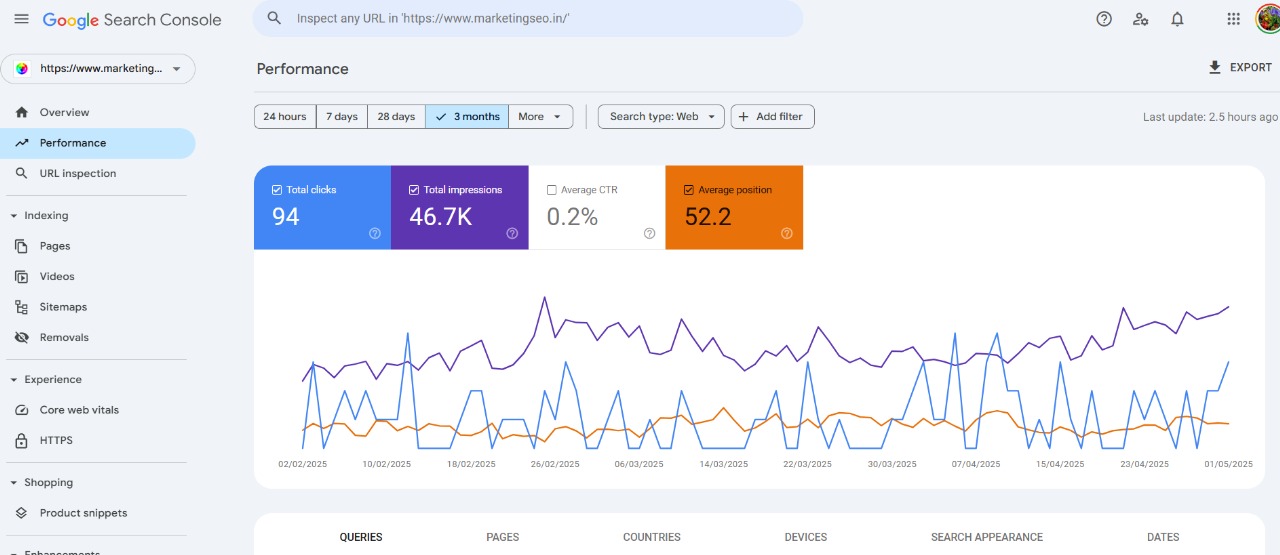
Additionally, digital marketing allows chemical companies to customize their messages for different buyer types. This means their communication meets the needs and wants of each group. This focused approach builds trust and reliability, which makes it more likely that potential customers will pick your brand instead of competitors.

Chemical Industry Website Design

The design of a website for the chemical industry plays a crucial role in establishing credibility, showcasing products and services effectively, and attracting potential customers in the realm of marketing of chemicals. A well-designed website should prioritize user experience, making it easy for visitors to navigate and find the product information they need.

Utilizing high-quality images and videos to visually represent products, incorporating clear calls-to-action to encourage conversions, and ensuring mobile responsiveness are essential elements of an effective chemical industry website design. In addition to an appealing layout, the content on the website should be informative, engaging, and optimized for entire search engines. Providing detailed product descriptions, technical specifications, safety information, and industry news can help build trust with visitors and position the company as a knowledgeable authority in the field of marketing of chemicals.

Implementing SEO best practices such as keyword optimization, meta tags, and internal linking can improve the website’s visibility in search engine results. Furthermore, incorporating features like online inquiry forms, live chat support, downloadable resources like brochures or whitepapers can enhance user engagement and provide valuable resources for startups. Regularly updating the website with fresh content, blog posts, case studies, or customer testimonials can also demonstrate the company’s commitment to innovation and customer satisfaction in the field of marketing of chemicals.

Overall, a well-designed chemical industry website serves as a powerful marketing tool that not only informs visitors about products and services but also reflects the professionalism and expertise of the company within the industry.

Enhancing Visibility and Reach in a Competitive Market | Marketing of Chemicals

The marketing of chemicals in India is highly competitive, making it challenging for companies to differentiate themselves. Our agency’s approach focuses on leveraging digital marketing tools to increase brand visibility and attract a wider audience. By establishing a strong online presence through search engine optimization (SEO), social media marketing, and content marketing, chemical companies can effectively connect with industry experts and generate qualified leads for chemical sales.
Creating valuable content with relevant keywords not only improves search engine rankings but also attracts potential buyers in the b2b chemical marketing sector. Sharing this content on social media platforms enhances visibility and drives traffic to the company’s website, ultimately allowing businesses to engage with customers globally and expand their reach in the international market.

Strategies for Marketing Chemical Products Online

Marketing of chemicals online needs a smart plan that mixes industry know-how with digital marketing skills. Chemical companies should create content that informs and engages their target audience. They must show the value of their products and solutions.
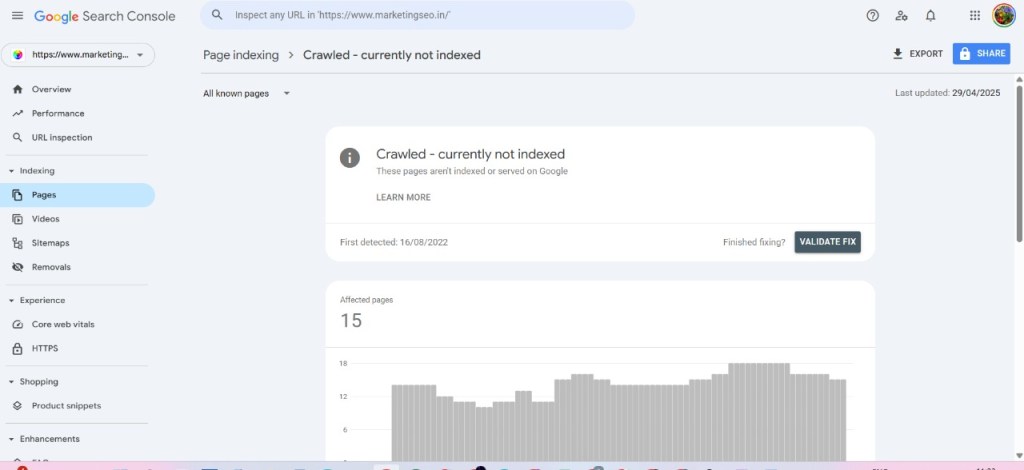
Using SEO is important to get a higher rank on Google. Social media is also a great way to connect with industry professionals. A varied strategy is key for success. By changing their marketing strategies for today’s digital world, chemical businesses can increase brand awareness, get leads, and boost sales growth.

Content Marketing: Engaging Your Audience with Technical Expertise

Content marketing is very important for building trust and showing leadership in the chemical industry. By creating and sharing useful content, companies can show their technical skills. This helps them become trusted sources of information.

It’s vital to create high-quality content that meets the needs and interests of the target audience. This can include:
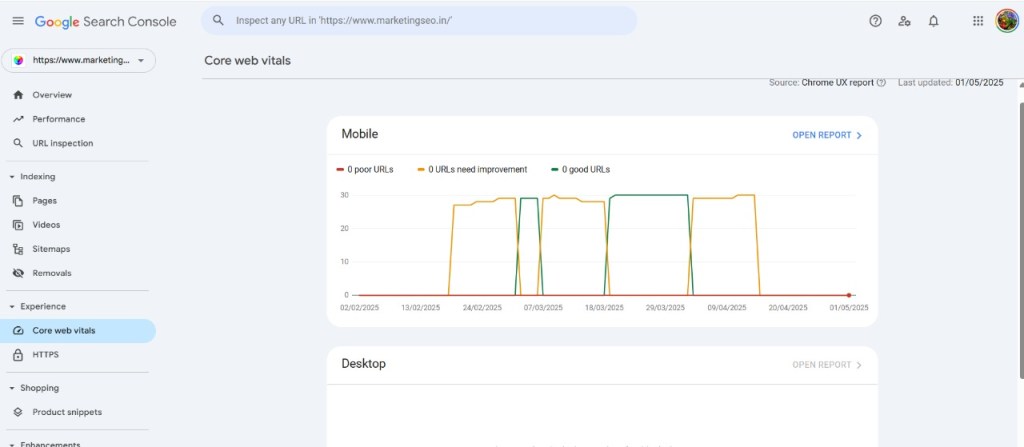
  • Technical articles and white papers: These detailed pieces let companies explain their expertise. They share valuable insights into industry trends, research findings, and technical progress.
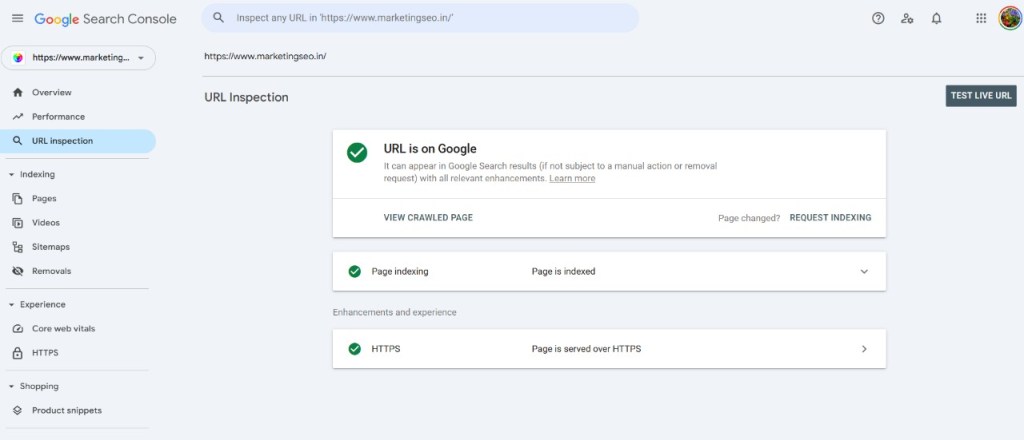
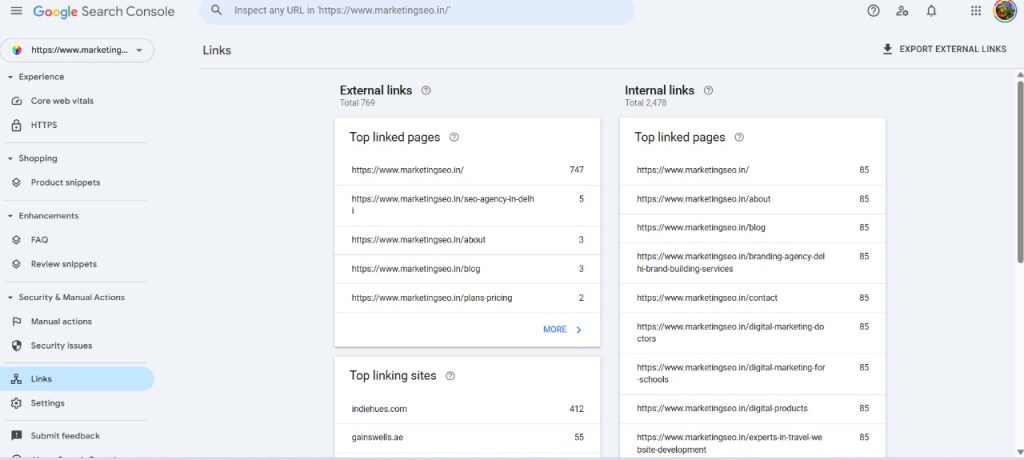
  • Blog posts and case studies: Writing thoughtful blog posts on important topics and sharing customer success stories helps to build credibility. It shows the real-world uses of their products.
  • Webinars and videos: Fun formats like webinars and videos can break down complicated topics. This makes information easier to understand and engages a wider audience.

By regularly sharing valuable information, chemical companies can become leaders in the industry and attract a loyal audience that seeks their expertise.

Website design for chemical industry

SEO for Chemical Industry: Improving Online Visibility

In today’s digital world, mastering marketing of chemicals involves ensuring that your chemical industry website design ranks high in search engine results pages (SERPs). This is crucial for attracting organic traffic and generating leads in the b2b chemical marketing sector. SEO plays a vital role in achieving this goal by enhancing your website’s content and technical aspects. By optimizing for the specific keywords used by your target audience, you can improve your visibility online.

Conducting detailed keyword research to identify relevant terms for your products, services, and the industry is essential. Incorporating these keywords naturally into your website content, meta descriptions, and image alt tags can increase your chances of ranking higher in search results. Additionally, a well-structured website, mobile-friendly design, and fast loading speeds are key components for SEO success in the chemical industry. Google’s ranking system prioritizes websites that provide a seamless user experience, so it is crucial to ensure that your site is easy to navigate, compatible with any device, and loads quickly.

By focusing on these aspects, you can enhance your website’s visibility and attract more organic traffic in the competitive b2b chemical marketing landscape.

Social Media Marketing: Building Brand Awareness and Engagement

Social media platforms are strong tools that help businesses in the marketing of chemicals reach their target audiences. They also help build brand awareness and encourage engagement. For the chemical industry, trust and credibility are very important. Social media allows companies to show their expertise and connect with other industry professionals. Platforms like LinkedIn play a vital role in B2B chemical marketing.

By creating a company page, sharing insights, joining relevant groups, and connecting with other professionals, you can increase your brand’s visibility in the chemical industry. By sharing engaging content like industry news, articles, and company updates on your Chemical industry website design, you keep your audience informed. This helps to keep your brand’s online presence strong. When you respond quickly to comments and messages, it shows you value your audience and builds stronger relationships with potential customers.

Dealing with Market Dynamics and Customer Demands

The marketing of chemicals industry works in a market that changes often. This market is affected by things like changing raw material prices, new rules, and shifting customer preferences. Companies must be quick to adapt to these changes in b2b chemical marketing. This helps them stay competitive and meet customer needs effectively.

Utilizing Chemical industry website design, digital tools, and analytics gives businesses important insights. They can see market trends, watch what competitors are doing, and understand customer behavior in the marketing of chemicals. This approach helps them make smart decisions. It also helps them set their prices right, create products that meet market demands, and change their marketing campaigns to be more effective.

Anticipating and adapting to shifts in consumer preferences and demands

In a market that is always changing, companies in the chemical industry need to be quick. They must also be flexible to meet what consumers want. By knowing about new trends, technologies, and changing needs in b2b chemical marketing, they can change their strategies and products. This helps them stay relevant and competitive in the marketing of chemicals. Chemical industry website design and digital channels are great for learning about what consumers think.

Social media discussions provide insights into industry shifts. Online surveys also highlight changes. Checking website data can reveal evolving preferences and needs in the chemical industry. This lets companies in the marketing of chemicals adjust their plans and products to match those changes. By keeping an eye on the market and changing consumer preferences in the chemical industry, chemical companies can grow consistently.

This focus on the customer helps build loyalty. It aligns product development and marketing strategies with what the target audience really wants in b2b chemical marketing.

Creating effective marketing strategies for niche chemical products

Marketing special chemical products in the chemical industry requires a different approach compared to marketing regular chemical products. Because these products are specialized, it is crucial to develop targeted marketing strategies that focus on the unique value they offer. Conducting thorough market research is essential in understanding the specific needs, challenges, and applications that are important to your niche market in the b2b chemical marketing sector.

By identifying and engaging with industry publications, online forums, and professional networks where your audience is active, you can establish better connections and increase the likelihood of achieving successful results in the Chemical industry website design. Additionally, emphasizing content marketing is key.

This involves educating people and showcasing your skill in the chemical industry. Creating detailed case studies that demonstrate the effectiveness of your products in real-world scenarios can be impactful. Collaborating with industry influencers can also help expand your reach and establish credibility within the niche community.

The role of market research and data analysis in chemical industry marketing.

Market research and data analysis are essential for successful marketing of chemicals in the chemical industry. They play a crucial role in helping businesses understand market trends, customer behavior, and competition. This information enables them to make informed decisions and develop targeted marketing campaigns that resonate with their target audience.

Through market research, chemical companies can identify product demand trends, analyze competitors’ strategies, and gain insights into consumer preferences and challenges. They can also gather valuable information related to pricing, which is vital for product development, marketing messages, and overall strategies.

Data analysis tools allow companies to monitor the effectiveness of their marketing campaigns. They can assess their return on investment (ROI). Companies can also identify areas for improvement. This data-driven approach enables companies to allocate their marketing budget strategically and ensure that their campaigns deliver tangible results. By leveraging data-driven insights, companies can formulate superior marketing strategies. These strategies cater to their target audience and enhance customer relationships. They also help companies gain a competitive edge in the b2b chemical marketing sector.

Marketing Specialties and Services for the Chemical Industry

The marketing of chemicals industry requires specialized services due to its unique needs. Marketing agencies specializing in b2b chemical marketing understand the intricacies of technical products, regulations, and the target audience, which includes researchers, engineers, and procurement managers.

These agencies offer services such as creating marketing plans and running digital marketing campaigns for Chemical industry website design. They also handle content creation, SEO, and social media management, all aimed at assisting chemical companies in reaching their marketing goals. By collaborating with these experts, chemical businesses can leverage their knowledge and experience to effectively market their products.

Marketing chemicals

Tailored strategies for chemical companies

No two chemical companies are the same when it comes to marketing of chemicals. Each one has its unique niche, products, customers, and business goals. So, a general marketing plan usually does not work well in the chemical industry. Customized strategies are important for success in b2b chemical marketing. Marketing plans for chemical companies should consider the complexity of their products. They should evaluate the rules in their target markets. Lastly, they need to find the best ways to communicate with their customers on their chemical industry website design.

This could mean focusing on content marketing that shows technical knowledge. It might involve using SEO to get better visibility for specific chemical compounds. Additionally, it could mean running social media campaigns to reach industry professionals on platforms like LinkedIn. A personalized approach ensures that marketing efforts focus on strategies that match each chemical company’s needs. It also aligns with their goals in the marketing of chemicals. This can help to boost their impact and increase the chances of getting a good ROI.

Branding and positioning for chemical products

In a competitive market like the marketing of chemicals, branding is crucial. It plays a vital role in helping chemical companies stand out and influences customers’ purchasing decisions. Chemical companies must establish a strong brand identity that showcases their values, expertise, and commitment to quality. Positioning, which is closely tied to branding, involves identifying a unique selling point that sets your company and products apart from the competition.

This can be achieved through factors such as cutting-edge technology, a focus on sustainability, exceptional customer service, or a diverse range of products tailored to specific markets. Chemical companies can enhance brand recognition by strategically crafting a distinctive brand identity. They can build customer trust and command premium prices. Additionally, this strategy helps gain a competitive advantage in the market.

Content marketing for chemical industry

Implementing a strong content marketing plan is important for chemical companies. It helps boost brand awareness and connect with their target audience. Using digital marketing tools and ways, businesses in the chemicals industry can share useful technical information. They can also show their skills and knowledge. Customizing content to meet the needs of the chemical sector can help generate leads and build brand loyalty. A good marketing plan that focuses on SEO, keywords, and specific content can greatly improve visibility and ROI in the competitive chemical market.

Social media management for chemical industry

Social media management is very important for the chemical industry. It helps companies build their brand and improve their visibility. By using digital tools and smart marketing efforts, businesses can connect well with their target audience. When social media strategies fit the unique needs of the industry, they can help get more leads and improve ROI. Being active on platforms like LinkedIn or Twitter allows companies to share technical information and show their expertise. This can lead to achieving business goals and creating stronger brand loyalty.

Email marketing for chemical companies

Email marketing is still an important tool for chemical companies, even with new digital marketing channels. It helps with gaining leads, building relationships with customers, and promoting products or services. To be effective, email marketing should include dividing your audience, sending specific content, and checking how well your emails perform.

It is essential to create content that speaks to your audience. Instead of sending regular promotional emails, focus on giving useful information. Address challenges in the industry, share your technical knowledge, or show relevant case studies.

By offering helpful insights, showing your skills, and providing customized solutions, chemical companies can use email marketing to find leads, support potential customers, and increase sales in a cost-effective way.

Case Studies: Success Stories of Digital Marketing in the Chemical Industry

The success of digital marketing in the chemical industry shows clearly through real examples. Many chemical companies in India have used digital channels to get real results. They have generated leads, increased sales, improved brand visibility, and become leaders in their field.

These case studies show how companies are using different digital marketing strategies. They include SEO, social media marketing, content marketing, and email campaigns. This helps them reach more people, connect with potential customers, and grow their business.

Increasing Leads and Sales Through Targeted Campaigns

A specialty chemical maker in India wanted to get more leads and sales for their specific adhesives used in the automotive sector. They teamed up with SARK Promotions – a digital marketing agency specializing in the marketing of chemicals to create a focused campaign. With their strong knowledge of both digital marketing and the chemical industry, the agency developed a plan with multiple parts.

The campaign included SEO work to boost their Chemical industry website design ranking for important keywords like “automotive adhesives” and “high-performance bonding solutions.” They ran targeted Google Ads. This was part of their b2b chemical marketing strategy. The goal was to find potential customers searching for such products online. Additionally, they made and shared useful content, such as case studies and technical articles, that showed the benefits and uses of their products.

What happened next? The company saw a big jump in website traffic from related searches. This led to a 30% increase in qualified leads and a 15% rise in sales in just six months. This success story shows how focused digital marketing campaigns can effectively help businesses in the chemical industry grow their leads and sales.

Strengthening Brand Position with Strategic Content Marketing

A top chemical distributor in India wanted to improve its brand image and become a leader in sustainable chemical solutions. They chose to invest in smart content marketing to reach this goal. Their plan aimed to create useful content that showed their knowledge, insights, and dedication to sustainability.

They wrote articles and white papers on subjects like “Eco-Friendly Chemical Sourcing,” “Green Chemistry Innovations,” and “Sustainable Practices in Chemical Distribution.” This content was shared on their website, social media, and through email newsletters focused on people who care about sustainability.

Regularly releasing and sharing valuable content helped increase their brand awareness and trust in the industry. The company became known as a reliable source of information on sustainable chemical solutions. This attracted new customers who appreciated their effort in being environmentally responsible.

Digital Transformation and Its Impact

Digital transformation is revolutionizing the marketing of chemicals in the chemical industry. It is changing how companies run their operations, market their products, and connect with customers. By incorporating digital technologies into different aspects of their business, companies can streamline processes, increase efficiency, and enhance customer experiences. This strategic approach helps them stay ahead of competitors in the b2b chemical marketing sector.

Chemical industry website design is also evolving with the rise of online marketplaces and e-commerce platforms, making it easier for companies to sell and buy products. Data analytics provide valuable insights into market trends. They help understand customer behaviors. Cloud-based solutions facilitate collaboration among teams. They also enable efficient data sharing. Additionally, digital marketing strategies play a crucial role in reaching a wider audience and keeping them engaged. Automation further reduces manual work and minimizes errors in the marketing of chemicals.

Preparing for the Future: Trends Shaping Online Marketing for Chemical Manufacturers

As technology improves, the chemical industry must keep up with digital marketing trends. This helps them reach their target audience and meet their business goals. By understanding these trends, chemical manufacturers can change their marketing strategies and take advantage of new chances.

A major trend is personalization. Customers want experiences that fit their needs and preferences. Companies can use data analytics and marketing automation to customize content, offers, and communication. This increases customer engagement and boosts sales. Another important trend is video marketing. Videos are a fun and effective way to share complex information and show products. By adding video content like product demos, explainer videos, and customer reviews to their marketing plans, companies can connect better with their audience.

The Rise of Eco-Friendly and Sustainable Chemical Products

As people become more aware of the environment, they want more eco-friendly and sustainable chemical products. Both consumers and businesses are searching for items that affect the environment less during their whole life – from making them to using them to throwing them away.

This change in demand brings both challenges and opportunities for chemical companies. They must adjust to this new market by spending money on research and development to make sustainable products. It is important to be transparent about where raw materials come from. Companies should explain how products are made and how they affect the environment after use. This will help build trust with consumers who care about the environment.

Chemical companies must highlight the sustainable aspects of their products in their marketing efforts. By clearly sharing their eco-friendly actions and the benefits of their products for the environment, they can attract more consumers who are looking for sustainable choices.

Embracing Technology for Enhanced Customer Experiences

Technology is changing how customers feel about their experiences, and this applies to the chemical industry too. Using digital tools and platforms is now necessary. It helps meet the changing needs of today’s tech-savvy customers.

Companies can use CRM systems to handle customer interactions and monitor their journey. They can also use marketing automation to make communication easier and more personal. This way, technology helps businesses provide customized and smooth experiences throughout the customer’s journey. Live chat features on websites allow for real-time customer support. This service answers questions quickly, ensuring customers are happy.

By using technology to improve customer experience, chemical businesses can keep customers coming back. They can build trust and create lasting relationships. This can help them grow in a strong and sustainable way.

Conclusion

In conclusion, the chemical industry is changing quickly. A good digital marketing plan can truly help chemical manufacturers in India. By using content marketing, SEO techniques, and social media management, businesses can improve their visibility and connect with more people. It’s important to embrace digital transformation, focus on eco-friendly products, and keep up with market trends to succeed in this tough environment. We are experts in digital marketing for the chemical industry. We know the challenges and can help you build strong connections with your audience and grow your business. Stay ahead by working with a marketing agency that knows your industry very well.

Frequently Asked Questions

How Can Chemical Manufacturers Benefit from Digital Marketing?

Digital marketing helps chemical manufacturers become more visible online. It allows them to get quality leads and connect with a larger audience. This type of marketing also builds brand awareness. As a result, it can lead to a better ROI through campaigns that focus on specific goals.

What Are the Key Components of a Successful Online Marketing Strategy for Chemical Products?

A good online marketing plan for chemical products usually includes SEO and engaging content that shows technical skills. It also involves being active on important social media platforms. Lastly, tracking performance helps improve campaigns for better results.

How to research the market for chemical products?

Market research for chemical products means figuring out what customers want. This includes checking out consumer trends and looking at data to understand how the market works. It also involves knowing who the competitors are and seeing how much demand there is for certain chemicals.

Design a site like this with WordPress.com
Get started